
Network
Toob-Downer
Paste a video link and save the video to your Mac, with a queue to keep track.
- Category
- Network
- Requires
- macOS 13+
- Size
- 846 KB
- Price
- Free
Preview
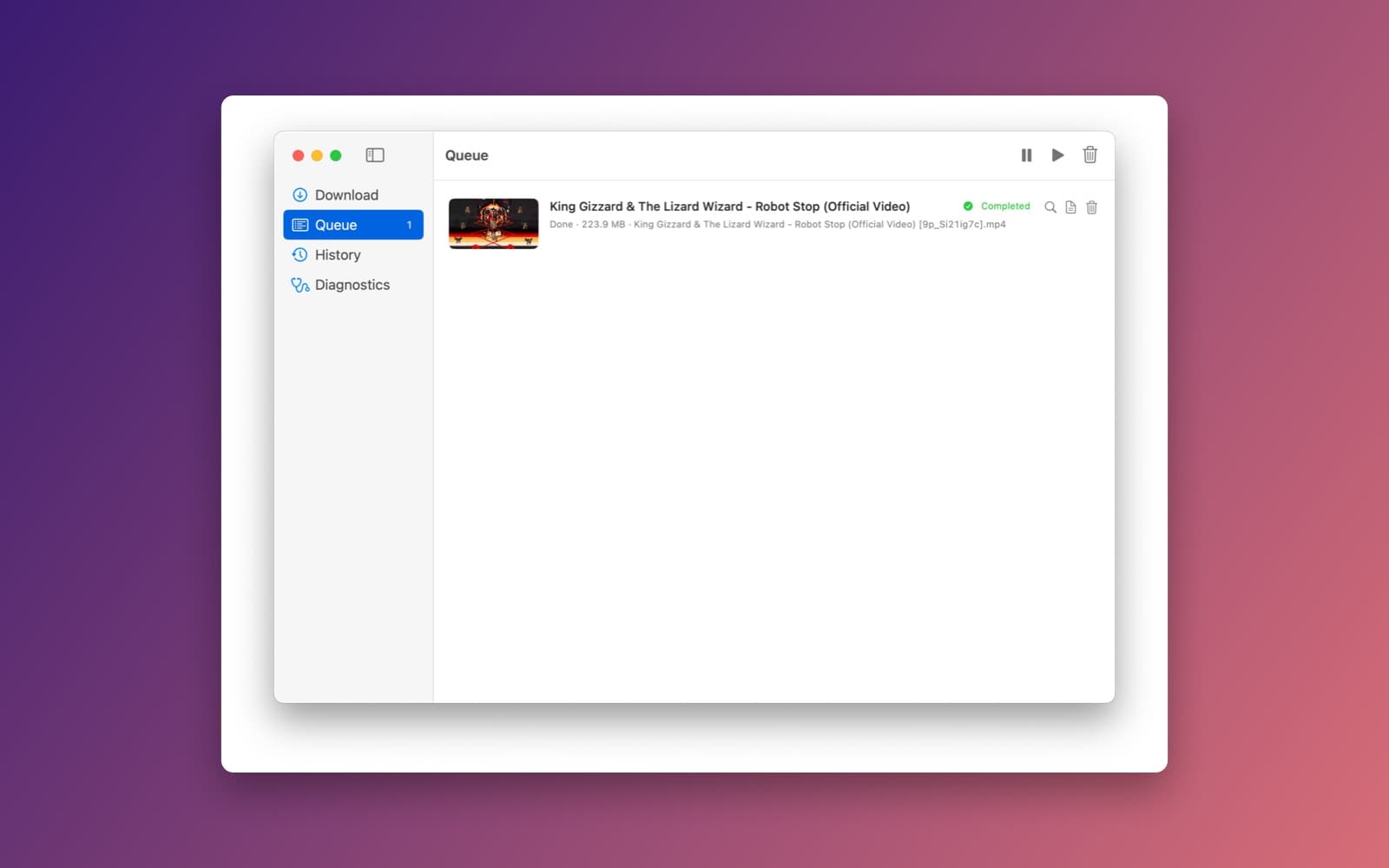
About Toob-Downer
Toob-Downer is a Mac front end for yt-dlp. You paste a video link, pick a quality, and it saves the video to your Mac.
What it does
- Sets itself up. On first launch it downloads the tools it needs (yt-dlp, FFmpeg, Deno and yt-dlp-ejs) into its own folder, so you do not install anything yourself.
- Download. Paste a link and it shows the thumbnail, title, length and uploader, plus the qualities available. Pick Best Quality, 4K, 1080p, 720p or Audio Only, or choose exact formats.
- Queue. Each item shows its thumbnail, title, status, size and saved file name. The toolbar pauses, resumes and clears the queue, and each row has buttons to find the file, see its log and remove it.
- History. A list of past downloads, with a way to open the file and retry ones that failed.
- Diagnostics. Shows the tool versions and paths, and can repair them if a download stops working.
Notes
Toob-Downer needs an internet connection the first time it runs, to fetch its tools. It does not get around paywalls, DRM or private videos. Only download what you have the right to save.
Information
- Developer
- SiliconDevKit (generated by AI from a prompt)
- Category
- Network
- Compatibility
- macOS 13 or later, Apple silicon. Apple silicon Macs only (M1 or later), not Intel
- Size
- 846 KB (.dmg)
- Latest version
- 1.0
- Price
- Free
- Signing
- Ad-hoc signed, not notarized
The prompt behind it
This app was generated from the prompt below. Paste it into SiliconDevKit to build your own version, then change it however you like.
Build a polished, production-ready native macOS app in Swift + SwiftUI that is a GUI frontend for yt-dlp. Do NOT reimplement video-site extraction. yt-dlp must be the actual download engine. Name the app Toob Downer. IMPORTANT: The app must work on a clean Mac without requiring Python, Homebrew, Node, Electron, Terminal commands, or manually installed dependencies. ## AUTOMATIC DEPENDENCIES On first launch, Toob Downer MUST automatically download and install everything required: * yt-dlp * FFmpeg + ffprobe * yt-dlp-ejs * Deno JavaScript runtime Store app-managed tools in: ~/Library/Application Support/<AppName>/Tools/ Detect Apple Silicon vs Intel and download the correct binaries. Show a beautiful first-launch setup screen with: * Dependency download progress * Current component * Overall percentage * Installed/failed status * Retry button After installation, validate every executable and perform a basic yt-dlp smoke test. Dependencies must be versioned, validated, updated safely, and repairable from Settings. Never overwrite a working installation with a failed download. ## MAIN UI Create a minimal, premium native Mac interface. Top: * URL input * Paste button * Download button After entering a URL, run yt-dlp format discovery and show: * Thumbnail * Title * Duration * Uploader * Available qualities * Available formats Provide simple presets: * Best Quality * 4K * 1080p * 720p * Audio Only Also provide an Advanced Formats option for choosing exact video/audio formats. ## DOWNLOAD QUEUE Support multiple downloads with: * Queue * Start/pause * Resume * Cancel * Retry * Reorder * Remove * Progress percentage * Download speed * ETA * Current file size * Final file size Parse yt-dlp stdout/stderr reliably rather than faking progress. Downloads must continue correctly when the UI is reopened. ## FEATURES Support: * Individual videos * Playlists * Audio extraction * MP3/M4A/Opus/etc. * Subtitles * Automatic subtitle selection * Thumbnail embedding * Metadata embedding * Custom filename templates * Custom download folder * Playlist numbering * Date/title/uploader variables Use FFmpeg for merging and post-processing. ## ADVANCED OPTIONS Expose useful yt-dlp options without making the main UI complicated: * Cookies/browser cookies * Custom User-Agent * Proxy * Rate limit * Retries * Fragment concurrency * Network timeout * Output template * Subtitle language * Embed thumbnail * Embed metadata Allow users to enter additional yt-dlp arguments in an advanced field. ## HISTORY Create a native history screen showing: * Title * Thumbnail * Date * Status * File location * Source URL Allow opening the downloaded file/folder and retrying failed downloads. Persist history locally. ## SYSTEM INTEGRATION Add: * Native macOS notifications * Drag-and-drop URLs * Clipboard monitoring as an optional setting * Share Extension if practical * macOS Services/Quick Action if practical Do not require a browser extension. ## DIAGNOSTICS Create a Diagnostics screen showing: * yt-dlp version * FFmpeg version * Deno version * yt-dlp-ejs status * Tool paths * macOS version * Architecture * Dependency health Include "Repair Dependencies" and "Run Diagnostics". Each download should have accessible logs for troubleshooting. ## ARCHITECTURE Use clean modular Swift code: AppState DependencyManager YTDLPManager FFmpegManager DenoManager EJSManager DownloadManager DownloadTask FormatManager ProcessRunner ProgressParser PlaylistManager HistoryStore SettingsStore LogManager NotificationManager Use Process for executing bundled tools. Never shell out through Terminal or rely on shell configuration. Use structured async/await where appropriate. Avoid blocking the main thread. ## ERROR HANDLING Handle gracefully: * Invalid URLs * Unsupported sites * Private/unavailable videos * Network failures * Rate limiting * Missing formats * FFmpeg failures * Dependency corruption * Interrupted downloads * Disk-space problems * Permission errors Show useful human-readable errors while preserving detailed technical logs. ## SECURITY Treat URLs, filenames, metadata, and subprocess arguments safely. Do not construct unsafe shell commands. Pass Process arguments directly. Do not implement DRM circumvention, paywall bypassing, CAPTCHA bypassing, credential theft, or other access-control bypasses. ## APP QUALITY The result must feel like a real Mac utility, not a web app. Use native SwiftUI controls, menus, sheets, alerts, keyboard shortcuts, toolbar commands, progress indicators, and proper macOS window behavior. Support light/dark mode and Dynamic Type. Remember the user's settings. ## CRITICAL REQUIREMENT Do not stop at creating the UI. Actually implement the complete working pipeline: URL → yt-dlp format discovery → format selection → yt-dlp download → FFmpeg processing → completed file. The app must automatically obtain and configure all required dependencies on a clean Mac. Before finishing, compile the app and test the complete flow end-to-end, including first-launch dependency installation, format discovery, video download, audio extraction, FFmpeg processing, subtitles, playlist downloads, cancellation, resume, restart recovery, and dependency repair. Deliver a normal native `.app`, with a DMG packaging configuration suitable for distribution.
What it cost
The cost of this demo was not recorded in our usage log. Demos built through the live build system show every run with its tokens and cost.
Version tree
Every change to this app is a new version. Use any build as a template to start your own copy from it; forks that their makers shared appear as branches.
Version 1.0Oct 8, 2026
Build a polished, production-ready native macOS app in Swift + SwiftUI that is a GUI frontend for yt-dlp. Do NOT reimplement video-site extraction. yt-dlp must be the actual download engine. Name the app Toob Downer. IMPORTANT: The app must work on a clean Mac without requiring Python, Homebrew, Node, Electron, Terminal commands, or manually installed dependencies. ## AUTOMATIC DEPENDENCIES On first launch, Toob Downer MUST automatically download and install everything required: * yt-dlp * FFmpeg + ffprobe * yt-dlp-ejs * Deno JavaScript runtime Store app-managed tools in: ~/Library/Application Support/<AppName>/Tools/ Detect Apple Silicon vs Intel and download the correct binaries. Show a beautiful first-launch setup screen with: * Dependency download progress * Current component * Overall percentage * Installed/failed status * Retry button After installation, validate every executable and perform a basic yt-dlp smoke test. Dependencies must be versioned, validated, updated safely, and repairable from Settings. Never overwrite a working installation with a failed download. ## MAIN UI Create a minimal, premium native Mac interface. Top: * URL input * Paste button * Download button After entering a URL, run yt-dlp format discovery and show: * Thumbnail * Title * Duration * Uploader * Available qualities * Available formats Provide simple presets: * Best Quality * 4K * 1080p * 720p * Audio Only Also provide an Advanced Formats option for choosing exact video/audio formats. ## DOWNLOAD QUEUE Support multiple downloads with: * Queue * Start/pause * Resume * Cancel * Retry * Reorder * Remove * Progress percentage * Download speed * ETA * Current file size * Final file size Parse yt-dlp stdout/stderr reliably rather than faking progress. Downloads must continue correctly when the UI is reopened. ## FEATURES Support: * Individual videos * Playlists * Audio extraction * MP3/M4A/Opus/etc. * Subtitles * Automatic subtitle selection * Thumbnail embedding * Metadata embedding * Custom filename templates * Custom download folder * Playlist numbering * Date/title/uploader variables Use FFmpeg for merging and post-processing. ## ADVANCED OPTIONS Expose useful yt-dlp options without making the main UI complicated: * Cookies/browser cookies * Custom User-Agent * Proxy * Rate limit * Retries * Fragment concurrency * Network timeout * Output template * Subtitle language * Embed thumbnail * Embed metadata Allow users to enter additional yt-dlp arguments in an advanced field. ## HISTORY Create a native history screen showing: * Title * Thumbnail * Date * Status * File location * Source URL Allow opening the downloaded file/folder and retrying failed downloads. Persist history locally. ## SYSTEM INTEGRATION Add: * Native macOS notifications * Drag-and-drop URLs * Clipboard monitoring as an optional setting * Share Extension if practical * macOS Services/Quick Action if practical Do not require a browser extension. ## DIAGNOSTICS Create a Diagnostics screen showing: * yt-dlp version * FFmpeg version * Deno version * yt-dlp-ejs status * Tool paths * macOS version * Architecture * Dependency health Include "Repair Dependencies" and "Run Diagnostics". Each download should have accessible logs for troubleshooting. ## ARCHITECTURE Use clean modular Swift code: AppState DependencyManager YTDLPManager FFmpegManager DenoManager EJSManager DownloadManager DownloadTask FormatManager ProcessRunner ProgressParser PlaylistManager HistoryStore SettingsStore LogManager NotificationManager Use Process for executing bundled tools. Never shell out through Terminal or rely on shell configuration. Use structured async/await where appropriate. Avoid blocking the main thread. ## ERROR HANDLING Handle gracefully: * Invalid URLs * Unsupported sites * Private/unavailable videos * Network failures * Rate limiting * Missing formats * FFmpeg failures * Dependency corruption * Interrupted downloads * Disk-space problems * Permission errors Show useful human-readable errors while preserving detailed technical logs. ## SECURITY Treat URLs, filenames, metadata, and subprocess arguments safely. Do not construct unsafe shell commands. Pass Process arguments directly. Do not implement DRM circumvention, paywall bypassing, CAPTCHA bypassing, credential theft, or other access-control bypasses. ## APP QUALITY The result must feel like a real Mac utility, not a web app. Use native SwiftUI controls, menus, sheets, alerts, keyboard shortcuts, toolbar commands, progress indicators, and proper macOS window behavior. Support light/dark mode and Dynamic Type. Remember the user's settings. ## CRITICAL REQUIREMENT Do not stop at creating the UI. Actually implement the complete working pipeline: URL → yt-dlp format discovery → format selection → yt-dlp download → FFmpeg processing → completed file. The app must automatically obtain and configure all required dependencies on a clean Mac. Before finishing, compile the app and test the complete flow end-to-end, including first-launch dependency installation, format discovery, video download, audio extraction, FFmpeg processing, subtitles, playlist downloads, cancellation, resume, restart recovery, and dependency repair. Deliver a normal native `.app`, with a DMG packaging configuration suitable for distribution.
A native Mac front end for yt-dlp that installs its own tools and downloads videos, playlists and audio with a queue and history.
Opening it for the first time
- Open the .dmg and drag Toob-Downer onto the Applications folder.
- Open it from Applications. macOS may say it can’t check the app for malicious software. Click Done.
- Open System Settings → Privacy & Security and click Open Anyway. This is needed once. Why this happens. To share an app without the warning, see how to notarize it.


