
Audio
AdMute
Listens to your Mac's audio and mutes the ads, then brings the sound back.
- Category
- Audio
- Requires
- macOS 13+
- Size
- 501 KB
- Price
- Free
Preview
About AdMute
AdMute listens to whatever your Mac is playing and fades the volume down when it thinks an ad has started, then brings it back when the ad ends. It works across apps, and it all runs on your Mac.
What it does
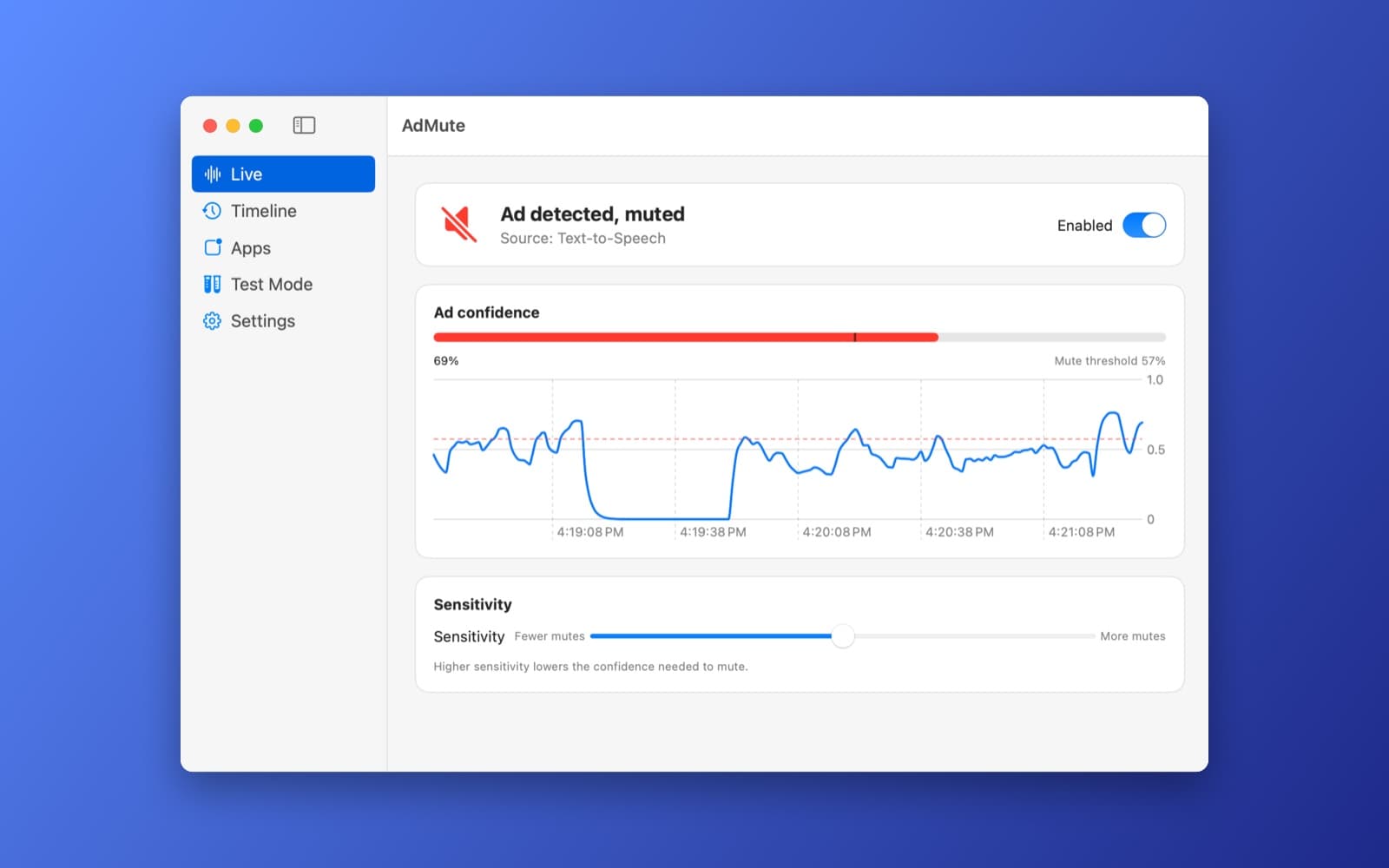
- Live view. Shows whether an ad was detected and the source, an ad-confidence meter with the mute threshold marked on it, and a graph of the confidence over the last few minutes.
- Sensitivity slider. Slide toward More mutes to lower the confidence needed to mute, or toward Fewer mutes to be more careful. There is also an on and off switch, in the window and in the menu bar.
- Timeline, Apps and Test Mode. A history of mutes and detected ads, statistics for each app, and a test mode to try it without waiting for a real ad. Settings has the rest, including how far the volume drops.
- How it decides. Apple's built-in sound classifier runs all the time. Speech that looks suspicious goes to the on-device speech recognizer, and the score also weighs ad phrases, music and speaker changes, repeats of ads it has already seen, and timing.
- Private. Nothing is uploaded and there is no network processing. History and statistics are saved on your Mac.
Notes
On first launch AdMute explains the permission it needs, Screen & System Audio Recording, and you may have to restart the app after granting it. It uses that permission to hear your system audio and changes only your output volume. It is not an audio driver. Which app an ad came from is a best guess. The scoring is not tuned, so use the sensitivity slider, and expect it to miss some ads and mute some things that are not ads.
Information
- Developer
- SiliconDevKit (generated by AI from a prompt)
- Category
- Audio
- Compatibility
- macOS 13 or later, Apple silicon. Apple silicon Macs only (M1 or later), not Intel
- Size
- 501 KB (.dmg)
- Latest version
- 1.0
- Price
- Free
- Signing
- Ad-hoc signed, not notarized
The prompt behind it
This app was generated from the prompt below. Paste it into SiliconDevKit to build your own version, then change it however you like.
Build a native macOS SwiftUI app called AdMute that detects and automatically mutes advertisements from ANY system audio source. Use Core Audio/Audio Server Plug-in for system-wide output capture and real-time audio routing with minimal latency. Run all ML locally on Apple Silicon using Core ML: lightweight audio classification continuously detects likely ads/jingles, then selectively transcribes suspicious segments with an on-device speech model. Combine audio classification, transcript keywords, speaker/music changes, repetition, and segment timing into an ad-confidence score. When confidence exceeds a threshold, smoothly duck/mute system audio and restore it when the ad ends. Include a menu-bar app, enable/disable toggle, sensitivity slider, mute-duration history, detected-ad timeline, per-app statistics, test mode, onboarding explaining required macOS audio permissions, and zero cloud/network processing. Optimize aggressively for low CPU, memory, and latency. Make the architecture modular so detection models can be replaced later.
What it cost
The cost of this demo was not recorded in our usage log. Demos built through the live build system show every run with its tokens and cost.
Version tree
Every change to this app is a new version. Use any build as a template to start your own copy from it; forks that their makers shared appear as branches.
Version 1.0Oct 7, 2026
Build a native macOS SwiftUI app called AdMute that detects and automatically mutes advertisements from ANY system audio source. Use Core Audio/Audio Server Plug-in for system-wide output capture and real-time audio routing with minimal latency. Run all ML locally on Apple Silicon using Core ML: lightweight audio classification continuously detects likely ads/jingles, then selectively transcribes suspicious segments with an on-device speech model. Combine audio classification, transcript keywords, speaker/music changes, repetition, and segment timing into an ad-confidence score. When confidence exceeds a threshold, smoothly duck/mute system audio and restore it when the ad ends. Include a menu-bar app, enable/disable toggle, sensitivity slider, mute-duration history, detected-ad timeline, per-app statistics, test mode, onboarding explaining required macOS audio permissions, and zero cloud/network processing. Optimize aggressively for low CPU, memory, and latency. Make the architecture modular so detection models can be replaced later.
Menu-bar app that detects ads in any system audio with on-device ML and smoothly mutes them.
Opening it for the first time
- Open the .dmg and drag AdMute onto the Applications folder.
- Open it from Applications. macOS may say it can’t check the app for malicious software. Click Done.
- Open System Settings → Privacy & Security and click Open Anyway. This is needed once. Why this happens. To share an app without the warning, see how to notarize it.


