
System
Sweep
Finds what you can safely free on your Mac, and only ever moves files to the Trash.
- Category
- System
- Requires
- macOS 13+
- Size
- 917 KB
- Price
- Free
Preview
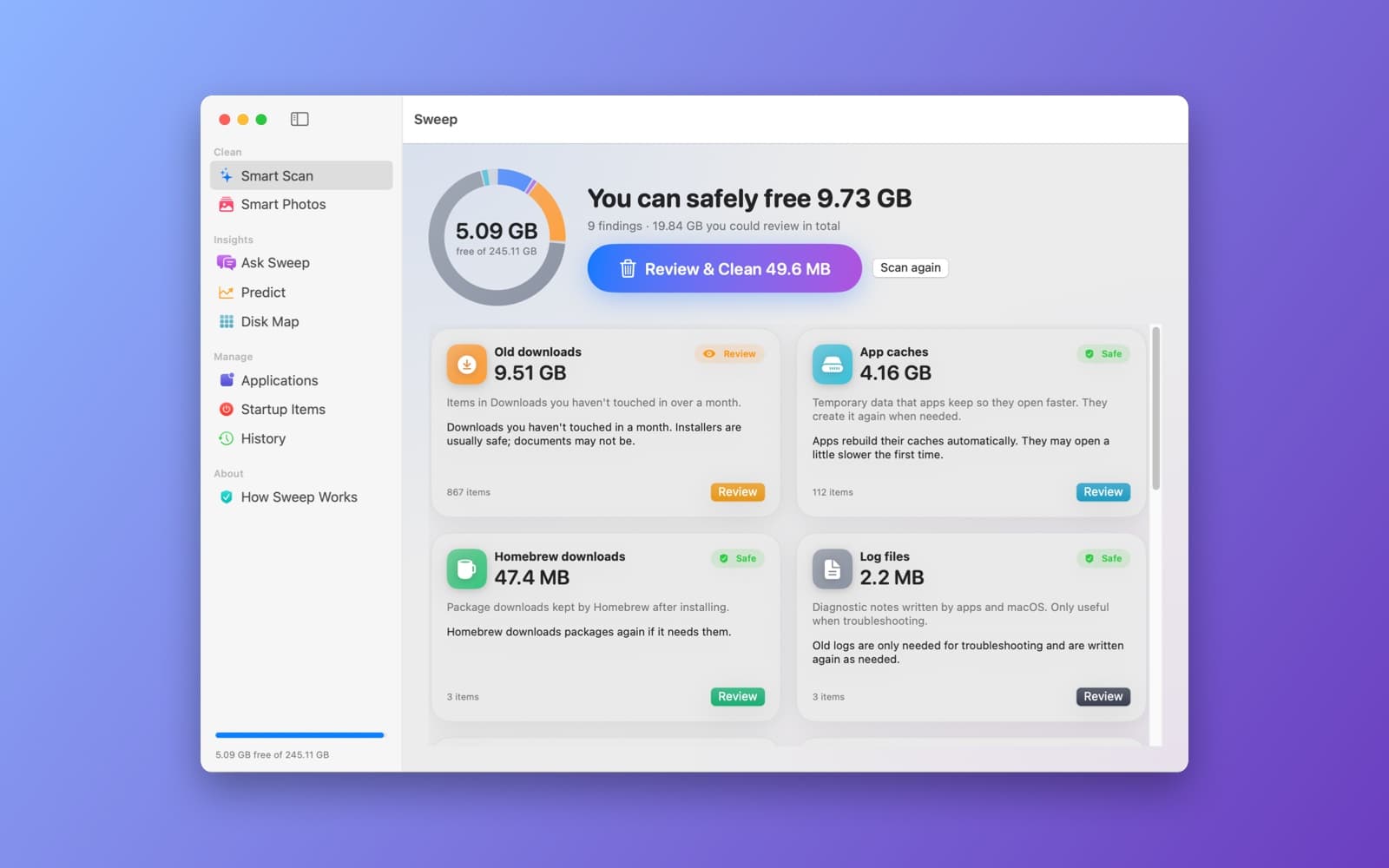
About Sweep
Sweep scans your Mac for space you can get back and tells you, in plain words, what each thing is and whether it is safe to remove. It runs on your Mac and never deletes anything for good.
What it does
- Smart Scan. One button finds old downloads, app caches, logs, Homebrew and Xcode leftovers and more. A ring shows your free space, and each finding is a card with its size, a short explanation, and a Safe or Review rating.
- Review before cleaning. You see everything that will be moved, and clean only what you tick.
- Always a way back. Files go to the Trash, never straight to deletion. History lists every clean-up, and Restore puts the items back where they were.
- Smart Photos and duplicates. Looks for duplicate files and for similar photos, using Apple's image analysis on your Mac.
- Ask Sweep and Predict. Ask plain questions like "are there duplicate files?" about what the scan found, and see how quickly your disk is filling up.
- Disk Map, Applications and Startup Items. See what takes the space, uninstall an app along with its leftovers, and review what opens at login.
- Private. Nothing is uploaded.
Notes
Full Disk Access is optional. Without it, Sweep scans only what macOS allows and says which folders it skipped. The Safe and Review ratings are suggestions, so look at what is listed before you clean. This is a first version, and it is worth trying on a Mac you can recover.
Information
- Developer
- SiliconDevKit (generated by AI from a prompt)
- Category
- System
- Compatibility
- macOS 13 or later, Apple silicon. Apple silicon Macs only (M1 or later), not Intel
- Size
- 917 KB (.dmg)
- Latest version
- 1.0
- Price
- Free
- Signing
- Ad-hoc signed, not notarized
The prompt behind it
This app was generated from the prompt below. Paste it into SiliconDevKit to build your own version, then change it however you like.
Build a native macOS SwiftUI app called Sweep, a next-generation Mac cleaner and storage manager that is smarter and safer than the leading mac cleaner app. Target macOS 13 and later, use only Apple frameworks, and run every bit of analysis and AI on the device, with nothing uploaded and no network calls. Design: a calm, modern, spacious interface that looks like a first-party Apple app. Use a translucent sidebar, large rounded cards, SF Pro with generous spacing, SF Symbols with subtle gradients, smooth spring animations and matched-geometry transitions between screens, full light and dark mode, and a menu bar extra showing free space. The home screen is one big animated storage ring (a donut chart colored by category: Apps, Photos, Media, Documents, Developer, System, Caches) with the free space in the middle, a single prominent Smart Scan button, and a one-line summary like "You can safely free 14.2 GB". After a scan, show an animated results screen with one card per finding, each with its size, a short plain-language explanation, and a review button. Cleaning plays a satisfying progress animation and ends with a summary of what was freed. Scanning (run in the background with concurrency and a live progress view, using FileManager enumerators and the resource values for allocated size): user and system caches (~/Library/Caches), logs, old iOS device backups and software updates, Xcode DerivedData, simulators and archives, Homebrew, npm, pip and Gradle caches, Trash and mail attachment downloads, language packs in apps, large files (a size threshold slider) and old files not opened in a long time (use the last-opened date), duplicate files (group by size, then a partial hash, then a full SHA-256 using CryptoKit), and similar or near-duplicate photos (Vision VNGenerateImageFeaturePrintRequest with distance clustering, and pick the sharpest as the one to keep using a Laplacian variance score). On-device AI: (1) Rate each finding as Safe, Review or Keep, with a plain-English reason ("Rebuilt automatically the next time you build the project"), using a rule table for known locations plus the NaturalLanguage framework to tell apart document names (invoices, tax, contracts) that should always be flagged Keep. (2) Smart Photo Cleanup: use VNClassifyImageRequest to find screenshots, receipts, memes, blurry shots and near-duplicates, grouped into suggested clean-ups. (3) Ask Sweep, a text field that takes plain questions like "what is using the most space?" or "what can I delete from my Downloads folder?", with answers drawn from the scan results; use the Foundation Models framework when it is available (macOS 26) and fall back to a built-in keyword and intent matcher on earlier systems. (4) Predict: using the history of past scans stored on disk, show how fast each category grows and warn when the disk will be nearly full ("about 3 weeks at this rate"). Also include: an Applications screen to uninstall an app together with its leftovers (Preferences, Application Support, Caches, Containers, Launch Agents), found by bundle identifier, with sizes; a Startup items screen listing login items and launch agents using ServiceManagement, with an enable and disable toggle; and a Disk Map, an interactive zoomable treemap of a folder, drawn with SwiftUI Canvas, where a click drills into a folder and a right click reveals it in Finder. Safety rules: never delete anything permanently. Move files to the Trash with FileManager.trashItem, show a full list of everything that will be moved, with checkboxes and a Quick Look preview, before any cleaning, and keep a Sweep history screen with a Restore button for each cleaning. Never touch the system volume, anything under /System, /usr or /bin, or the user's Photos library, Mail database or iCloud Drive placeholders. Explain Full Disk Access in a friendly onboarding screen and handle the case where it is not granted, scanning only what is allowed. Be honest in the UI that the Safe, Review and Keep ratings are suggestions, and that the app does not run in the background or hide anything.
What it cost
The cost of this demo was not recorded in our usage log. Demos built through the live build system show every run with its tokens and cost.
Version tree
Every change to this app is a new version. Use any build as a template to start your own copy from it; forks that their makers shared appear as branches.
Version 1.0Oct 7, 2026
Build a native macOS SwiftUI app called Sweep, a next-generation Mac cleaner and storage manager that is smarter and safer than the leading mac cleaner app. Target macOS 13 and later, use only Apple frameworks, and run every bit of analysis and AI on the device, with nothing uploaded and no network calls. Design: a calm, modern, spacious interface that looks like a first-party Apple app. Use a translucent sidebar, large rounded cards, SF Pro with generous spacing, SF Symbols with subtle gradients, smooth spring animations and matched-geometry transitions between screens, full light and dark mode, and a menu bar extra showing free space. The home screen is one big animated storage ring (a donut chart colored by category: Apps, Photos, Media, Documents, Developer, System, Caches) with the free space in the middle, a single prominent Smart Scan button, and a one-line summary like "You can safely free 14.2 GB". After a scan, show an animated results screen with one card per finding, each with its size, a short plain-language explanation, and a review button. Cleaning plays a satisfying progress animation and ends with a summary of what was freed. Scanning (run in the background with concurrency and a live progress view, using FileManager enumerators and the resource values for allocated size): user and system caches (~/Library/Caches), logs, old iOS device backups and software updates, Xcode DerivedData, simulators and archives, Homebrew, npm, pip and Gradle caches, Trash and mail attachment downloads, language packs in apps, large files (a size threshold slider) and old files not opened in a long time (use the last-opened date), duplicate files (group by size, then a partial hash, then a full SHA-256 using CryptoKit), and similar or near-duplicate photos (Vision VNGenerateImageFeaturePrintRequest with distance clustering, and pick the sharpest as the one to keep using a Laplacian variance score). On-device AI: (1) Rate each finding as Safe, Review or Keep, with a plain-English reason ("Rebuilt automatically the next time you build the project"), using a rule table for known locations plus the NaturalLanguage framework to tell apart document names (invoices, tax, contracts) that should always be flagged Keep. (2) Smart Photo Cleanup: use VNClassifyImageRequest to find screenshots, receipts, memes, blurry shots and near-duplicates, grouped into suggested clean-ups. (3) Ask Sweep, a text field that takes plain questions like "what is using the most space?" or "what can I delete from my Downloads folder?", with answers drawn from the scan results; use the Foundation Models framework when it is available (macOS 26) and fall back to a built-in keyword and intent matcher on earlier systems. (4) Predict: using the history of past scans stored on disk, show how fast each category grows and warn when the disk will be nearly full ("about 3 weeks at this rate"). Also include: an Applications screen to uninstall an app together with its leftovers (Preferences, Application Support, Caches, Containers, Launch Agents), found by bundle identifier, with sizes; a Startup items screen listing login items and launch agents using ServiceManagement, with an enable and disable toggle; and a Disk Map, an interactive zoomable treemap of a folder, drawn with SwiftUI Canvas, where a click drills into a folder and a right click reveals it in Finder. Safety rules: never delete anything permanently. Move files to the Trash with FileManager.trashItem, show a full list of everything that will be moved, with checkboxes and a Quick Look preview, before any cleaning, and keep a Sweep history screen with a Restore button for each cleaning. Never touch the system volume, anything under /System, /usr or /bin, or the user's Photos library, Mail database or iCloud Drive placeholders. Explain Full Disk Access in a friendly onboarding screen and handle the case where it is not granted, scanning only what is allowed. Be honest in the UI that the Safe, Review and Keep ratings are suggestions, and that the app does not run in the background or hide anything.
A private, on-device Mac cleaner and storage manager that finds what you can safely free and only ever moves files to the Trash.
Opening it for the first time
- Open the .dmg and drag Sweep onto the Applications folder.
- Open it from Applications. macOS may say it can’t check the app for malicious software. Click Done.
- Open System Settings → Privacy & Security and click Open Anyway. This is needed once. Why this happens. To share an app without the warning, see how to notarize it.


