
Productivity
Summarizer
Summarize text, files, web pages or your screen from the menu bar.
- Category
- Productivity
- Requires
- macOS 13+
- Size
- 14 MB
- Price
- Free
Preview
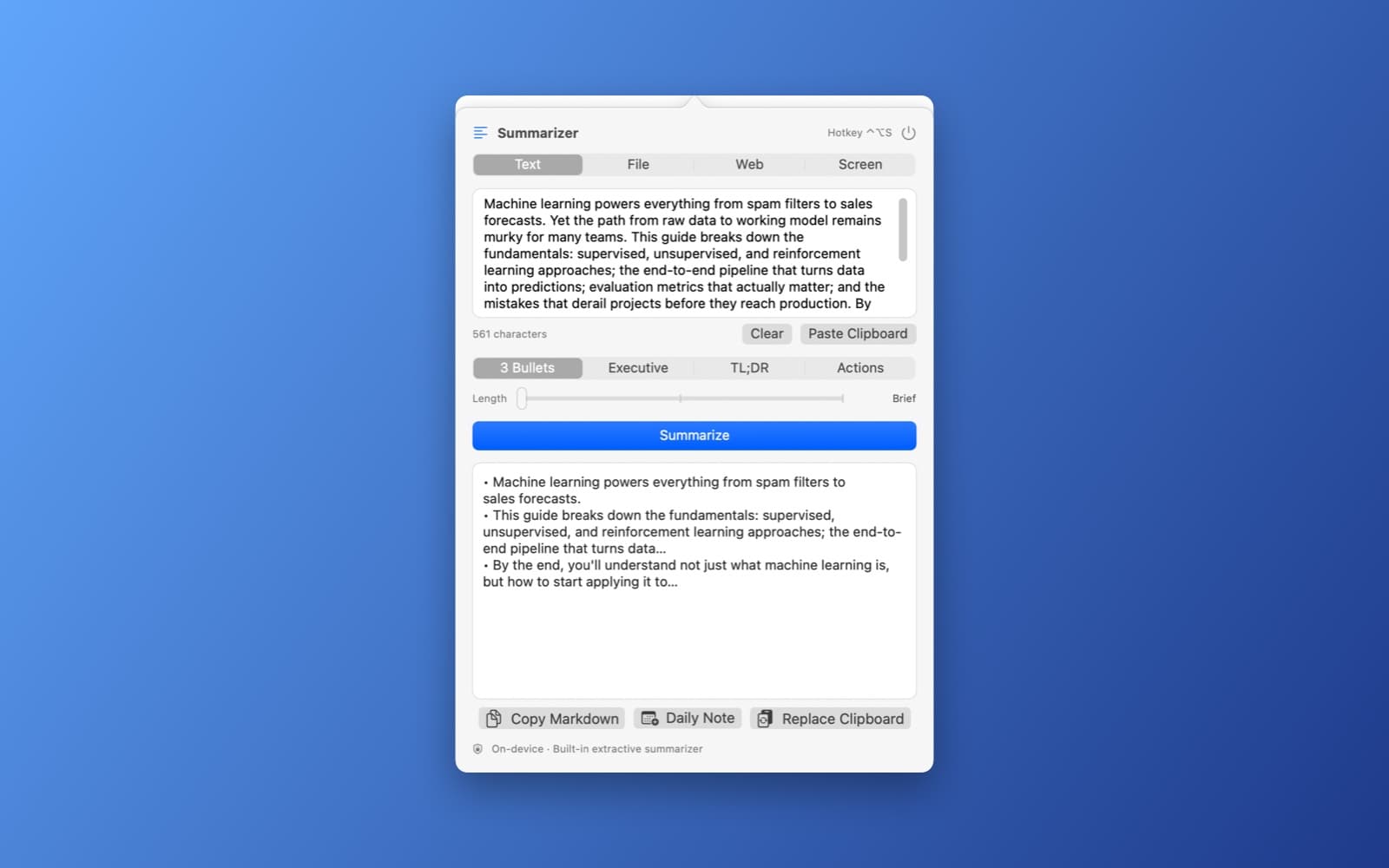
About Summarizer
Summarizer turns long text into a short summary from the menu bar, all on your Mac.
What it does
- Four ways in. Paste text, drop a file (PDF, TXT, DOCX, RTF or Markdown), enter a web address to read a page, or capture a window or the screen and read it with the Vision text recognizer.
- Hotkey. Press Control+Option+S to summarize whatever you have selected.
- Four styles. 3 bullets, an executive paragraph, TL;DR, or action items, with a length slider from Brief to Detailed.
- Quick actions. Copy the summary as Markdown, add it to a daily note, or replace the clipboard with it.
Notes
The summarizer is built in and extractive: it picks the most important sentences from your text, so it works instantly with no download. It does not rewrite text the way a language model does. Nothing leaves your Mac, apart from fetching a web address you enter.
Information
- Developer
- SiliconDevKit (generated by AI from a prompt)
- Category
- Productivity
- Compatibility
- macOS 13 or later, Apple silicon. Apple silicon Macs only (M1 or later), not Intel
- Size
- 14 MB (.dmg)
- Latest version
- 1.0
- Price
- Free
- Signing
- Ad-hoc signed, not notarized
The prompt behind it
This app was generated from the prompt below. Paste it into SiliconDevKit to build your own version, then change it however you like.
Build a menu bar app called **Summarizer** that instantly generates concise summaries of selected text, documents, webpages, emails, or active screen content entirely on-device. Clicking the menu bar icon opens a clean utility popover with tabs to paste clipboard text, drag and drop documents (PDF, TXT, DOCX), input a URL to fetch reader-mode text, or capture the active window/screen for instant OCR processing. Include a global hotkey that captures whatever text or window is currently selected and opens the summary popover instantly. Power the core processing locally without cloud dependencies: use Vision's `VNRecognizeTextRequest` for extracting text from screen captures or scanned documents, and run a local on-device small language model (via Apple's Foundation Models framework, Core ML, or a bundled quantized LLM runtime like llama.cpp / MLC-LLM) to perform the summarization. Support output modes: 3-bullet takeaway, executive paragraph, TL;DR, or key action items, along with an adjustable length slider (Brief, Balanced, Detailed). Show the generated summary in a scrollable output panel with quick-action buttons to copy markdown, append to a daily note, or replace the clipboard. Everything runs strictly on-device with zero internet access, no tracking, and no external API calls.
What it cost
The cost of this demo was not recorded in our usage log. Demos built through the live build system show every run with its tokens and cost.
Version tree
Every change to this app is a new version. Use any build as a template to start your own copy from it; forks that their makers shared appear as branches.
Version 1.0Oct 7, 2026
Build a menu bar app called **Summarizer** that instantly generates concise summaries of selected text, documents, webpages, emails, or active screen content entirely on-device. Clicking the menu bar icon opens a clean utility popover with tabs to paste clipboard text, drag and drop documents (PDF, TXT, DOCX), input a URL to fetch reader-mode text, or capture the active window/screen for instant OCR processing. Include a global hotkey that captures whatever text or window is currently selected and opens the summary popover instantly. Power the core processing locally without cloud dependencies: use Vision's `VNRecognizeTextRequest` for extracting text from screen captures or scanned documents, and run a local on-device small language model (via Apple's Foundation Models framework, Core ML, or a bundled quantized LLM runtime like llama.cpp / MLC-LLM) to perform the summarization. Support output modes: 3-bullet takeaway, executive paragraph, TL;DR, or key action items, along with an adjustable length slider (Brief, Balanced, Detailed). Show the generated summary in a scrollable output panel with quick-action buttons to copy markdown, append to a daily note, or replace the clipboard. Everything runs strictly on-device with zero internet access, no tracking, and no external API calls.
A menu bar app that summarizes text, documents, webpages and screen content entirely on-device.
Opening it for the first time
- Open the .dmg and drag Summarizer onto the Applications folder.
- Open it from Applications. macOS may say it can’t check the app for malicious software. Click Done.
- Open System Settings → Privacy & Security and click Open Anyway. This is needed once. Why this happens. To share an app without the warning, see how to notarize it.


