
Audio
Spot Downer
Paste a Spotify link and save the songs to your Mac as audio files, with a queue and a library.
- Category
- Audio
- Requires
- macOS 13+
- Size
- 1.0 MB
- Price
- Free
Preview
About Spot Downer
Spot Downer takes a Spotify link for a track, album, playlist or artist and saves the songs to your Mac as audio files. It is built on the same setup and queue as Toob-Downer, with spotdl doing the work: it reads the song details from Spotify, finds matching audio on YouTube Music or YouTube, and downloads that. It does not download from Spotify itself.
What it does
- Paste and preview. Paste an open.spotify.com link and it shows the cover art, title, artist, album and track count first. For an album or playlist you get a track list with a checkbox on each song.
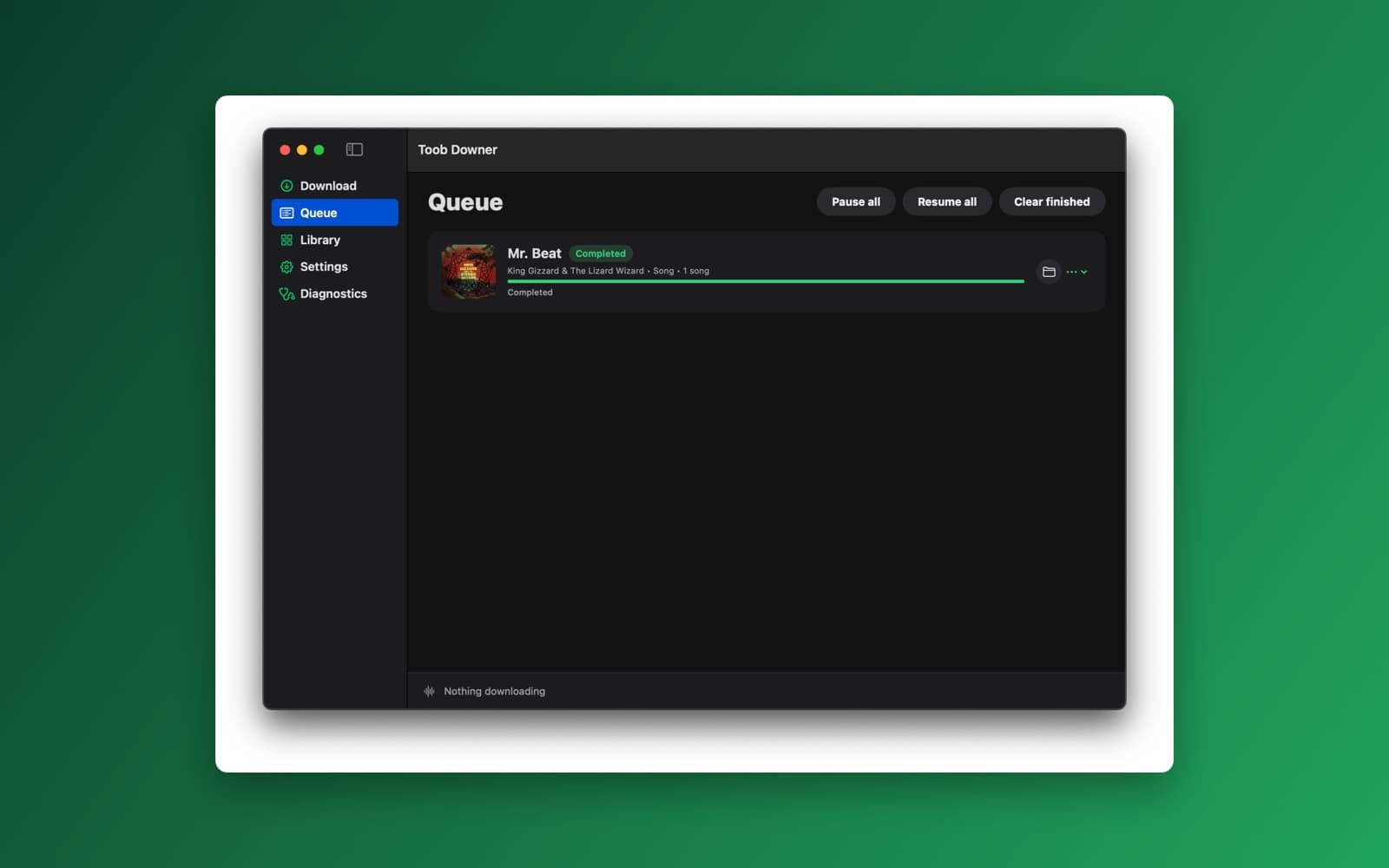
- Queue. Downloads wait in a queue with Pause all, Resume all and Clear finished. Each item shows its cover art, a progress bar and its status, and has a button to show the file in Finder. An album or playlist is one item with a row for each song.
- Output choices. Keep the original audio, or save as M4A, MP3 or Opus, with cover art and tags embedded. The audio quality is whatever YouTube has, so re-encoding does not make it better.
- Library, Settings and Diagnostics. Library lists what you have downloaded. Settings has your own Spotify credentials (stored in the Keychain), the order of audio sources and the filename template. Diagnostics checks each tool and can repair them.
- Sets itself up. On first launch it downloads its own Python, spotdl, yt-dlp, FFmpeg and Deno, so you do not need Python or Homebrew.
Notes
Spot Downer is not made by or connected to Spotify. A song with no match is reported and skipped, and rate limits on the shared Spotify credentials are common, so use your own if downloads fail. It does not remove DRM. Use it only for music you have the right to save, and see the copyright page for takedown requests.
Information
- Developer
- SiliconDevKit (generated by AI from a prompt)
- Category
- Audio
- Compatibility
- macOS 13 or later, Apple silicon. Apple silicon Macs only (M1 or later), not Intel
- Size
- 1.0 MB (.dmg)
- Latest version
- 1.0.1
- Price
- Free
- Signing
- Ad-hoc signed, not notarized
The prompt behind it
This app was generated from the prompt below. Paste it into SiliconDevKit to build your own version, then change it however you like.
FOLLOW-UP: Convert the existing Toob Downer app into a Spotify audio downloader. Keep the existing project, architecture, dependency system, ProcessRunner, queue, history, notifications, diagnostics, settings, and DMG packaging. Modify and extend them; don't rewrite from scratch. Remove video-specific UI (video quality presets, video format picker). ## ENGINE * Wrap spotdl. It reads Spotify metadata, finds matching audio on YouTube Music/YouTube, and downloads it with yt-dlp. Do NOT reimplement matching or extraction. * FFmpeg handles conversion, tagging, and cover-art embedding. * No DRM circumvention and no decrypting Spotify streams. If a track is unavailable or has no match, report it and skip it. ## BUNDLED PYTHON (NO SYSTEM PYTHON) The app must work on a clean Mac with no Python, Homebrew, or Terminal. * On first launch (and on upgrade from the old version), download a relocatable standalone CPython (python-build-standalone, install_only) for arm64 or x86_64 into ~/Library/Application Support/Toob Downer/Tools/python/ * Create an isolated venv at Tools/venv/ and pip install pinned versions of spotdl and "yt-dlp[default]" (includes yt-dlp-ejs). * Keep the existing FFmpeg/ffprobe and Deno installs. yt-dlp needs a JS runtime for YouTube. * Run venv/bin/spotdl via Process only, never a shell. Use a controlled environment: PATH = Tools/bin + venv/bin + /usr/bin:/bin; PYTHONNOUSERSITE=1; unset PYTHONPATH and PYTHONHOME. Never read the user's shell config. Pass --ffmpeg with the explicit path. * Never overwrite a working install with a failed one: build in staging, validate (spotdl --version, import yt_dlp, ffmpeg, deno), then atomically swap. Keep the previous version for rollback. * Settings: "Update Engine" (staged pip upgrade) and "Repair" (rebuild the venv). * Setup screen components: Python runtime, Python environment, spotdl, yt-dlp, FFmpeg, Deno. Keep the progress/retry/status UI. ## URLS & PREVIEW Accept open.spotify.com links and spotify: URIs for tracks, albums, playlists, and artists. Anything else shows "Not a Spotify link." Before downloading, get metadata only via `spotdl save <url> --save-file <tmp>.spotdl`. Show cover art, title, artist, album/playlist, track count, and duration. Collections show a track list with include/exclude checkboxes. ## MAIN WINDOW UI/UX (SPOTIFY-INSPIRED) Native SwiftUI with a Spotify-desktop feel: * Dark-first: near-black background (#121212-style), elevated dark-gray cards, white text, muted gray secondary text. Provide an equivalent light palette for light mode. * One vivid green accent for primary actions, progress, and active states. Use a distinct shade, not Spotify's exact brand green. * Left sidebar (NavigationSplitView): Download, Queue, Library, Settings, Diagnostics, with SF Symbols. * Top: pill-shaped URL field with a paste button and a round accent Download button. * Preview: large cover art with a gradient header tinted from the artwork's dominant color, bold title, and an "Artist • Album • Year • N songs, X min" line. Below it, a playlist-style track list (#, title/artist, album, duration) with row hover highlight. * Library: grid of rounded cover cards with hover lift, plus a list toggle. * Persistent bottom "now downloading" bar: art, title, artist, thin accent progress bar, speed/ETA, pause/cancel. * Subtle animations, rounded corners, generous spacing, bold SF Pro hierarchy. * Never use Spotify's logo, name, wordmark, or icons in the UI or app icon. ## OUTPUT OPTIONS Presets: Best/Original (default, no re-encode), M4A, MP3, Opus. Label them honestly: source quality is YouTube's, and re-encoding doesn't improve it. Options: * Embed cover art and tags (title, artist, album, track number, year, genre) * Lyrics (genius/musixmatch/azlyrics/synced), embedded or .lrc * .m3u generation * Skip existing (--overwrite skip) * Output template with spotdl variables ({artist}, {title}, {album}, {track-number}, {playlist}, {year}) and a live filename preview * Folder layout: flat / Artist/Album / Playlist ## SPOTIFY SETTINGS * Optional own Client ID/Secret (the default shared credentials get rate-limited), stored in the Keychain, with a short in-app guide to the Spotify Developer Dashboard. * Audio provider order (youtube-music, youtube) and match strictness. * Optional --user-auth for Liked Songs and private playlists via spotdl's OAuth in the system browser. Never handle the user's password. * --yt-dlp-args passthrough, including cookies-from-browser if enabled. Plus an advanced field for extra spotdl args. ## QUEUE & PROGRESS Keep pause, resume, cancel, retry, reorder, remove, and restart recovery. * Collections are a parent job with per-track child rows. Overall progress = done/total. Per-track status: queued/searching/downloading/converting/tagging/done/skipped/failed. * SpotDLProgressParser parses real stdout/stderr. Use --log-level and simple output, not rich TTY output, and per-song Downloaded/Skipping/LookupError lines. Never fake progress; use indeterminate progress per track if needed. * Pause = terminate cleanly. Resume = re-run with skip-existing. * Report no-match tracks individually, with "Retry with custom search query." ## ARCHITECTURE Add or modify: PythonRuntimeManager, VenvManager, SpotDLManager, SpotifyURLParser, MetadataPreviewService, CredentialStore (Keychain), SpotDLProgressParser. DependencyManager orchestrates installs. Keep the other managers. Retire the video parts of FormatManager and PlaylistManager. ## HISTORY & DIAGNOSTICS History: cover, title, artist, album/playlist, date, status, file path, Spotify URL, track count. Actions: Open in Finder, Retry failed, Re-download. Diagnostics: Python version/path, venv health, spotdl/yt-dlp versions, yt-dlp-ejs, FFmpeg, Deno, credential status (never show secrets). Buttons: "Test Spotify" (metadata-only fetch of a public track) and "Copy Report" (redacted). ## ERRORS (friendly message + full log) Handle 429 rate limits (suggest own credentials), invalid credentials, no match, region-locked or removed tracks, private playlists without auth, pip/venv failures, runtime corruption, network failures, disk space, and permissions. ## SECURITY Process arguments as arrays only, sanitized filenames, no secrets in logs, Keychain for credentials. ## DONE MEANS Compile and test end to end on a clean account: first-launch install, upgrade from the old version, a track, an album, a playlist, an artist, M4A/MP3 with art and tags, lyrics, skip-existing re-run, cancel, pause/resume, relaunch mid-queue, update with rollback, and Repair. Deliver an updated .app and DMG configuration.
What it cost
The cost of this demo was not recorded in our usage log. Demos built through the live build system show every run with its tokens and cost.
Version tree
Every change to this app is a new version. Use any build as a template to start your own copy from it; forks that their makers shared appear as branches.
Version 1.0.1Oct 8, 2026
FOLLOW-UP: Convert the existing Toob Downer app into a Spotify audio downloader. Keep the existing project, architecture, dependency system, ProcessRunner, queue, history, notifications, diagnostics, settings, and DMG packaging. Modify and extend them; don't rewrite from scratch. Remove video-specific UI (video quality presets, video format picker). ## ENGINE * Wrap spotdl. It reads Spotify metadata, finds matching audio on YouTube Music/YouTube, and downloads it with yt-dlp. Do NOT reimplement matching or extraction. * FFmpeg handles conversion, tagging, and cover-art embedding. * No DRM circumvention and no decrypting Spotify streams. If a track is unavailable or has no match, report it and skip it. ## BUNDLED PYTHON (NO SYSTEM PYTHON) The app must work on a clean Mac with no Python, Homebrew, or Terminal. * On first launch (and on upgrade from the old version), download a relocatable standalone CPython (python-build-standalone, install_only) for arm64 or x86_64 into ~/Library/Application Support/Toob Downer/Tools/python/ * Create an isolated venv at Tools/venv/ and pip install pinned versions of spotdl and "yt-dlp[default]" (includes yt-dlp-ejs). * Keep the existing FFmpeg/ffprobe and Deno installs. yt-dlp needs a JS runtime for YouTube. * Run venv/bin/spotdl via Process only, never a shell. Use a controlled environment: PATH = Tools/bin + venv/bin + /usr/bin:/bin; PYTHONNOUSERSITE=1; unset PYTHONPATH and PYTHONHOME. Never read the user's shell config. Pass --ffmpeg with the explicit path. * Never overwrite a working install with a failed one: build in staging, validate (spotdl --version, import yt_dlp, ffmpeg, deno), then atomically swap. Keep the previous version for rollback. * Settings: "Update Engine" (staged pip upgrade) and "Repair" (rebuild the venv). * Setup screen components: Python runtime, Python environment, spotdl, yt-dlp, FFmpeg, Deno. Keep the progress/retry/status UI. ## URLS & PREVIEW Accept open.spotify.com links and spotify: URIs for tracks, albums, playlists, and artists. Anything else shows "Not a Spotify link." Before downloading, get metadata only via `spotdl save <url> --save-file <tmp>.spotdl`. Show cover art, title, artist, album/playlist, track count, and duration. Collections show a track list with include/exclude checkboxes. ## MAIN WINDOW UI/UX (SPOTIFY-INSPIRED) Native SwiftUI with a Spotify-desktop feel: * Dark-first: near-black background (#121212-style), elevated dark-gray cards, white text, muted gray secondary text. Provide an equivalent light palette for light mode. * One vivid green accent for primary actions, progress, and active states. Use a distinct shade, not Spotify's exact brand green. * Left sidebar (NavigationSplitView): Download, Queue, Library, Settings, Diagnostics, with SF Symbols. * Top: pill-shaped URL field with a paste button and a round accent Download button. * Preview: large cover art with a gradient header tinted from the artwork's dominant color, bold title, and an "Artist • Album • Year • N songs, X min" line. Below it, a playlist-style track list (#, title/artist, album, duration) with row hover highlight. * Library: grid of rounded cover cards with hover lift, plus a list toggle. * Persistent bottom "now downloading" bar: art, title, artist, thin accent progress bar, speed/ETA, pause/cancel. * Subtle animations, rounded corners, generous spacing, bold SF Pro hierarchy. * Never use Spotify's logo, name, wordmark, or icons in the UI or app icon. ## OUTPUT OPTIONS Presets: Best/Original (default, no re-encode), M4A, MP3, Opus. Label them honestly: source quality is YouTube's, and re-encoding doesn't improve it. Options: * Embed cover art and tags (title, artist, album, track number, year, genre) * Lyrics (genius/musixmatch/azlyrics/synced), embedded or .lrc * .m3u generation * Skip existing (--overwrite skip) * Output template with spotdl variables ({artist}, {title}, {album}, {track-number}, {playlist}, {year}) and a live filename preview * Folder layout: flat / Artist/Album / Playlist ## SPOTIFY SETTINGS * Optional own Client ID/Secret (the default shared credentials get rate-limited), stored in the Keychain, with a short in-app guide to the Spotify Developer Dashboard. * Audio provider order (youtube-music, youtube) and match strictness. * Optional --user-auth for Liked Songs and private playlists via spotdl's OAuth in the system browser. Never handle the user's password. * --yt-dlp-args passthrough, including cookies-from-browser if enabled. Plus an advanced field for extra spotdl args. ## QUEUE & PROGRESS Keep pause, resume, cancel, retry, reorder, remove, and restart recovery. * Collections are a parent job with per-track child rows. Overall progress = done/total. Per-track status: queued/searching/downloading/converting/tagging/done/skipped/failed. * SpotDLProgressParser parses real stdout/stderr. Use --log-level and simple output, not rich TTY output, and per-song Downloaded/Skipping/LookupError lines. Never fake progress; use indeterminate progress per track if needed. * Pause = terminate cleanly. Resume = re-run with skip-existing. * Report no-match tracks individually, with "Retry with custom search query." ## ARCHITECTURE Add or modify: PythonRuntimeManager, VenvManager, SpotDLManager, SpotifyURLParser, MetadataPreviewService, CredentialStore (Keychain), SpotDLProgressParser. DependencyManager orchestrates installs. Keep the other managers. Retire the video parts of FormatManager and PlaylistManager. ## HISTORY & DIAGNOSTICS History: cover, title, artist, album/playlist, date, status, file path, Spotify URL, track count. Actions: Open in Finder, Retry failed, Re-download. Diagnostics: Python version/path, venv health, spotdl/yt-dlp versions, yt-dlp-ejs, FFmpeg, Deno, credential status (never show secrets). Buttons: "Test Spotify" (metadata-only fetch of a public track) and "Copy Report" (redacted). ## ERRORS (friendly message + full log) Handle 429 rate limits (suggest own credentials), invalid credentials, no match, region-locked or removed tracks, private playlists without auth, pip/venv failures, runtime corruption, network failures, disk space, and permissions. ## SECURITY Process arguments as arrays only, sanitized filenames, no secrets in logs, Keychain for credentials. ## DONE MEANS Compile and test end to end on a clean account: first-launch install, upgrade from the old version, a track, an album, a playlist, an artist, M4A/MP3 with art and tags, lyrics, skip-existing re-run, cancel, pause/resume, relaunch mid-queue, update with rollback, and Repair. Deliver an updated .app and DMG configuration.
A native Mac app that downloads Spotify songs, albums, playlists and artists as tagged audio files using a built-in spotdl engine.
Opening it for the first time
- Open the .dmg and drag Spot Downer onto the Applications folder.
- Open it from Applications. macOS may say it can’t check the app for malicious software. Click Done.
- Open System Settings → Privacy & Security and click Open Anyway. This is needed once. Why this happens. To share an app without the warning, see how to notarize it.
You might also like
 Get
GetPlayTube
Paste a video link and watch it in a clean player, with no ads.
 Get
GetAdMute
Listens to your Mac's audio and mutes the ads, then brings the sound back.
 Get
GetToob-Downer
Paste a video link and save the video to your Mac, with a queue to keep track.
 Get
GetAgent Swarm
Send one task to Claude, Gemini and Hermes at once.