
Productivity
Shot to Site
Drop in a screenshot and watch a web page rebuild itself, live.
- Category
- Productivity
- Requires
- macOS 13+
- Size
- 860 KB
- Price
- Free
Preview
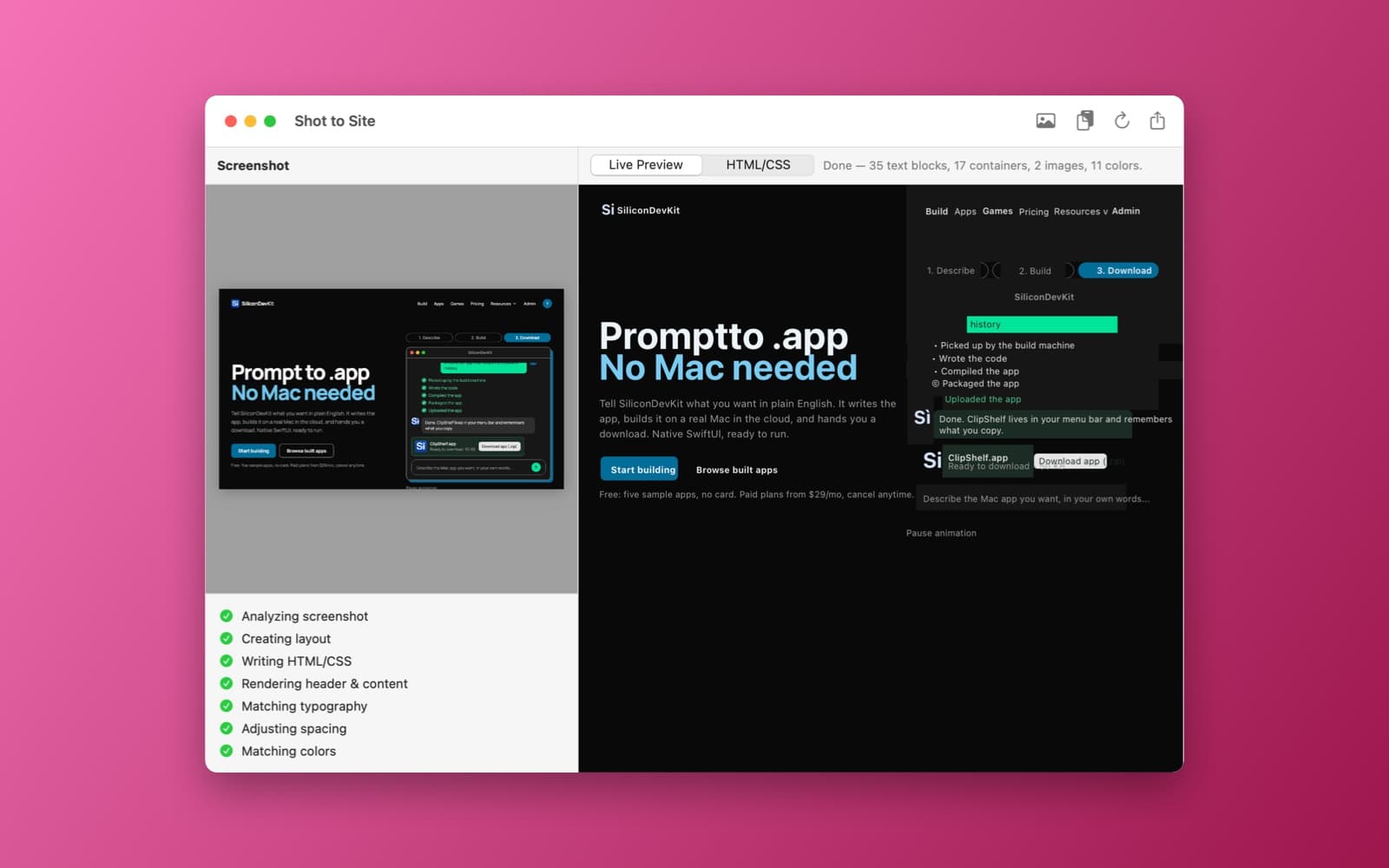
About Shot to Site
Shot to Site turns a screenshot of a web page into a simple web page you can see taking shape.
What it does
- Drop or paste. Drop in a screenshot, or paste one from the clipboard.
- Reads the picture. Uses the Vision text recognizer to find the text and where it sits, and picks out the images, boxes and main colors. A status line reports what it found, such as 37 text blocks, 24 containers, 5 images and 8 colors.
- Builds the page as you watch. A Live Preview tab (and an HTML/CSS tab) on the right fills in as each step runs: analyzing the screenshot, creating the layout, writing the HTML and CSS, rendering the header and content, then matching typography, colors and spacing.
Notes
It rebuilds a page from the text and layout it can detect, so treat the result as a starting point, not a pixel-perfect copy: on a busy page, text can overlap and some elements land in the wrong place. Everything runs on your Mac and nothing is uploaded.
Information
- Developer
- SiliconDevKit (generated by AI from a prompt)
- Category
- Productivity
- Compatibility
- macOS 13 or later, Apple silicon. Apple silicon Macs only (M1 or later), not Intel
- Size
- 860 KB (.dmg)
- Latest version
- 1.0
- Price
- Free
- Signing
- Ad-hoc signed, not notarized
The prompt behind it
This app was generated from the prompt below. Paste it into SiliconDevKit to build your own version, then change it however you like.
build an "ai screenshot -> site builder" mac app. see the chat log below: could "AI Screenshot → Website" be done with a real time view of the build as it builds? Yes. That would actually make the idea much better. You could have a split-screen UI: Left: uploaded screenshot Right: live browser preview As the AI works: Analyzing screenshot... ↓ Creating layout... ↓ Writing HTML/CSS... ↓ Rendering header... ↓ Matching typography... ↓ Adjusting spacing... ↓ Matching colors... The preview updates continuously as the AI edits the code, so the user watches the website being reconstructed in real time. Technically, this is very feasible with a local HTML/CSS/JS sandbox + live preview, while Apple's on-device AI handles the reasoning/code generation.
What it cost
The cost of this demo was not recorded in our usage log. Demos built through the live build system show every run with its tokens and cost.
Version tree
Every change to this app is a new version. Use any build as a template to start your own copy from it; forks that their makers shared appear as branches.
Version 1.0Oct 7, 2026
build an "ai screenshot -> site builder" mac app. see the chat log below: could "AI Screenshot → Website" be done with a real time view of the build as it builds? Yes. That would actually make the idea much better. You could have a split-screen UI: Left: uploaded screenshot Right: live browser preview As the AI works: Analyzing screenshot... ↓ Creating layout... ↓ Writing HTML/CSS... ↓ Rendering header... ↓ Matching typography... ↓ Adjusting spacing... ↓ Matching colors... The preview updates continuously as the AI edits the code, so the user watches the website being reconstructed in real time. Technically, this is very feasible with a local HTML/CSS/JS sandbox + live preview, while Apple's on-device AI handles the reasoning/code generation.
Drop in a screenshot and watch it rebuilt as live HTML/CSS, step by step, in a split-screen preview.
Opening it for the first time
- Open the .dmg and drag Shot to Site onto the Applications folder.
- Open it from Applications. macOS may say it can’t check the app for malicious software. Click Done.
- Open System Settings → Privacy & Security and click Open Anyway. This is needed once. Why this happens. To share an app without the warning, see how to notarize it.


