
Audio
Music Streamer +
A YouTube audio player with a local recommendation engine, non-stop radio and song downloads.
- Category
- Audio
- Requires
- macOS 13+
- Size
- 1.4 MB
- Price
- Free
Preview
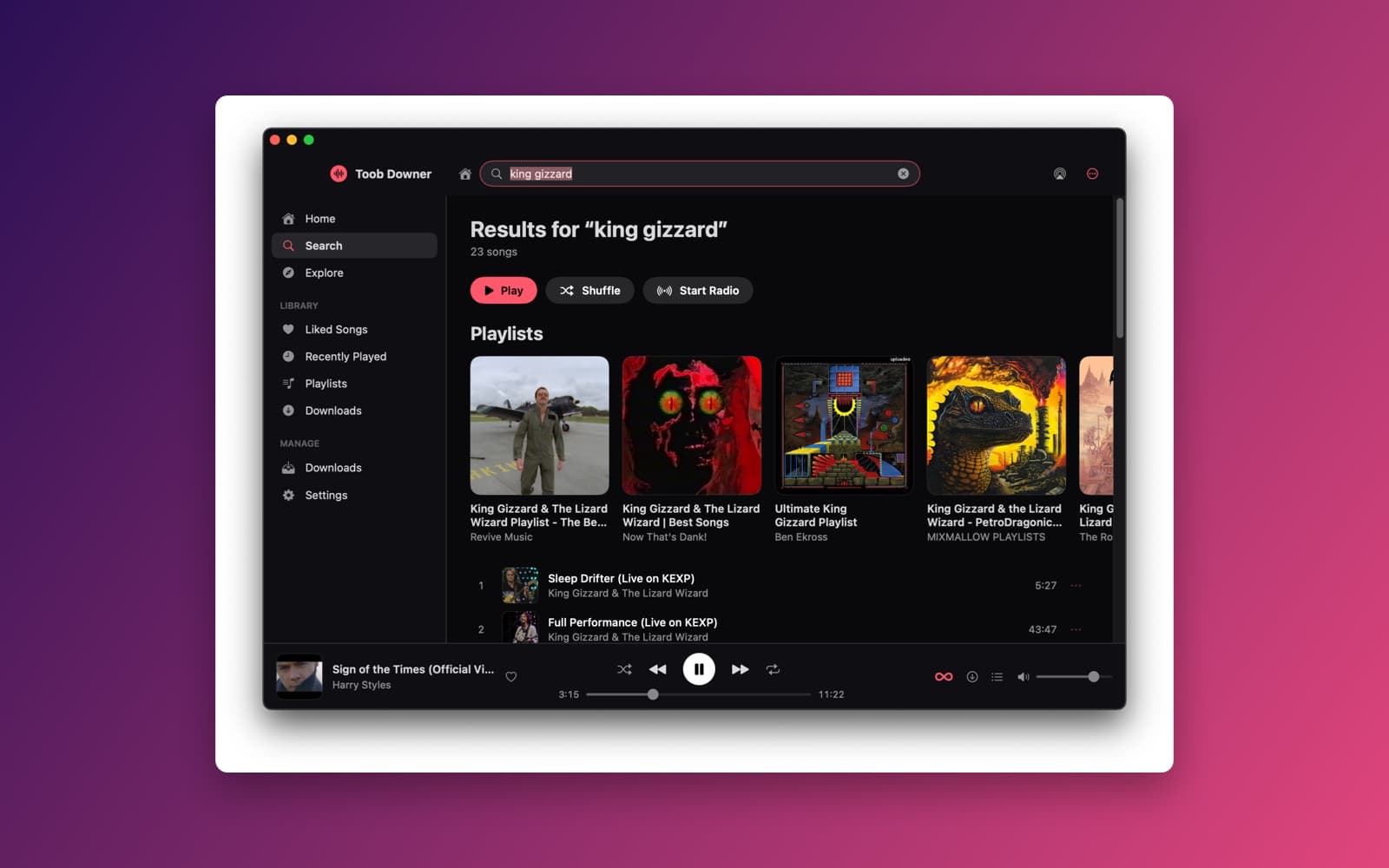
About Music Streamer +
Music Streamer + plays YouTube videos as audio only, in a dark music-service window with a sidebar, rows of artwork cards and a player bar along the bottom. It is built on the same yt-dlp setup as Toob-Downer, so it can also save songs to your Mac.
What it does
- Search and play. Search for a song or artist and get songs and playlists back, with Play, Shuffle and Start Radio buttons. It also plays single videos, YouTube playlists and mixes.
- Home that learns. The Home screen is built on your Mac from what you play, skip, like and search for, and changes as you listen. Nothing is sent to a recommendation server.
- Non-Stop Playback. When the queue ends it picks the next songs for you from the current track, your history and YouTube's own mixes, avoiding repeats, so it works like a personal radio station.
- Player bar and menu bar. Play, skip, seek, volume, shuffle, repeat and queue controls sit at the bottom of the window, with a smaller player in the menu bar. Playback keeps going when you close either one.
- Library. Liked Songs, Recently Played, your own playlists that you can reorder, and Downloads.
- Download songs and playlists. Save audio as MP3, M4A or Opus, with progress shown in Downloads, while the music keeps playing.
- Sets itself up. On first launch it downloads the tools it needs (yt-dlp, FFmpeg, Deno and yt-dlp-ejs), so you install nothing yourself.
Notes
This is version 1.0.1 of Toob Downer, made by asking SiliconDevKit to change the app from a video downloader into a music player. It needs an internet connection, and the first launch takes a while to fetch its tools. It plays audio from YouTube through yt-dlp, which YouTube may block or change at any time, and it can break when that happens. Use it only for music you have the right to listen to and save. See the copyright page for takedown requests.
Information
- Developer
- SiliconDevKit (generated by AI from a prompt)
- Category
- Audio
- Compatibility
- macOS 13 or later, Apple silicon. Apple silicon Macs only (M1 or later), not Intel
- Size
- 1.4 MB (.dmg)
- Latest version
- 1.0.1
- Price
- Free
- Signing
- Ad-hoc signed, not notarized
The prompt behind it
This app was generated from the prompt below. Paste it into SiliconDevKit to build your own version, then change it however you like.
Modify the EXISTING **Toob Downer** macOS app into a native YouTube audio-only music player. IMPORTANT: This is a modification of an existing, working project. **Do NOT rebuild the project from scratch.** The existing Toob Downer dependency installation and yt-dlp pipeline already works correctly on clean Macs. PRESERVE AND REUSE that implementation. ## DO NOT BREAK Keep the existing working implementation for: * Automatic yt-dlp installation * FFmpeg + ffprobe installation * yt-dlp-ejs installation * Deno installation * Apple Silicon / Intel detection * Dependency storage * Dependency validation * Dependency repair/update * Process execution * yt-dlp communication * Existing error handling * Existing download functionality where reusable Do not replace working dependency code with a new implementation. First inspect the entire existing codebase and understand how Toob Downer currently installs, validates, locates, and executes its dependencies. Reuse those existing managers/services wherever possible. ## NEW PRODUCT Transform Toob Downer from a general video downloader into a **YouTube audio-only music player for macOS**. The app should have BOTH: 1. A polished full-size music application window. 2. A compact menu-bar player/popover. The full window should feel like a premium modern music service, inspired by the attached reference screenshot: dark background, horizontal content sections, artwork cards, carousels, sidebar, persistent player, and strong visual hierarchy. Do not copy branding or exact UI. ## MAIN WINDOW Create a full-size native SwiftUI window with: ### Sidebar * Home * Search * Explore * Library * Downloads * Settings Library: * Liked Songs * Recently Played * Playlists * Downloads ### Top Bar * App logo/name * Search field * Output/device control if practical * Settings/menu ### Home The Home screen must NOT be a static collection of fake sections. Build an **algorithm-on-the-fly** recommendation system that generates the homepage from the user's actual activity. Possible dynamic sections: * Quick Picks * Continue Listening * Made For You * Because You Played... * Your Mixes * Radio * New From Your Favorites * Albums For You * Your Playlists * Recently Played * Forgotten Favorites * Explore by Genre * Downloads Only show sections when there is enough relevant content. The exact sections and their order should evolve based on the user's behavior. ## ALGORITHM-ON-THE-FLY Implement a lightweight LOCAL recommendation engine. Track locally: * Play history * Completion rate * Skips * Likes * Search history * Frequently played artists * Frequently played genres * Frequently played tracks * Recent tracks * Current queue * Playlist contents Use these signals to score recommendation candidates. Balance familiarity and discovery. Avoid repeatedly showing the same tracks. Recommendations should update automatically as the user listens. No cloud recommendation backend is required. No user account should be required. ## SEARCH Implement YouTube music search using the existing yt-dlp infrastructure wherever practical. Results should show: * Artwork * Title * Artist/channel * Duration Actions: * Play * Play Next * Add to Queue * Add to Playlist * Download Prioritize reliability over fancy search functionality. ## AUDIO PLAYBACK The core flow should be: YouTube URL/search result → yt-dlp resolves audio stream → native macOS audio playback Do NOT download the entire song just to play it. Use appropriate native Apple audio frameworks. Support: * Play/pause * Previous/next * Seeking * Volume * Queue * Shuffle * Repeat * Track artwork * Metadata * Buffering/loading states * Playback error recovery Playback must continue when the main window or menu-bar popover closes. ## YOUTUBE CONTENT Support: * Individual videos * YouTube playlists * YouTube Mixes * YouTube Radio mixes * Auto-generated mixes where yt-dlp exposes them Treat YouTube videos as audio sources. Resolve playlist/mix contents into a playable queue. ## NON-STOP PLAYBACK Add a **Non-Stop Playback** mode. When enabled, the app should continuously generate the next tracks instead of stopping when the queue ends. Use: * Current track * Current artist * Current playlist * Listening history * Genre affinity * Recommendation engine * YouTube Mix/Radio results Avoid immediate repeats. If one candidate fails, automatically try another. The experience should feel like a personalized infinite radio station. ## PLAYER Add a persistent bottom player bar to the main window: * Artwork * Title * Artist * Previous * Play/pause * Next * Progress * Seek * Volume * Shuffle * Repeat * Queue * Download Clicking the track opens a larger Now Playing view. ## MENU BAR PLAYER Keep the app running in the macOS menu bar. The menu-bar popover should contain: * Artwork * Track title * Artist * Play/pause * Previous * Next * Progress * Volume * Queue Closing the popover must NOT stop playback. Support macOS media keys and global keyboard shortcuts where practical. ## PLAYLISTS Support local playlists: * Create * Rename * Delete * Add/remove tracks * Reorder * Play * Shuffle * Download Also support playing/importing YouTube playlists. ## DOWNLOADS KEEP AND REUSE TOOB DOWNER'S EXISTING WORKING DOWNLOAD PIPELINE. Add: **Download Song** * Download the current track as audio. **Download Playlist** * Download all tracks in the playlist. Use the existing yt-dlp + FFmpeg infrastructure. Support: * MP3 * M4A * Opus Show download progress in Downloads. Downloaded audio should include metadata/artwork when available. Downloads must not interrupt playback. ## HISTORY / LIBRARY Persist locally: * Recently played * Liked songs * Search history * Playlists * Downloads * Listening statistics Allow any track to be replayed or added to the queue. ## VISUAL DESIGN Use the attached reference screenshot as inspiration. Full window: * Nearly black/dark background * Left sidebar * Large horizontal sections * Artwork cards * Rounded corners * Horizontal scrolling carousels * Subtle borders * Compact typography * Generous spacing * Premium music-service appearance Do NOT make it look like a generic dashboard or CRUD app. Use native SwiftUI/macOS components wherever appropriate. ## ARCHITECTURE Before modifying code, identify existing Toob Downer components that can be reused. Prefer extending existing architecture rather than replacing it. Add/modify components such as: * PlayerManager * AudioPlayer * QueueManager * PlaylistManager * RecommendationEngine * SearchManager * HistoryStore * LibraryStore * DownloadManager * MetadataManager * ArtworkManager * MenuBarController Reuse existing: * DependencyManager * YTDLPManager * FFmpegManager * Deno/EJS handling * ProcessRunner * Download infrastructure Rename/refactor only when necessary. ## CRITICAL REQUIREMENT The resulting application must actually work. Do not create mock recommendation data, fake playback, placeholder search results, or fake download behavior. Test the existing dependency system BEFORE changing it. Then test: 1. Clean dependency installation 2. YouTube song extraction 3. Audio streaming/playback 4. Queue 5. Search 6. Playlist playback 7. Mix playback 8. Radio playback 9. Non-stop playback 10. Keyboard/media controls 11. Individual audio download 12. Playlist download 13. History 14. Local playlists 15. Restart/recovery Most importantly: **Preserve the proven Toob Downer dependency/download infrastructure. Modify the product around it rather than replacing the foundation.**
What it cost
The cost of this demo was not recorded in our usage log. Demos built through the live build system show every run with its tokens and cost.
Version tree
Every change to this app is a new version. Use any build as a template to start your own copy from it; forks that their makers shared appear as branches.
Version 1.0.1Oct 8, 2026
Modify the EXISTING **Toob Downer** macOS app into a native YouTube audio-only music player. IMPORTANT: This is a modification of an existing, working project. **Do NOT rebuild the project from scratch.** The existing Toob Downer dependency installation and yt-dlp pipeline already works correctly on clean Macs. PRESERVE AND REUSE that implementation. ## DO NOT BREAK Keep the existing working implementation for: * Automatic yt-dlp installation * FFmpeg + ffprobe installation * yt-dlp-ejs installation * Deno installation * Apple Silicon / Intel detection * Dependency storage * Dependency validation * Dependency repair/update * Process execution * yt-dlp communication * Existing error handling * Existing download functionality where reusable Do not replace working dependency code with a new implementation. First inspect the entire existing codebase and understand how Toob Downer currently installs, validates, locates, and executes its dependencies. Reuse those existing managers/services wherever possible. ## NEW PRODUCT Transform Toob Downer from a general video downloader into a **YouTube audio-only music player for macOS**. The app should have BOTH: 1. A polished full-size music application window. 2. A compact menu-bar player/popover. The full window should feel like a premium modern music service, inspired by the attached reference screenshot: dark background, horizontal content sections, artwork cards, carousels, sidebar, persistent player, and strong visual hierarchy. Do not copy branding or exact UI. ## MAIN WINDOW Create a full-size native SwiftUI window with: ### Sidebar * Home * Search * Explore * Library * Downloads * Settings Library: * Liked Songs * Recently Played * Playlists * Downloads ### Top Bar * App logo/name * Search field * Output/device control if practical * Settings/menu ### Home The Home screen must NOT be a static collection of fake sections. Build an **algorithm-on-the-fly** recommendation system that generates the homepage from the user's actual activity. Possible dynamic sections: * Quick Picks * Continue Listening * Made For You * Because You Played... * Your Mixes * Radio * New From Your Favorites * Albums For You * Your Playlists * Recently Played * Forgotten Favorites * Explore by Genre * Downloads Only show sections when there is enough relevant content. The exact sections and their order should evolve based on the user's behavior. ## ALGORITHM-ON-THE-FLY Implement a lightweight LOCAL recommendation engine. Track locally: * Play history * Completion rate * Skips * Likes * Search history * Frequently played artists * Frequently played genres * Frequently played tracks * Recent tracks * Current queue * Playlist contents Use these signals to score recommendation candidates. Balance familiarity and discovery. Avoid repeatedly showing the same tracks. Recommendations should update automatically as the user listens. No cloud recommendation backend is required. No user account should be required. ## SEARCH Implement YouTube music search using the existing yt-dlp infrastructure wherever practical. Results should show: * Artwork * Title * Artist/channel * Duration Actions: * Play * Play Next * Add to Queue * Add to Playlist * Download Prioritize reliability over fancy search functionality. ## AUDIO PLAYBACK The core flow should be: YouTube URL/search result → yt-dlp resolves audio stream → native macOS audio playback Do NOT download the entire song just to play it. Use appropriate native Apple audio frameworks. Support: * Play/pause * Previous/next * Seeking * Volume * Queue * Shuffle * Repeat * Track artwork * Metadata * Buffering/loading states * Playback error recovery Playback must continue when the main window or menu-bar popover closes. ## YOUTUBE CONTENT Support: * Individual videos * YouTube playlists * YouTube Mixes * YouTube Radio mixes * Auto-generated mixes where yt-dlp exposes them Treat YouTube videos as audio sources. Resolve playlist/mix contents into a playable queue. ## NON-STOP PLAYBACK Add a **Non-Stop Playback** mode. When enabled, the app should continuously generate the next tracks instead of stopping when the queue ends. Use: * Current track * Current artist * Current playlist * Listening history * Genre affinity * Recommendation engine * YouTube Mix/Radio results Avoid immediate repeats. If one candidate fails, automatically try another. The experience should feel like a personalized infinite radio station. ## PLAYER Add a persistent bottom player bar to the main window: * Artwork * Title * Artist * Previous * Play/pause * Next * Progress * Seek * Volume * Shuffle * Repeat * Queue * Download Clicking the track opens a larger Now Playing view. ## MENU BAR PLAYER Keep the app running in the macOS menu bar. The menu-bar popover should contain: * Artwork * Track title * Artist * Play/pause * Previous * Next * Progress * Volume * Queue Closing the popover must NOT stop playback. Support macOS media keys and global keyboard shortcuts where practical. ## PLAYLISTS Support local playlists: * Create * Rename * Delete * Add/remove tracks * Reorder * Play * Shuffle * Download Also support playing/importing YouTube playlists. ## DOWNLOADS KEEP AND REUSE TOOB DOWNER'S EXISTING WORKING DOWNLOAD PIPELINE. Add: **Download Song** * Download the current track as audio. **Download Playlist** * Download all tracks in the playlist. Use the existing yt-dlp + FFmpeg infrastructure. Support: * MP3 * M4A * Opus Show download progress in Downloads. Downloaded audio should include metadata/artwork when available. Downloads must not interrupt playback. ## HISTORY / LIBRARY Persist locally: * Recently played * Liked songs * Search history * Playlists * Downloads * Listening statistics Allow any track to be replayed or added to the queue. ## VISUAL DESIGN Use the attached reference screenshot as inspiration. Full window: * Nearly black/dark background * Left sidebar * Large horizontal sections * Artwork cards * Rounded corners * Horizontal scrolling carousels * Subtle borders * Compact typography * Generous spacing * Premium music-service appearance Do NOT make it look like a generic dashboard or CRUD app. Use native SwiftUI/macOS components wherever appropriate. ## ARCHITECTURE Before modifying code, identify existing Toob Downer components that can be reused. Prefer extending existing architecture rather than replacing it. Add/modify components such as: * PlayerManager * AudioPlayer * QueueManager * PlaylistManager * RecommendationEngine * SearchManager * HistoryStore * LibraryStore * DownloadManager * MetadataManager * ArtworkManager * MenuBarController Reuse existing: * DependencyManager * YTDLPManager * FFmpegManager * Deno/EJS handling * ProcessRunner * Download infrastructure Rename/refactor only when necessary. ## CRITICAL REQUIREMENT The resulting application must actually work. Do not create mock recommendation data, fake playback, placeholder search results, or fake download behavior. Test the existing dependency system BEFORE changing it. Then test: 1. Clean dependency installation 2. YouTube song extraction 3. Audio streaming/playback 4. Queue 5. Search 6. Playlist playback 7. Mix playback 8. Radio playback 9. Non-stop playback 10. Keyboard/media controls 11. Individual audio download 12. Playlist download 13. History 14. Local playlists 15. Restart/recovery Most importantly: **Preserve the proven Toob Downer dependency/download infrastructure. Modify the product around it rather than replacing the foundation.**
A YouTube audio music player for Mac with local recommendations, non-stop radio, a menu-bar player and song downloads, powered by yt-dlp.
Opening it for the first time
- Open the .dmg and drag Music Streamer + onto the Applications folder.
- Open it from Applications. macOS may say it can’t check the app for malicious software. Click Done.
- Open System Settings → Privacy & Security and click Open Anyway. This is needed once. Why this happens. To share an app without the warning, see how to notarize it.
You might also like
 Get
GetPlayTube
Paste a video link and watch it in a clean player, with no ads.
 Get
GetAdMute
Listens to your Mac's audio and mutes the ads, then brings the sound back.
 Get
GetToob-Downer
Paste a video link and save the video to your Mac, with a queue to keep track.
 Get
GetAgent Swarm
Send one task to Claude, Gemini and Hermes at once.