
Productivity
Hotkey Launcher
Press your own key combination to open an app, a folder, a file or a website, or to run a Shortcut, from anywhere.
- Category
- Productivity
- Requires
- macOS 13+
- Size
- 433 KB
- Price
- Free
Preview
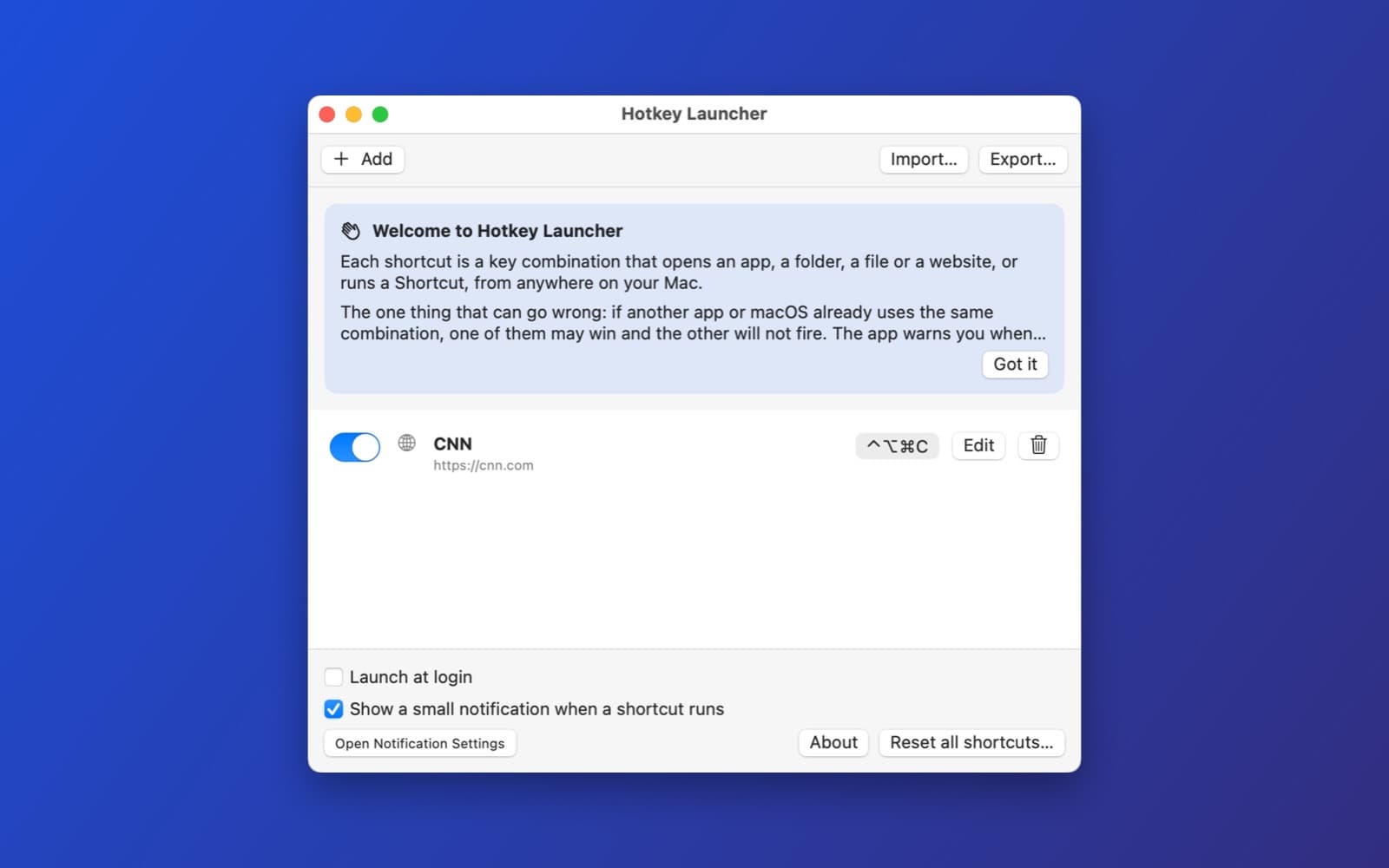
About Hotkey Launcher
Hotkey Launcher is a small menu bar app. You choose a key combination, say what it should open, and it works from anywhere on your Mac. One shortcut can open your browser, another a project folder, another a website.
What it does
- Five kinds of action. Open an app, open a folder or file, open a website, or run a Shortcut from the Shortcuts app.
- A simple list. Each shortcut has an on/off switch, its key combination, and Edit and delete buttons. Add one with a name, a target and a key recorder.
- Honest warnings. If another app or macOS already uses the same keys, it tells you. If a target was moved or deleted, the row shows "Not found" instead of failing silently.
- Import and export. Save your list as a small file and load it on another Mac.
- Settings. Launch at login, a small notification when a shortcut runs, and Reset all shortcuts.
- Private. It is built to record no keystrokes except the combinations you set, and to send nothing anywhere.
How it was made
One prompt in the SiliconDevKit desktop app. The prompt asked for a third-party package called KeyboardShortcuts, which SiliconDevKit does not allow. The first build therefore failed to compile ("no such module KeyboardShortcuts"). The desktop app sent the error back automatically, and the fix round rewrote the shortcuts code with Apple's own hot key interface instead. That is version 1.1, and it contains no third-party code.
Notes
The screenshot shows the welcome card and one shortcut, a website that opens with Control, Option and Command with C. We did not test the other action types, conflicts with system shortcuts, launch at login, the Shortcuts action, or import and export.
Information
- Developer
- SiliconDevKit (generated by AI from a prompt)
- Category
- Productivity
- Compatibility
- macOS 13 or later, Apple silicon. Apple silicon Macs only (M1 or later), not Intel
- Size
- 433 KB (.dmg)
- Latest version
- 1.1
- Price
- Free
- Signing
- Ad-hoc signed, not notarized
The prompt behind it
This app was generated from the prompt below. Paste it into SiliconDevKit to build your own version, then change it however you like.
Build a native Mac menu bar app called Hotkey Launcher: set your own global keyboard shortcuts that open an app, a folder, a file, a website, or run a Shortcuts automation, from anywhere. Use the KeyboardShortcuts Swift package (by Sindre Sorhus, MIT license) for the shortcut recorder and the global hotkeys. It is the only third-party package; everything else is Apple frameworks. RESEARCH FIRST (use WebSearch and WebFetch before you write code) Do not rely on memory. Read the KeyboardShortcuts README: (1) how to add it to Package.swift with an exact version and the product name; (2) KeyboardShortcuts.Name, KeyboardShortcuts.Recorder (the SwiftUI view), onKeyUp and onKeyDown handlers, getShortcut, setShortcut, reset, and how it warns about shortcuts the system already uses; (3) how shortcut names are created at run time for a user-made list (not only constants); (4) the minimum macOS version of the package. Also read Apple's documentation for NSWorkspace (open(_:), openApplication(at:configuration:), activateFileViewerSelecting), SMAppService (launch at login), MenuBarExtra and NSOpenPanel, and how to run a Shortcuts automation (the shortcuts:// URL scheme "run-shortcut?name="; check the exact format). Where a page disagrees with this prompt, follow the page and say what changed. WHAT THE APP DOES - A menu bar app (LSUIElement true, SF Symbol icon, no picture files). The menu lists the user's shortcuts with their key combination, a "Pause all shortcuts" switch, "Open Settings" and "Quit". - The Settings window is a simple list. "Add" opens a small form: a name, an action type (Open an app, Open a folder or file, Open a website, Run a Shortcut), the target (an NSOpenPanel for apps, folders and files; a text field for a website, checked to start with http:// or https://; a field for the Shortcut's name), and the KeyboardShortcuts.Recorder. Each row can be edited, switched off or deleted. Show a clear warning if two entries use the same keys or the keys are already taken by the system, using what the package reports. - An action that opens an app brings it to the front if it is already running. A website opens in the default browser. A missing target (an app that was moved or deleted) shows a red "Not found" note on the row and a notification when the key is pressed, never a silent failure. - Import and export of the list as a small JSON file. Stored in UserDefaults or a JSON file in Application Support, with the shortcuts themselves kept by the package. - Settings: "Launch at login" (SMAppService), "Show a small notification when a shortcut runs", and "Reset all shortcuts" with a confirmation. TRUST - The app records no keystrokes except the combinations the user sets, and sends nothing anywhere: no network code at all. Say so in an About box. A first-run card explains the shortcuts and the one thing that can go wrong (a combination another app also uses). QUALITY - macOS 13 or later (raise it if the package needs more), Swift 5 language mode, SwiftUI with an AppKit app delegate for the menu bar item. No Xcode project, no asset catalog. Modular: ShortcutStore, ActionRunner, SettingsView, EditorForm and the menu. Friendly errors with a Show Details box. - The code is compiled later on the user's Mac, not here: check every initializer, argument label and optional, with no force-unwraps. Do not fake anything: an empty list says it is empty and shows an Add button. - In your reply, say in a few sentences what you built, what the lookups changed (the package version, the recorder API, the Shortcuts URL), and what you could not test: the global hotkeys on a real Mac, conflicts with the system, launch at login and the Shortcuts action were not run.
What it cost
Every AI run that made this demo, one per line. Model: Claude Sonnet 5.5. Tokens are shown as (in / out). “In” counts everything the model read, including text it had already seen in the session at a reduced price.
| Initial prompt(370k in / 28k out) | 59 credits | |
| + | Automatic fix: compile error(245k in / 9k out) | 18 credits |
| = | Total(615k in / 37k out) | 77 credits |
Credits are what a build uses on your plan. This counts AI usage only: hosting and the Mac that compiled it are not included.
Version tree
Every change to this app is a new version. Use any build as a template to start your own copy from it; forks that their makers shared appear as branches.
Version 1.0Oct 11, 2026
Build a native Mac menu bar app called Hotkey Launcher: set your own global keyboard shortcuts that open an app, a folder, a file, a website, or run a Shortcuts automation, from anywhere. Use the KeyboardShortcuts Swift package (by Sindre Sorhus, MIT license) for the shortcut recorder and the global hotkeys. It is the only third-party package; everything else is Apple frameworks. RESEARCH FIRST (use WebSearch and WebFetch before you write code) Do not rely on memory. Read the KeyboardShortcuts README: (1) how to add it to Package.swift with an exact version and the product name; (2) KeyboardShortcuts.Name, KeyboardShortcuts.Recorder (the SwiftUI view), onKeyUp and onKeyDown handlers, getShortcut, setShortcut, reset, and how it warns about shortcuts the system already uses; (3) how shortcut names are created at run time for a user-made list (not only constants); (4) the minimum macOS version of the package. Also read Apple's documentation for NSWorkspace (open(_:), openApplication(at:configuration:), activateFileViewerSelecting), SMAppService (launch at login), MenuBarExtra and NSOpenPanel, and how to run a Shortcuts automation (the shortcuts:// URL scheme "run-shortcut?name="; check the exact format). Where a page disagrees with this prompt, follow the page and say what changed. WHAT THE APP DOES - A menu bar app (LSUIElement true, SF Symbol icon, no picture files). The menu lists the user's shortcuts with their key combination, a "Pause all shortcuts" switch, "Open Settings" and "Quit". - The Settings window is a simple list. "Add" opens a small form: a name, an action type (Open an app, Open a folder or file, Open a website, Run a Shortcut), the target (an NSOpenPanel for apps, folders and files; a text field for a website, checked to start with http:// or https://; a field for the Shortcut's name), and the KeyboardShortcuts.Recorder. Each row can be edited, switched off or deleted. Show a clear warning if two entries use the same keys or the keys are already taken by the system, using what the package reports. - An action that opens an app brings it to the front if it is already running. A website opens in the default browser. A missing target (an app that was moved or deleted) shows a red "Not found" note on the row and a notification when the key is pressed, never a silent failure. - Import and export of the list as a small JSON file. Stored in UserDefaults or a JSON file in Application Support, with the shortcuts themselves kept by the package. - Settings: "Launch at login" (SMAppService), "Show a small notification when a shortcut runs", and "Reset all shortcuts" with a confirmation. TRUST - The app records no keystrokes except the combinations the user sets, and sends nothing anywhere: no network code at all. Say so in an About box. A first-run card explains the shortcuts and the one thing that can go wrong (a combination another app also uses). QUALITY - macOS 13 or later (raise it if the package needs more), Swift 5 language mode, SwiftUI with an AppKit app delegate for the menu bar item. No Xcode project, no asset catalog. Modular: ShortcutStore, ActionRunner, SettingsView, EditorForm and the menu. Friendly errors with a Show Details box. - The code is compiled later on the user's Mac, not here: check every initializer, argument label and optional, with no force-unwraps. Do not fake anything: an empty list says it is empty and shows an Add button. - In your reply, say in a few sentences what you built, what the lookups changed (the package version, the recorder API, the Shortcuts URL), and what you could not test: the global hotkeys on a real Mac, conflicts with the system, launch at login and the Shortcuts action were not run.
Global keyboard shortcuts that open apps, folders, files, websites or run Shortcuts from the menu bar.
Opening it for the first time
- Open the .dmg and drag Hotkey Launcher onto the Applications folder.
- Open it from Applications. macOS may say it can’t check the app for malicious software. Click Done.
- Open System Settings → Privacy & Security and click Open Anyway. This is needed once. Why this happens. To share an app without the warning, see how to notarize it.
You might also like
 Get
GetPlayTube
Paste a video link and watch it in a clean player, with no ads.
 Get
GetAdMute
Listens to your Mac's audio and mutes the ads, then brings the sound back.
 Get
GetToob-Downer
Paste a video link and save the video to your Mac, with a queue to keep track.
 Get
GetAgent Swarm
Send one task to Claude, Gemini and Hermes at once.