
Media
FollowFrame
A minimal screen recorder that captures a fixed-size viewport smoothly following your cursor.
- Category
- Media
- Requires
- macOS 13+
- Size
- 352 KB
- Price
- Free
Preview
About FollowFrame
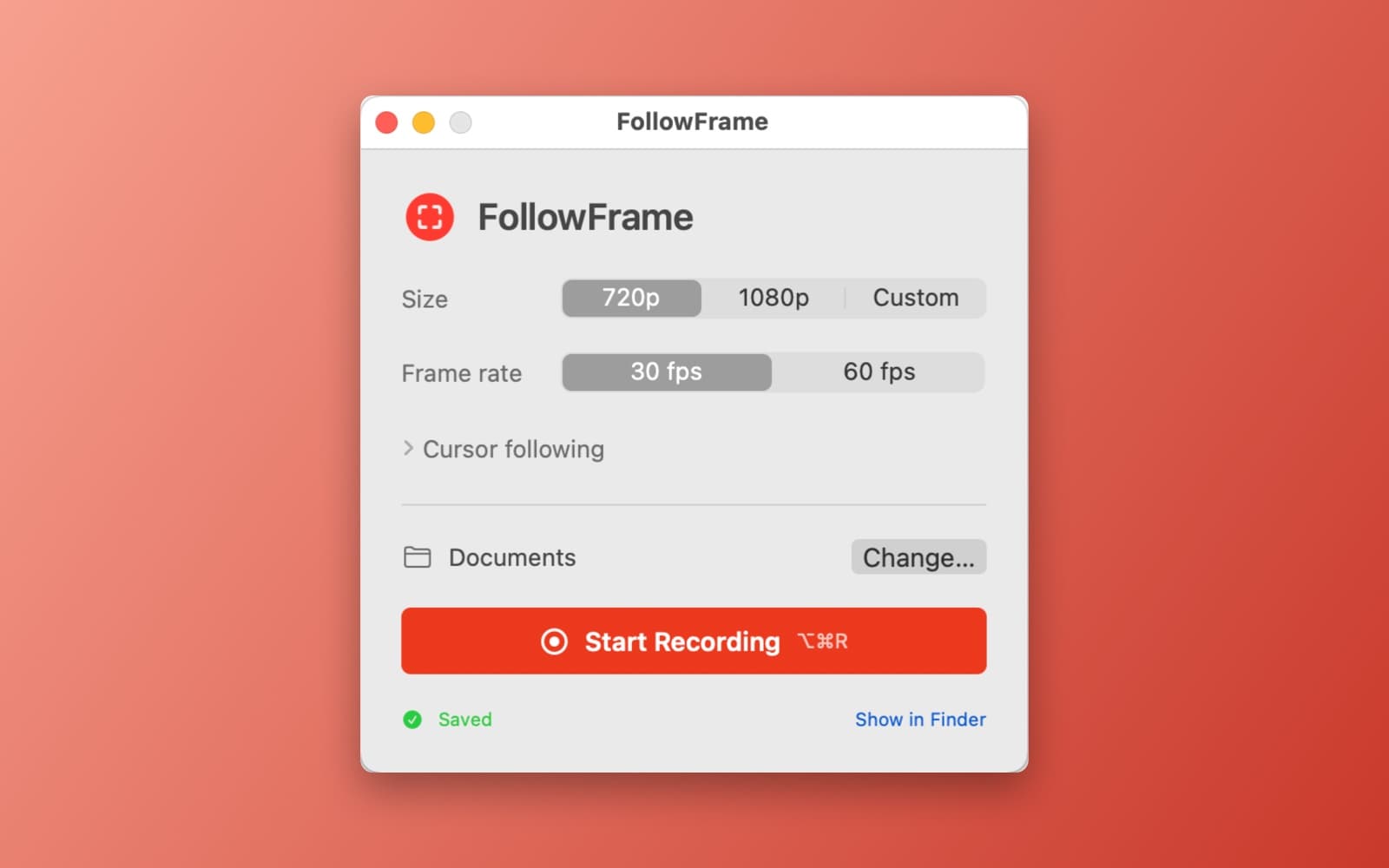
FollowFrame records a fixed-size part of your screen and moves it along with your mouse cursor, so a tutorial or demo stays zoomed in on what you are doing. It records to an MP4 file on your Mac.
What it does
- Pick a size. Choose 720p, 1080p or a custom size, and 30 or 60 frames per second. The defaults need no setup.
- Follows the cursor. The viewport glides after the pointer. Under Cursor following there are settings for how smooth the motion is and for a dead zone, so small movements do not move the frame.
- Click indicator. A subtle ring marks your clicks in the recording.
- Recording controls. A countdown, then a small floating toolbar with pause, resume and stop, and the elapsed time. Start Recording is also Option-Command-R.
- Saves where you choose. Pick a folder, and Show in Finder opens the finished file.
- Private. Nothing is uploaded.
Notes
The first time, FollowFrame asks for Screen Recording permission, and you may have to reopen the app after allowing it. Version 1.1 fixes a bug in version 1.0 where pressing Start Recording closed the window and nothing was recorded.
Information
- Developer
- SiliconDevKit (generated by AI from a prompt)
- Category
- Media
- Compatibility
- macOS 13 or later, Apple silicon. Apple silicon Macs only (M1 or later), not Intel
- Size
- 352 KB (.dmg)
- Latest version
- 1.1
- Price
- Free
- Signing
- Ad-hoc signed, not notarized
The prompt behind it
This app was generated from the prompt below. Paste it into SiliconDevKit to build your own version, then change it however you like.
Build a polished native macOS SwiftUI app called FollowFrame: an ultra-simple screen recorder that captures a fixed-size viewport following the mouse cursor. Use ScreenCaptureKit + Metal/Core Graphics + AVAssetWriter. Let users choose 720p, 1080p, or custom dimensions, then record only that viewport while smoothly following the cursor with configurable smoothing and a dead-zone. Keep the cursor visible and optionally add a subtle click indicator. Include a minimal floating recording toolbar, countdown, pause/resume, stop, elapsed time, and output folder selection. Automatically constrain the viewport to screen edges so it never captures outside the display. Export H.264 MP4 at 30/60 FPS. Make the UI exceptionally clean and minimal, with sensible defaults and almost no configuration. Support multi-monitor setups, Retina scaling, keyboard shortcuts, and Screen Recording permission onboarding. No cloud services or unnecessary dependencies.
What it cost
The cost of this demo was not recorded in our usage log. Demos built through the live build system show every run with its tokens and cost.
Version tree
Every change to this app is a new version. Use any build as a template to start your own copy from it; forks that their makers shared appear as branches.
Version 1.0Oct 7, 2026
Build a polished native macOS SwiftUI app called FollowFrame: an ultra-simple screen recorder that captures a fixed-size viewport following the mouse cursor. Use ScreenCaptureKit + Metal/Core Graphics + AVAssetWriter. Let users choose 720p, 1080p, or custom dimensions, then record only that viewport while smoothly following the cursor with configurable smoothing and a dead-zone. Keep the cursor visible and optionally add a subtle click indicator. Include a minimal floating recording toolbar, countdown, pause/resume, stop, elapsed time, and output folder selection. Automatically constrain the viewport to screen edges so it never captures outside the display. Export H.264 MP4 at 30/60 FPS. Make the UI exceptionally clean and minimal, with sensible defaults and almost no configuration. Support multi-monitor setups, Retina scaling, keyboard shortcuts, and Screen Recording permission onboarding. No cloud services or unnecessary dependencies.
A minimal screen recorder that captures a fixed-size viewport smoothly following your cursor.
Version 1.1Oct 7, 2026
when i click "start recording" the FollowFrame window goes away/closes and nothing else happens. fix it
A minimal screen recorder that captures a fixed-size viewport smoothly following your cursor.
Opening it for the first time
- Open the .dmg and drag FollowFrame onto the Applications folder.
- Open it from Applications. macOS may say it can’t check the app for malicious software. Click Done.
- Open System Settings → Privacy & Security and click Open Anyway. This is needed once. Why this happens. To share an app without the warning, see how to notarize it.


