
Productivity
Computer Use
Tell your Mac what to do in plain English, with a model that runs on your Mac.
- Category
- Productivity
- Requires
- macOS 13+
- Size
- 15 MB
- Price
- Free
Preview
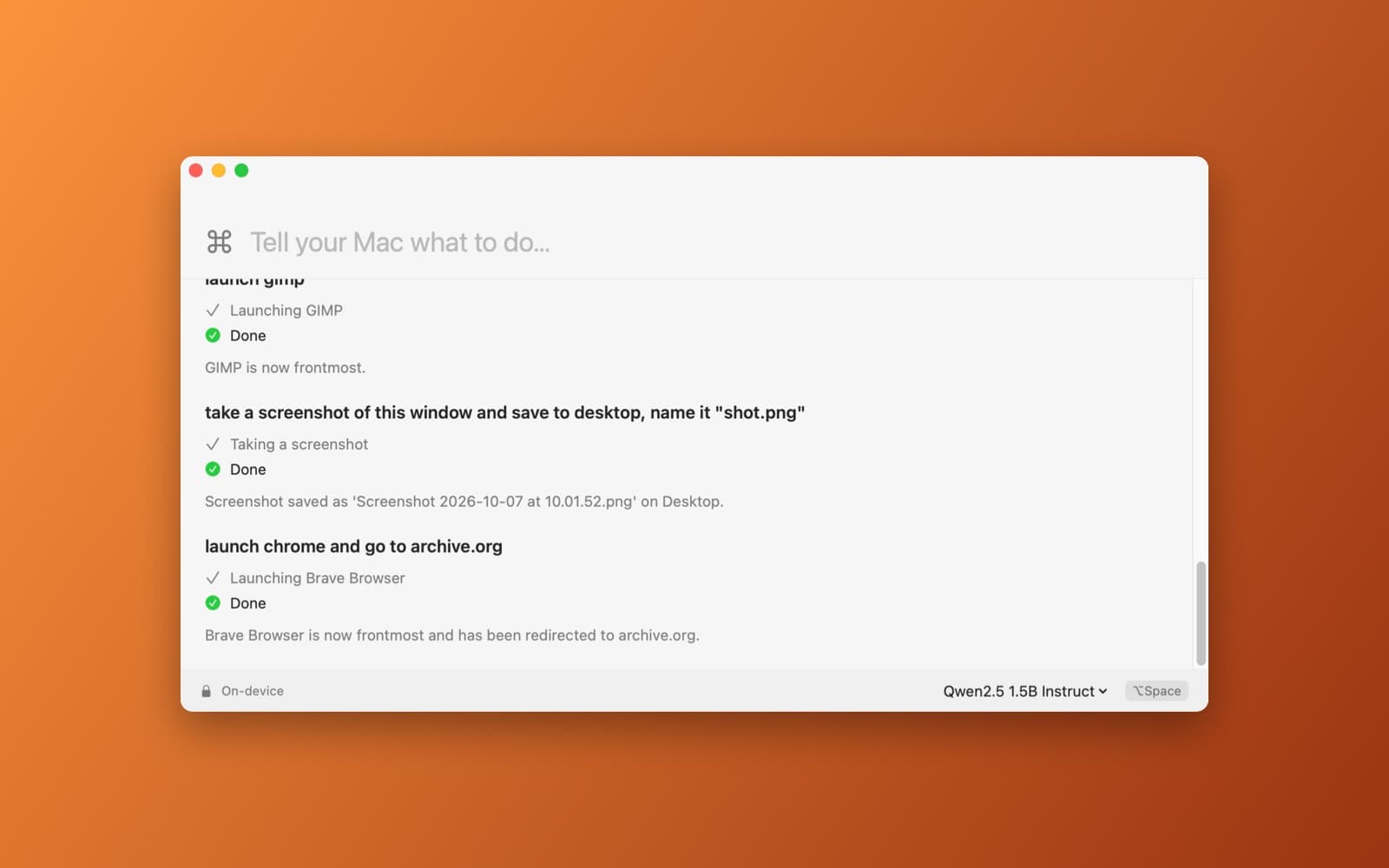
About Computer Use
Computer Use is a private command palette: type what you want, and a language model on your Mac works out the steps and does them.
What it does
- Plain-English commands. Try "launch GIMP", "take a screenshot of this window and save it to the desktop", or "open a browser and go to archive.org".
- See what it is doing. Each command shows a short action log, such as Launching GIMP, then Done, then a one-line result.
- Local model. Runs Qwen2.5 1.5B Instruct, with Llama 3.2 3B Instruct as a larger option, picked from the bar at the bottom of the window. The model is downloaded once, then everything runs on the Mac.
- Hotkey. Press Option+Space to bring up the window from anywhere.
- Confirmation first. It is built to ask before anything destructive or consequential, such as deleting files or sending messages.
Notes
The first launch downloads the model: about 1 GB for Qwen2.5 1.5B, or 2 GB for Llama 3.2 3B. macOS will ask for permission before an app can control other apps, so allow it when prompted. A small model can misread a command, so check what it did, especially for anything you can't undo.
Information
- Developer
- SiliconDevKit (generated by AI from a prompt)
- Category
- Productivity
- Compatibility
- macOS 13 or later, Apple silicon. Apple silicon Macs only (M1 or later), not Intel
- Size
- 15 MB (.dmg)
- Latest version
- 1.1
- Price
- Free
- Signing
- Ad-hoc signed, not notarized
The prompt behind it
This app was generated from the prompt below. Paste it into SiliconDevKit to build your own version, then change it however you like.
Yes. This is a strong Mac app concept: **local LLM + accessibility APIs + AppleScript + screenshots**, with no cloud dependency. Build a native macOS SwiftUI app called Computer Use, a completely local-only computer-use assistant. The user types natural-language commands such as: * “Open Brave and go to cnn.com” * “Open Safari and search Google for MacBook Air” * “Open Finder and create a folder called Projects” * “Take a screenshot and save it to Downloads” * “Open my Downloads folder and find the latest PDF” * “Switch to VS Code and open my project” * “Close Spotify” ### Core architecture Use an on-device LLM for command understanding and planning. No cloud APIs, accounts, telemetry, or remote AI services. Use native macOS capabilities to execute actions: * macOS Accessibility APIs for interacting with applications and UI elements * AppleScript / System Events where appropriate * NSWorkspace for launching and switching applications * URL schemes / browser automation where appropriate * CGWindow APIs and screenshots for visual understanding * Keyboard/mouse events only when necessary The LLM should convert natural-language requests into a small set of structured actions, execute them sequentially, observe the result, and continue until the task is complete. Example: User: “Open Brave and go to cnn.com” Plan: 1. Launch Brave 2. Focus Brave 3. Open a new tab 4. Navigate to [https://cnn.com](https://cnn.com) 5. Verify the page/window changed successfully ### UI Create an extremely polished, minimal native SwiftUI interface inspired by Raycast/Spotlight. Main window: * Large command input * Conversation/history below * Streaming status showing what the assistant is doing * Compact action log such as: `Launching Brave` `Opening new tab` `Navigating to cnn.com` `Done` Include a global keyboard shortcut to summon the command palette. ### Safety Before potentially destructive or consequential actions, require confirmation. Examples: * Delete files * Send messages/emails * Purchase something * Close unsaved work * Modify system settings Read-only and reversible actions should execute immediately. ### Local AI Support a locally downloaded model running entirely on the Mac. Design the inference layer so different local models can be swapped later. The app should function completely offline except when the user's requested computer action itself requires internet access. ### Goal Make this feel like a lightweight, private, native Mac version of “computer use”: the user describes what they want, and the local AI operates their Mac to accomplish it. Use modern clean UI/UX
What it cost
The cost of this demo was not recorded in our usage log. Demos built through the live build system show every run with its tokens and cost.
Version tree
Every change to this app is a new version. Use any build as a template to start your own copy from it; forks that their makers shared appear as branches.
Version 1.0Oct 7, 2026
Yes. This is a strong Mac app concept: **local LLM + accessibility APIs + AppleScript + screenshots**, with no cloud dependency. Build a native macOS SwiftUI app called Computer Use, a completely local-only computer-use assistant. The user types natural-language commands such as: * “Open Brave and go to cnn.com” * “Open Safari and search Google for MacBook Air” * “Open Finder and create a folder called Projects” * “Take a screenshot and save it to Downloads” * “Open my Downloads folder and find the latest PDF” * “Switch to VS Code and open my project” * “Close Spotify” ### Core architecture Use an on-device LLM for command understanding and planning. No cloud APIs, accounts, telemetry, or remote AI services. Use native macOS capabilities to execute actions: * macOS Accessibility APIs for interacting with applications and UI elements * AppleScript / System Events where appropriate * NSWorkspace for launching and switching applications * URL schemes / browser automation where appropriate * CGWindow APIs and screenshots for visual understanding * Keyboard/mouse events only when necessary The LLM should convert natural-language requests into a small set of structured actions, execute them sequentially, observe the result, and continue until the task is complete. Example: User: “Open Brave and go to cnn.com” Plan: 1. Launch Brave 2. Focus Brave 3. Open a new tab 4. Navigate to [https://cnn.com](https://cnn.com) 5. Verify the page/window changed successfully ### UI Create an extremely polished, minimal native SwiftUI interface inspired by Raycast/Spotlight. Main window: * Large command input * Conversation/history below * Streaming status showing what the assistant is doing * Compact action log such as: `Launching Brave` `Opening new tab` `Navigating to cnn.com` `Done` Include a global keyboard shortcut to summon the command palette. ### Safety Before potentially destructive or consequential actions, require confirmation. Examples: * Delete files * Send messages/emails * Purchase something * Close unsaved work * Modify system settings Read-only and reversible actions should execute immediately. ### Local AI Support a locally downloaded model running entirely on the Mac. Design the inference layer so different local models can be swapped later. The app should function completely offline except when the user's requested computer action itself requires internet access. ### Goal Make this feel like a lightweight, private, native Mac version of “computer use”: the user describes what they want, and the local AI operates their Mac to accomplish it. Use modern clean UI/UX
A private, fully on-device assistant that operates your Mac from plain-English commands.
Version 1.1Oct 7, 2026
model downloads fine (qwen) and loads fine, but when i send a command (like one of the demo commands), nothing happens / crash happens (Computer Use quit unexpectedly.)... fix it!
A private, fully on-device assistant that operates your Mac from plain-English commands.
Opening it for the first time
- Open the .dmg and drag Computer Use onto the Applications folder.
- Open it from Applications. macOS may say it can’t check the app for malicious software. Click Done.
- Open System Settings → Privacy & Security and click Open Anyway. This is needed once. Why this happens. To share an app without the warning, see how to notarize it.


