
Visual
AirPainter
Paint in the air. Pinch your fingers in front of the webcam and your strokes glow on the screen.
- Category
- Visual
- Requires
- macOS 13+
- Size
- 404 KB
- Price
- Free
Preview
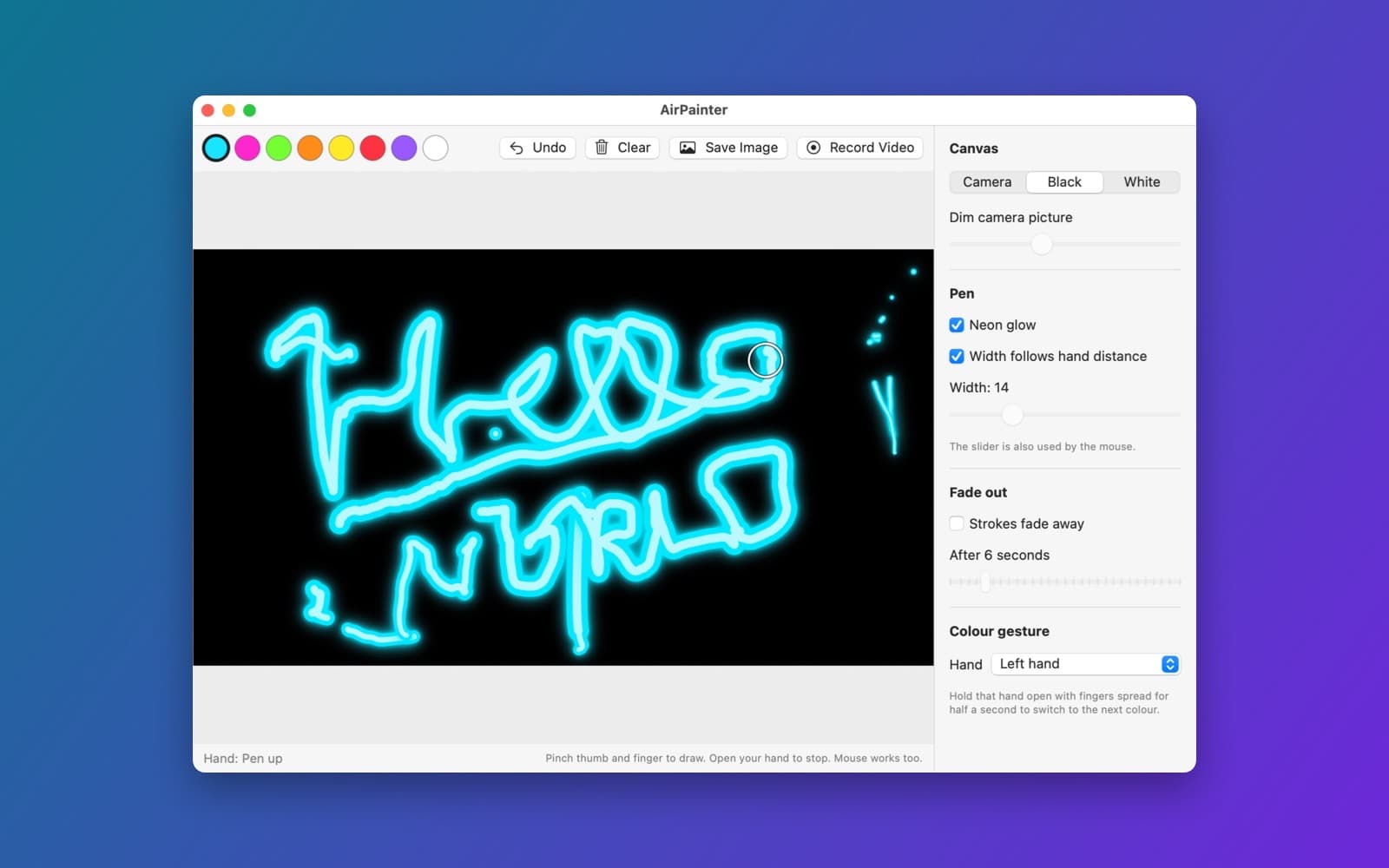
About AirPainter
AirPainter lets you draw with your hand. Pinch your thumb and index finger in front of the webcam to put the pen down, open your hand to lift it, and your strokes glow on the screen. The mouse works too, so you can try it without the camera.
What it does
- Pinch to draw. The pen follows the point between your thumb tip and index fingertip. A ring shows where it is, and it fills in while the pen is down.
- Width follows your hand. Move your hand closer to the camera for a thicker line, or turn that off and use the Width slider instead.
- Colours. A row of colours along the top. Hold a chosen hand (the left one by default) open with the fingers spread for half a second to switch to the next colour.
- Canvas. Draw over the camera picture (dimmed with a slider), on black, or on white.
- Neon glow and fade out. Strokes can glow like neon, and can fade away after a number of seconds you choose.
- Undo, Clear, Save Image and Record Video. Save the painting as a PNG, or record the window to a video.
How it was made
One prompt in the SiliconDevKit desktop app, with no follow-up. The prompt asks the builder to read Apple's documentation for the camera, the Vision framework's hand pose request and drawing, before it writes code. The cloud wrote the code and a Mac compiled it, and the first build compiled with no fixes.
Notes
The first time you open it, macOS asks for camera permission. The screenshot shows a short test drawing. We did not test how well the hand tracking works in different light, the colour gesture, saving an image or recording a video.
Information
- Developer
- SiliconDevKit (generated by AI from a prompt)
- Category
- Visual
- Compatibility
- macOS 13 or later, Apple silicon. Apple silicon Macs only (M1 or later), not Intel
- Size
- 404 KB (.dmg)
- Latest version
- 1.0
- Price
- Free
- Signing
- Ad-hoc signed, not notarized
The prompt behind it
This app was generated from the prompt below. Paste it into SiliconDevKit to build your own version, then change it however you like.
Build a native Mac app called AirPainter. You paint in the air in front of the webcam: pinch your thumb and finger to draw, open your hand to stop, and your strokes glow on the screen over your own picture. Save the result as an image or a short video. RESEARCH FIRST (use WebSearch and WebFetch before you write code) Do not rely on memory. Read Apple's documentation for: (1) AVCaptureSession with AVCaptureVideoDataOutput and the camera permission (NSCameraUsageDescription); (2) Vision hand pose: VNDetectHumanHandPoseRequest (maximumHandCount, joint names thumbTip, indexTip, wrist, middleTip, chirality, confidence, normalised coordinates with origin bottom left, buffer orientation and mirroring); (3) drawing many smooth strokes fast: Core Graphics paths in a CALayer, or SpriteKit, or Metal; Catmull-Rom or quadratic smoothing between points; a glow made with a blurred copy or CIBloom; (4) AVAssetWriter with AVAssetWriterInputPixelBufferAdaptor for recording the composed frames; NSSavePanel; (5) smoothing noisy points (a One Euro filter). Where a page disagrees with this prompt, follow the page and say what changed. HOW IT WORKS - The window shows the mirrored live camera picture (dimmed with a slider, or fully replaced by a black or white canvas) with the painting on top. - Pinch (thumb tip to index tip distance below a threshold relative to hand size, with hysteresis so it does not flicker) = pen down; the pen position is the midpoint of the two tips, smoothed. Open hand = pen up. Show a ring cursor at the pen position, filled when the pen is down. - Stroke width follows the hand's distance from the camera (the hand's size in the picture, wrist to middle finger knuckle, smoothed): closer = thicker. A switch can turn this off and use a width slider instead. - Colors: a palette strip; a quick gesture changes color: open the left hand with all fingers spread and hold for half a second to cycle to the next color (and a normal click on the palette also works). Neon glow on or off. - Undo stroke (Command-Z), Clear (confirmation), and a "Fade out" option where strokes fade away after N seconds. - Save Image (PNG with the painting only on a transparent background, or with the camera picture) and Record Video (the composed window picture to an .mp4 in the Movies folder, with a red dot and timer). - Mouse fallback: drawing with the mouse works too, so the app is usable and testable without the camera. - Tracking lost: lift the pen, never draw a straight jump line across the canvas. PRIVACY - Say on the first-run screen that the picture is analysed live and never saved or sent unless the user saves it, and that there is no network code. A clear message with a System Settings button when the camera is denied. QUALITY - macOS 13, Swift 5 language mode, SwiftUI with ObservableObject and @Published. Only Apple frameworks, no packages, no Xcode project or asset catalog. Modular: CameraSource, HandTracker, StrokeModel (points, widths, colors, smoothing), CanvasRenderer, Recorder and the views. Vision on its own queue, publish to the main thread, drop frames instead of queuing them. Friendly errors with a Show Details box. - The code is compiled later on the user's Mac, not here: check every initializer, argument label and optional, with no force-unwraps. Do not fake anything. - In your reply, say in a few sentences what you built, what the lookups changed, and what you could not test: the camera, pinch reliability, the colour gesture, the recording and drawing speed were not run.
What it cost
Every AI run that made this demo, one per line. Model: Claude Sonnet 5.5. Tokens are shown as (in / out). “In” counts everything the model read, including text it had already seen in the session at a reduced price.
| Initial prompt(240k in / 51k out) | 86 credits | |
| = | Total(240k in / 51k out) | 86 credits |
Credits are what a build uses on your plan. This counts AI usage only: hosting and the Mac that compiled it are not included.
Version tree
Every change to this app is a new version. Use any build as a template to start your own copy from it; forks that their makers shared appear as branches.
Version 1.0Oct 11, 2026
Build a native Mac app called AirPainter. You paint in the air in front of the webcam: pinch your thumb and finger to draw, open your hand to stop, and your strokes glow on the screen over your own picture. Save the result as an image or a short video. RESEARCH FIRST (use WebSearch and WebFetch before you write code) Do not rely on memory. Read Apple's documentation for: (1) AVCaptureSession with AVCaptureVideoDataOutput and the camera permission (NSCameraUsageDescription); (2) Vision hand pose: VNDetectHumanHandPoseRequest (maximumHandCount, joint names thumbTip, indexTip, wrist, middleTip, chirality, confidence, normalised coordinates with origin bottom left, buffer orientation and mirroring); (3) drawing many smooth strokes fast: Core Graphics paths in a CALayer, or SpriteKit, or Metal; Catmull-Rom or quadratic smoothing between points; a glow made with a blurred copy or CIBloom; (4) AVAssetWriter with AVAssetWriterInputPixelBufferAdaptor for recording the composed frames; NSSavePanel; (5) smoothing noisy points (a One Euro filter). Where a page disagrees with this prompt, follow the page and say what changed. HOW IT WORKS - The window shows the mirrored live camera picture (dimmed with a slider, or fully replaced by a black or white canvas) with the painting on top. - Pinch (thumb tip to index tip distance below a threshold relative to hand size, with hysteresis so it does not flicker) = pen down; the pen position is the midpoint of the two tips, smoothed. Open hand = pen up. Show a ring cursor at the pen position, filled when the pen is down. - Stroke width follows the hand's distance from the camera (the hand's size in the picture, wrist to middle finger knuckle, smoothed): closer = thicker. A switch can turn this off and use a width slider instead. - Colors: a palette strip; a quick gesture changes color: open the left hand with all fingers spread and hold for half a second to cycle to the next color (and a normal click on the palette also works). Neon glow on or off. - Undo stroke (Command-Z), Clear (confirmation), and a "Fade out" option where strokes fade away after N seconds. - Save Image (PNG with the painting only on a transparent background, or with the camera picture) and Record Video (the composed window picture to an .mp4 in the Movies folder, with a red dot and timer). - Mouse fallback: drawing with the mouse works too, so the app is usable and testable without the camera. - Tracking lost: lift the pen, never draw a straight jump line across the canvas. PRIVACY - Say on the first-run screen that the picture is analysed live and never saved or sent unless the user saves it, and that there is no network code. A clear message with a System Settings button when the camera is denied. QUALITY - macOS 13, Swift 5 language mode, SwiftUI with ObservableObject and @Published. Only Apple frameworks, no packages, no Xcode project or asset catalog. Modular: CameraSource, HandTracker, StrokeModel (points, widths, colors, smoothing), CanvasRenderer, Recorder and the views. Vision on its own queue, publish to the main thread, drop frames instead of queuing them. Friendly errors with a Show Details box. - The code is compiled later on the user's Mac, not here: check every initializer, argument label and optional, with no force-unwraps. Do not fake anything. - In your reply, say in a few sentences what you built, what the lookups changed, and what you could not test: the camera, pinch reliability, the colour gesture, the recording and drawing speed were not run.
Paint glowing strokes in the air by pinching your fingers in front of the webcam, then save an image or video.
Opening it for the first time
- Open the .dmg and drag AirPainter onto the Applications folder.
- Open it from Applications. macOS may say it can’t check the app for malicious software. Click Done.
- Open System Settings → Privacy & Security and click Open Anyway. This is needed once. Why this happens. To share an app without the warning, see how to notarize it.
You might also like
 Get
GetPlayTube
Paste a video link and watch it in a clean player, with no ads.
 Get
GetAdMute
Listens to your Mac's audio and mutes the ads, then brings the sound back.
 Get
GetToob-Downer
Paste a video link and save the video to your Mac, with a queue to keep track.
 Get
GetAgent Swarm
Send one task to Claude, Gemini and Hermes at once.