
Game
Open RTS
A small real-time strategy game on a desert map. Build units, select them and fight.
- Category
- Game
- Requires
- macOS 13+
- Size
- 1 MB
- Price
- Free
Preview
About Open RTS
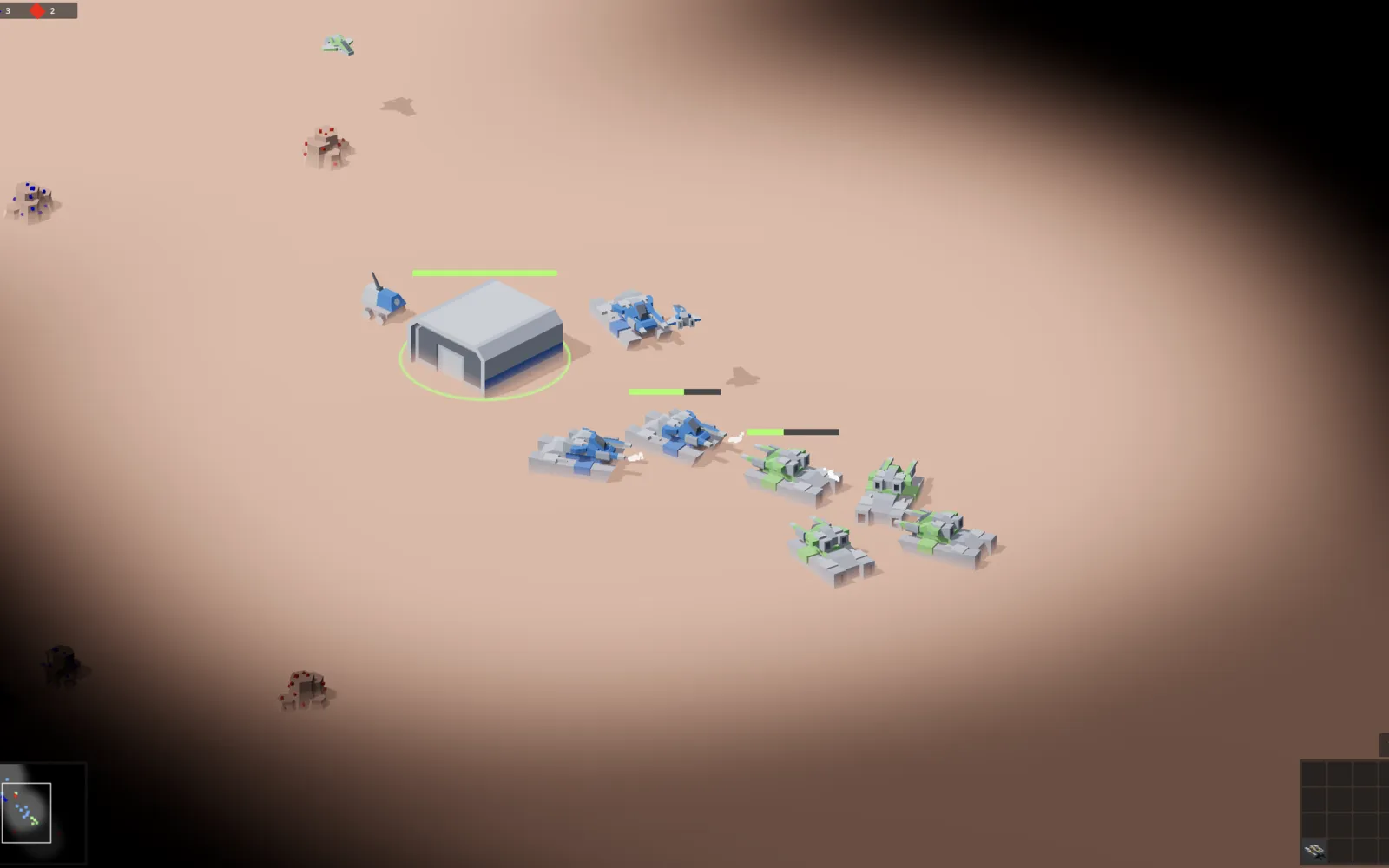
Open RTS is a real-time strategy game with a tilted top-down view of a desert map. You command a blue army from a base building and fight a green army.
What it does
- Select and command units. Selected units show a health bar, and tanks fire at the enemy.
- Fog of war. You only see the area around your units. The rest of the map stays dark.
- Minimap and build panel. A minimap sits in the bottom left, and a grid of buildable units in the bottom right.
- Resources. Counters at the top show what you have collected.
Notes
The screenshot shows a skirmish between blue and green tanks next to the blue base.
Information
- Developer
- SiliconDevKit (generated by AI from a prompt)
- Category
- Game
- Compatibility
- macOS 13 or later. Apple silicon Macs only (M1 or later), not Intel
- Size
- 1 MB (.dmg)
- Latest version
- 1.0
- Price
- Free
- Signing
- Ad-hoc signed, not notarized
The prompt behind it
This game was generated from the prompt below. Paste it into SiliconDevKit to build your own version, then change it however you like.
Build a native Mac app called Open RTS: a ready-to-play Mac version of a real-time strategy game made in Godot 4 (https://github.com/lampe-games/godot-open-rts). One window, one big Play button. The app downloads the game's source and the right Godot engine by itself, prepares everything, and starts the game in its own window. No Godot knowledge needed, nothing to type. Nothing is sent anywhere except the downloads. RESEARCH FIRST (WebSearch and WebFetch before any code) Read, do not remember: (1) https://github.com/lampe-games/godot-open-rts: the README (what the game is, controls, requirements), the licence, the default branch, the releases page, and whether a macOS build or an export_presets.cfg already exists; (2) the repo's project.godot: config_version (4 means Godot 3, 5 means Godot 4), the config/features line (for example "4.2" or "C#"), the main scene, and any addons or git submodules the game needs; (3) the official Godot downloads for macOS: archive names and URLs on godotengine.org and in the godotengine/godot-builds releases, the universal (arm64 and x86_64) app, the separate .NET build, the SHA512-SUMS file, and the command line flags --path, --headless, --import, --quit, --fullscreen, --windowed, --resolution; (4) that the official Godot app can run a project folder with --path without export templates, and what a first import does. Where a page disagrees with this prompt, follow the page and say what changed. HOW IT WORKS (one click) - Big Play button. The first time: "Downloads the game and the Godot engine once, about <size once known>. Nothing to type." - 1 Game: download the repo as a zip (https://github.com/lampe-games/godot-open-rts/archive/refs/heads/<branch>.zip, or a release asset if the research shows a better one) into a temp file with progress, speed and Cancel, then unzip with /usr/bin/ditto (Process, argument array) into Application Support/Open RTS/Game/. Find the folder that holds project.godot (it may be in a subfolder). Fetch any submodule or addon the research says is needed. - 2 Engine: choose the Godot version and build from project.godot (and the .NET build only for C#). Download it once into Application Support/Open RTS/Engine/, verify the checksum with CryptoKit, and strip the quarantine flag with xattr -dr com.apple.quarantine after saying why. - 3 Import: run the engine once with --headless --import --path <project> --quit, stream the log, and show "First-time setup, this can take a minute or more". - 4 Play: run the engine with --path <project> in a normal window. Show the state (Not downloaded, Downloading, Setting up, Ready, Playing, Needs something with the plain reason), a Stop button, and "Show log". If the game exits within 10 seconds or fails, show the last 30 log lines in plain words with a Copy button. Never say it works unless it started and stayed open. - Godot 4 project, possibly with addons or submodules: check for them, and fetch what is needed. List mouse and keyboard controls from the README. It may need a fast Mac: show a note. - Skip steps that are already done. Later launches go straight to Play. THE WINDOW - Top: a title and a picture drawn in code (a gradient and an SF Symbol; no copied screenshots), one line about the game taken from the README, the licence found in the repo, and a short controls list taken from the README (say "see README" if it has none). - Settings: Windowed or Fullscreen and a resolution choice (only flags the research confirms), Update the game (download again, keep save files), Reinstall, Remove everything (shows the disk size it frees), Reveal in Finder, "Show saves" (Godot's user:// folder under ~/Library/Application Support/Godot, when it exists). - About: the game's author and licence, the Godot licence (MIT), a link to https://github.com/lampe-games/godot-open-rts, and a note that the game belongs to its author. Quitting the app while the game runs asks first. QUALITY - macOS 13, Swift 5 language mode, SwiftUI with ObservableObject and @Published. Apple frameworks only (Foundation, AppKit, CryptoKit), no packages, no Xcode project or asset catalog. Modules: RepoDownloader, ProjectInspector, EngineManager, GameRunner, LogStore and the views. - Run every Process off the main thread, with an argument array, never a shell string. Check every initializer, label and optional; no force-unwraps. - Do not fake anything: no pretend progress, no pretend success. In your reply, say what you built, what the lookups changed (Godot version, repo layout, requirements) and what you could not test: the downloads, the import step, the game actually starting, performance, and keyboard, mouse and gamepad input.
What it cost
Every AI run that made this demo, one per line. Model: Claude Sonnet 5.5. Tokens are shown as (in / out). “In” counts everything the model read, including text it had already seen in the session at a reduced price.
| Initial prompt(16 in / 45k out) | 77 credits | |
| + | Fix: compile errors(4 in / 194 out) | 81 credits |
| = | Total(20 in / 45k out) | 158 credits |
Credits are what a build uses on your plan. This counts AI usage only: hosting and the Mac that compiled it are not included. This demo took 2 attempts, and all of them are counted. Token counts come from the build's session log. Credits are worked out from them with Claude Sonnet 5.5's token prices.
Opening it for the first time
- Open the .dmg and drag Open RTS onto the Applications folder.
- Open it from Applications. macOS may say it can’t check the app for malicious software. Click Done.
- Open System Settings → Privacy & Security and click Open Anyway. This is needed once. Why this happens. To share an app without the warning, see how to notarize it.
You might also like
 Get
GetSpace Horror FPS
A first-person arena shooter with waves of enemies, built entirely in code.
 Get
GetWolfenvibe
A fast Doom-style shooter with real brick walls and gun sounds.
 Get
GetFlappy Canary
Flap a canary through the pipes. A Mac port of an open-source game.
 Get
GetQuake SRP Player
Play the open-source quake-srp port of Quake in its own Mac window.