
Game
Hollow Point
A first-person arena shooter with waves of enemies, built entirely in code.
- Category
- Game
- Requires
- macOS 13+
- Size
- 0.5 MB
- Price
- Free
Preview
About Hollow Point
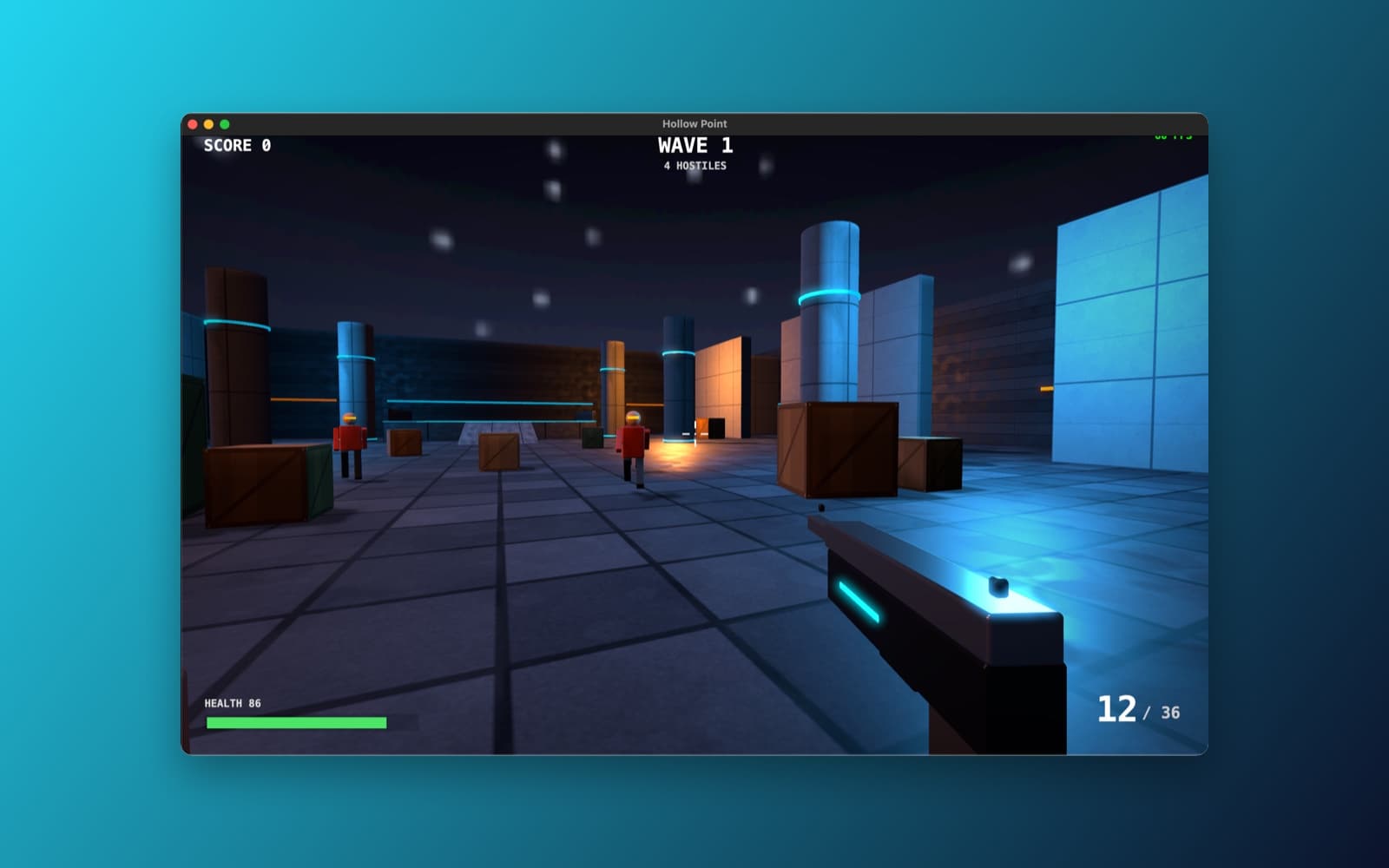
Hollow Point is a small first-person shooter in a neon-lit concrete arena. Waves of soldiers come at you, and each wave is bigger than the last. It uses no pictures or sound files: the arena, the enemies, the gun and the textures are all made by code.
What it does
- Play. Move with WASD, look with the mouse, and click to shoot. Reload, pick up health and ammo, and see how many waves you can survive.
- Enemies. Soldiers chase you, and each wave brings more of them.
- The look. Lit materials, glowing light strips, fog and a bloom effect, drawn with SceneKit, with a HUD for score, wave, health and ammo drawn with SpriteKit.
How it was made
One prompt in the SiliconDevKit desktop app. It asked for a SceneKit game with nothing but code, and told the builder to read Apple's SceneKit, physics and mouse-capture documentation first. The first build did not compile on the Mac: the Swift compiler stopped on one expression that was too long to check. The automatic compile-fix round shortened it and made version 1.1, which is the download here. The fix cost 13 credits.
Notes
The screenshot shows the game running in its first wave with the frame-rate counter at the top right. We played the start of a wave. We did not check every enemy type or play through many waves, so balance (how hard the enemies are) and some controls may need tuning. The prompt is shown in full below.
Information
- Developer
- SiliconDevKit (generated by AI from a prompt)
- Category
- Game
- Compatibility
- macOS 13 or later, Apple silicon. Apple silicon Macs only (M1 or later), not Intel
- Size
- 0.5 MB (.dmg)
- Latest version
- 1.0
- Price
- Free
- Signing
- Ad-hoc signed, not notarized
The prompt behind it
This game was generated from the prompt below. Paste it into SiliconDevKit to build your own version, then change it however you like.
Build a Mac first-person shooter called Hollow Point, a small but good-looking 3D game in one window. It uses Apple's SceneKit (import SceneKit) for the 3D world, SpriteKit for the HUD, and runs at 60 frames per second on Apple silicon. Everything is made in code: no model files, no texture files, no sound files, no asset catalog and no packages. RESEARCH FIRST (use WebSearch and WebFetch before you write code) Do not rely on memory for these APIs. Read Apple's documentation for: (1) SCNView, SCNScene, SCNRenderer and the SCNSceneRendererDelegate update loop (renderer(_:updateAtTime:)); (2) SCNPhysicsWorld and SCNPhysicsBody (categoryBitMask, contactTestBitMask, kinematic and dynamic bodies, SCNPhysicsContactDelegate) and SCNPhysicsWorld.rayTestWithSegment; (3) SCNMaterial with physicallyBased lighting, SCNCamera (wantsHDR, bloomIntensity, motionBlurIntensity, ambient occlusion), SCNParticleSystem, fog (scene.fogStartDistance); (4) mouse look on macOS: CGAssociateMouseAndMouseCursorPosition, NSCursor.hide, mouseMoved with deltaX and deltaY, and how to keep a mouse captured in a window; (5) GCController or key events for WASD; (6) AVAudioEngine with AVAudioPCMBuffer for sounds made from numbers. Where a page disagrees with this prompt, follow the page and say what changed. THE GAME - One arena level built from boxes and cylinders: a large room with pillars, crates, a raised platform and two side corridors, with a dark sky gradient and fog. Walls are static physics bodies so the player and enemies cannot pass through them. - Player: first person camera at eye height on an invisible capsule. WASD to move, mouse to look (clamp the pitch), Shift to sprint, Space to jump, Esc to release the mouse and pause, click to capture it again. Smooth acceleration and a small head bob. Do not let the player fall through the floor or slip through a wall; use a physics body with the player's capsule, damping and a speed limit. - Weapon: a gun model made of boxes shown at the bottom right of the view, a hitscan shot with an SCNPhysicsWorld ray test from the screen centre, muzzle flash light, a short recoil animation, a spread that grows while firing, 12 rounds, reload on R (about 1.5 seconds), a crosshair that reacts to a hit. A bullet that hits a wall leaves a small spark particle; one that hits an enemy shows a hit marker. - Enemies: three kinds built from primitives with simple walk animation (swing the limbs with SCNAction): a runner (fast, weak), a soldier (medium, shoots back with a visible tracer and some inaccuracy) and a brute (slow, tough, melee). They chase the player by steering toward them and around obstacles (simple wall avoidance by ray tests, not a navmesh). They spawn at the edges in waves, each wave bigger than the last, with a short break between waves. - Health and damage: the player has 100 health with a red screen flash, a slow regeneration after 5 seconds without damage, and a game over screen with the wave reached and the best wave (UserDefaults) and "Press Return to play again". Pickups (health and ammo) drop from some enemies. - Looks: use .physicallyBased materials with roughness and metalness values for the concrete, metal and crates (colours and procedural noise images you draw with Core Graphics into an NSImage, not files), one directional light with soft shadows, a few point lights and emissive strips on the walls, HDR with bloom and a slight vignette, ambient occlusion where available, and fog. Death makes an enemy collapse and fade with a small particle burst. It should look clean and modern, not like a grey box. - Sound: synthesize every effect with AVAudioEngine (gunshot as filtered noise with a fast decay, reload clicks, hit, enemy hurt and death, pickup, low ambient drone). Master volume and a mute key (M). No files. - HUD: a SpriteKit overlay scene (SCNView.overlaySKScene) with health bar, ammo, wave number, score, a small FPS counter that can be toggled with F, a pause menu and a title screen with a Start button. PERFORMANCE AND HONESTY - Target 60 frames per second at 1280 by 800 or the window size. Reuse nodes (a pool for bullets, sparks and enemies), share geometries and materials, flatten static level geometry with flattenedClone where it helps, keep the number of lights low, and set SCNView preferredFramesPerSecond to 60 and antialiasingMode to .multisampling4X. Use a fixed time step for game logic that is separate from drawing. Show the real measured FPS, never a fake number. - Do not fake anything. If a feature cannot work (for example ambient occlusion on some systems), skip it quietly and keep the game playable. QUALITY - macOS 13, Swift 5 language mode, SwiftUI shell hosting an SCNView through NSViewRepresentable (a custom SCNView subclass that handles keyDown, keyUp, mouseMoved, mouseDown and acceptsFirstResponder). Only Apple frameworks, no Xcode project or asset catalog. - Modular files: GameController (state, waves, score), LevelBuilder, PlayerController, WeaponSystem, EnemyFactory and EnemyAI, MaterialFactory (procedural textures), SoundSynth, HUDScene, and the SwiftUI shell. - The code is compiled later on the user's Mac, not here: check every initializer, argument label and optional, with no force-unwraps. Mouse capture, the feel of the controls, collisions and the frame rate cannot be tested here, so keep tuning values (speeds, gravity, sensitivity) together in one Config struct with a sensitivity slider in the pause menu. - In your reply, say in a few sentences what you built, what the lookups changed, and what you could not test (mouse capture, controls feel, physics tuning and frame rate).
What it cost
Every AI run that made this demo, one per line. Model: Claude Sonnet 5.5. Tokens are shown as (in / out). “In” counts everything the model read, including text it had already seen in the session at a reduced price.
| Initial prompt(2.14M in / 129k out) | 234 credits | |
| + | Compile fix(494k in / 887 out) | 13 credits |
| = | Total(2.63M in / 130k out) | 247 credits |
Credits are what a build uses on your plan. This counts AI usage only: hosting and the Mac that compiled it are not included.
Version tree
Every change to this app is a new version. Use any build as a template to start your own copy from it; forks that their makers shared appear as branches.
Version 1.0Oct 10, 2026
Build a Mac first-person shooter called Hollow Point, a small but good-looking 3D game in one window. It uses Apple's SceneKit (import SceneKit) for the 3D world, SpriteKit for the HUD, and runs at 60 frames per second on Apple silicon. Everything is made in code: no model files, no texture files, no sound files, no asset catalog and no packages. RESEARCH FIRST (use WebSearch and WebFetch before you write code) Do not rely on memory for these APIs. Read Apple's documentation for: (1) SCNView, SCNScene, SCNRenderer and the SCNSceneRendererDelegate update loop (renderer(_:updateAtTime:)); (2) SCNPhysicsWorld and SCNPhysicsBody (categoryBitMask, contactTestBitMask, kinematic and dynamic bodies, SCNPhysicsContactDelegate) and SCNPhysicsWorld.rayTestWithSegment; (3) SCNMaterial with physicallyBased lighting, SCNCamera (wantsHDR, bloomIntensity, motionBlurIntensity, ambient occlusion), SCNParticleSystem, fog (scene.fogStartDistance); (4) mouse look on macOS: CGAssociateMouseAndMouseCursorPosition, NSCursor.hide, mouseMoved with deltaX and deltaY, and how to keep a mouse captured in a window; (5) GCController or key events for WASD; (6) AVAudioEngine with AVAudioPCMBuffer for sounds made from numbers. Where a page disagrees with this prompt, follow the page and say what changed. THE GAME - One arena level built from boxes and cylinders: a large room with pillars, crates, a raised platform and two side corridors, with a dark sky gradient and fog. Walls are static physics bodies so the player and enemies cannot pass through them. - Player: first person camera at eye height on an invisible capsule. WASD to move, mouse to look (clamp the pitch), Shift to sprint, Space to jump, Esc to release the mouse and pause, click to capture it again. Smooth acceleration and a small head bob. Do not let the player fall through the floor or slip through a wall; use a physics body with the player's capsule, damping and a speed limit. - Weapon: a gun model made of boxes shown at the bottom right of the view, a hitscan shot with an SCNPhysicsWorld ray test from the screen centre, muzzle flash light, a short recoil animation, a spread that grows while firing, 12 rounds, reload on R (about 1.5 seconds), a crosshair that reacts to a hit. A bullet that hits a wall leaves a small spark particle; one that hits an enemy shows a hit marker. - Enemies: three kinds built from primitives with simple walk animation (swing the limbs with SCNAction): a runner (fast, weak), a soldier (medium, shoots back with a visible tracer and some inaccuracy) and a brute (slow, tough, melee). They chase the player by steering toward them and around obstacles (simple wall avoidance by ray tests, not a navmesh). They spawn at the edges in waves, each wave bigger than the last, with a short break between waves. - Health and damage: the player has 100 health with a red screen flash, a slow regeneration after 5 seconds without damage, and a game over screen with the wave reached and the best wave (UserDefaults) and "Press Return to play again". Pickups (health and ammo) drop from some enemies. - Looks: use .physicallyBased materials with roughness and metalness values for the concrete, metal and crates (colours and procedural noise images you draw with Core Graphics into an NSImage, not files), one directional light with soft shadows, a few point lights and emissive strips on the walls, HDR with bloom and a slight vignette, ambient occlusion where available, and fog. Death makes an enemy collapse and fade with a small particle burst. It should look clean and modern, not like a grey box. - Sound: synthesize every effect with AVAudioEngine (gunshot as filtered noise with a fast decay, reload clicks, hit, enemy hurt and death, pickup, low ambient drone). Master volume and a mute key (M). No files. - HUD: a SpriteKit overlay scene (SCNView.overlaySKScene) with health bar, ammo, wave number, score, a small FPS counter that can be toggled with F, a pause menu and a title screen with a Start button. PERFORMANCE AND HONESTY - Target 60 frames per second at 1280 by 800 or the window size. Reuse nodes (a pool for bullets, sparks and enemies), share geometries and materials, flatten static level geometry with flattenedClone where it helps, keep the number of lights low, and set SCNView preferredFramesPerSecond to 60 and antialiasingMode to .multisampling4X. Use a fixed time step for game logic that is separate from drawing. Show the real measured FPS, never a fake number. - Do not fake anything. If a feature cannot work (for example ambient occlusion on some systems), skip it quietly and keep the game playable. QUALITY - macOS 13, Swift 5 language mode, SwiftUI shell hosting an SCNView through NSViewRepresentable (a custom SCNView subclass that handles keyDown, keyUp, mouseMoved, mouseDown and acceptsFirstResponder). Only Apple frameworks, no Xcode project or asset catalog. - Modular files: GameController (state, waves, score), LevelBuilder, PlayerController, WeaponSystem, EnemyFactory and EnemyAI, MaterialFactory (procedural textures), SoundSynth, HUDScene, and the SwiftUI shell. - The code is compiled later on the user's Mac, not here: check every initializer, argument label and optional, with no force-unwraps. Mouse capture, the feel of the controls, collisions and the frame rate cannot be tested here, so keep tuning values (speeds, gravity, sensitivity) together in one Config struct with a sensitivity slider in the pause menu. - In your reply, say in a few sentences what you built, what the lookups changed, and what you could not test (mouse capture, controls feel, physics tuning and frame rate).
A first-person arena shooter with waves of enemies, built entirely in code with SceneKit and SpriteKit.
Opening it for the first time
- Open the .dmg and drag Hollow Point onto the Applications folder.
- Open it from Applications. macOS may say it can’t check the app for malicious software. Click Done.
- Open System Settings → Privacy & Security and click Open Anyway. This is needed once. Why this happens. To share an app without the warning, see how to notarize it.

