
Game
Quake SRP Player
Play the open-source quake-srp port of Quake in its own Mac window.
- Category
- Game
- Requires
- macOS 13+
- Size
- 1.1 MB
- Price
- Free
Preview
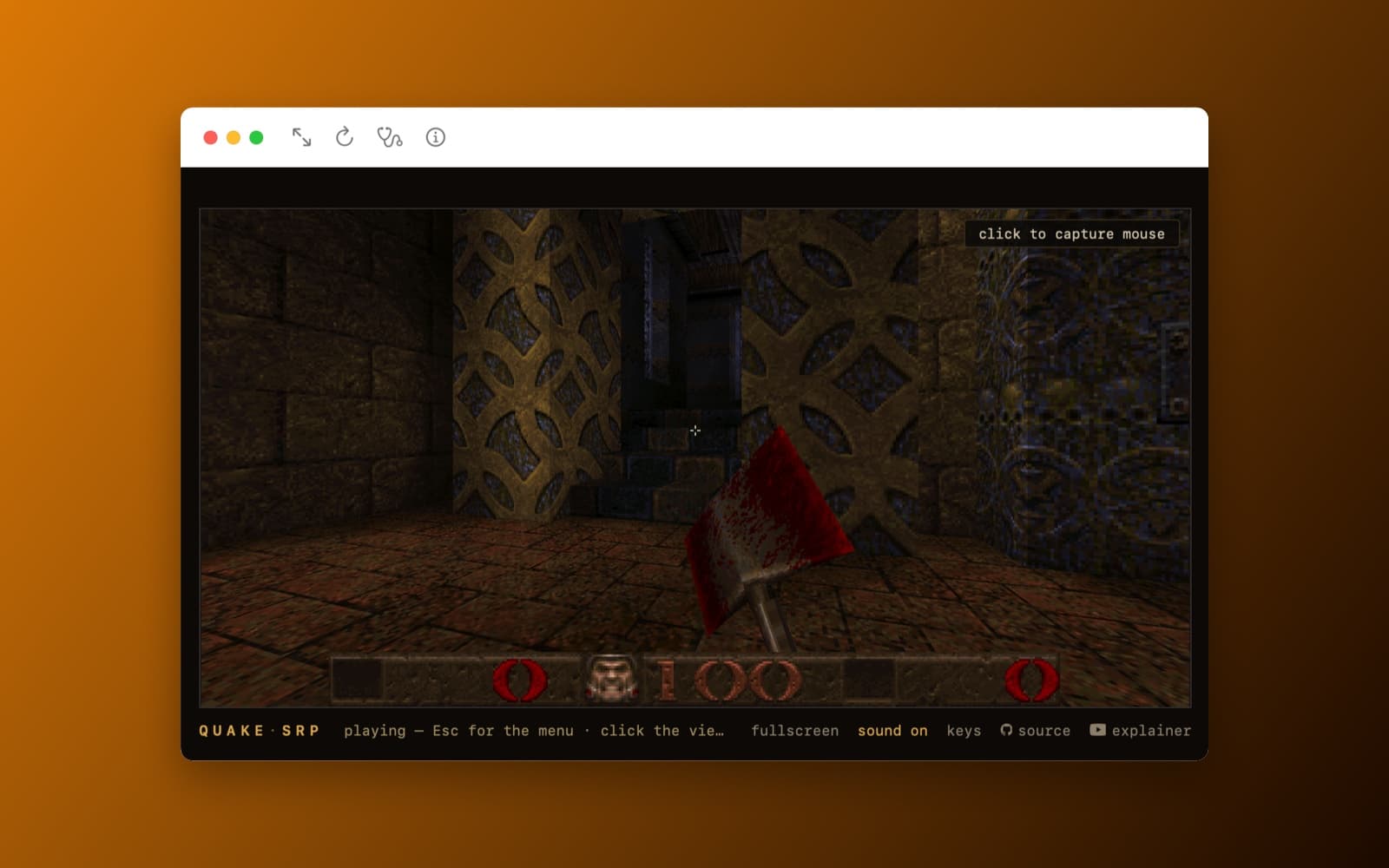
About Quake SRP Player
Quake SRP Player is a small Mac app that plays quake-srp in its own window. quake-srp is an open-source port of id Software's Quake, written in Rust, that normally runs in a web browser. This app does not contain the game and does not change it. On the first launch it downloads the project's published web build and id's free shareware episode, and from then on it plays offline.
What it does
- One button to start. The first launch downloads the game files and shows the licenses. After that it opens straight into the game.
- Plays in its own window. The game runs in a web view inside a normal Mac window, with buttons for fullscreen, reload, a self-test and an About page.
- Runs on your Mac. The app serves the downloaded files to itself from a small local server, so the game can use shared memory and play offline.
- The shareware episode. It plays the free first episode of Quake. The full game's data is not included.
How it was made
One prompt in the SiliconDevKit desktop app. The prompt asks the builder to read the quake-srp README and files first, to find the exact files of the published web build, and to include a self-test that shows whether the web view supports what the game needs (shared memory, threads, mouse capture). The cloud wrote the code and a Mac compiled it.
Notes
quake-srp is by its own author and is licensed GPL-2.0: source on GitHub. Quake and its shareware data belong to id Software, and this app is not affiliated with either. The screenshot shows the game running in the app: the first level and the status bar, with the game's own bar below it. We tested that the game starts and runs. We did not test the mouse look and keyboard in depth, fullscreen, sound or saving a game. The first launch needs internet.
Information
- Developer
- SiliconDevKit (generated by AI from a prompt)
- Category
- Game
- Compatibility
- macOS 13 or later, Apple silicon, internet for the first launch. Apple silicon Macs only (M1 or later), not Intel
- Size
- 1.1 MB (.dmg)
- Latest version
- 1.0
- Price
- Free
- Signing
- Ad-hoc signed, not notarized
The prompt behind it
This game was generated from the prompt below. Paste it into SiliconDevKit to build your own version, then change it however you like.
Build a Mac app called Quake SRP Player: a native window that plays "quake-srp", an open-source Rust port of id's Quake that runs in a browser as WebAssembly. The app does not port, change or rebuild the game. It downloads the project's own published web build once, serves it to itself from a tiny local web server, and shows it in a WKWebView, so it plays like a normal Mac game, offline after the first launch. The project is https://github.com/terrapapagalli1516/quake-srp (GPL-2.0). Its public demo is https://quake-srp.pages.dev. Swift only: do not try to compile Rust. RESEARCH FIRST (use WebSearch and WebFetch before you write code) Do not rely on memory. Read: (1) the repository README (the sections "Build and run it" and "A public demo") and the files in its web/ and quake-wasm/ folders, especially web/publish.sh, to learn exactly which files make up the published page (the page, the JavaScript, the .wasm program, the service worker, id1/pak0.pak, id1/slicnse.txt, the _headers file); (2) the live demo at https://quake-srp.pages.dev: fetch its index.html and find every file it loads and their sizes, and read its _headers file, so the app can fetch the same files; (3) ci/fetch_shareware.sh for the expected hashes of PAK0.PAK, if any; (4) Apple's documentation for WKWebView and WKWebViewConfiguration (WKPreferences.isElementFullscreenEnabled, mediaTypesRequiringUserActionForPlayback, WKUserScript, WKScriptMessageHandler, WKWebsiteDataStore persistence), and whether WKWebView gives a page crossOriginIsolated and SharedArrayBuffer when the server sends Cross-Origin-Opener-Policy: same-origin and Cross-Origin-Embedder-Policy: require-corp, and whether it supports the Pointer Lock API and the Keyboard Lock API; (5) the Network framework NWListener for a small HTTP/1.1 server on 127.0.0.1. Where a page disagrees with this prompt, follow the page and say what changed. FIRST LAUNCH (one button) - A clean start card: the app name, one line ("Play Quake in its own window. Uses the open-source quake-srp web build and id's free shareware episode."), and a big "Download and Play" button with the size shown (from the research). Download every file of the published build into Application Support/Quake SRP Player/site/, each with progress, speed and a Cancel button, to a temporary file first, check the size (and the hash where one is published), then move it into place. Never ship, bundle or modify the game files. Skip files already downloaded and verified. If the site is unreachable, say so plainly with a Try again button. - Show the licenses before the first download: quake-srp is GPL-2.0 (link to the repository, where its source is), and the shareware data comes with id's own licence file (slicnse.txt), which the app saves beside the data and shows in the About window. State that this is the shareware episode only, that the app is not affiliated with id Software or the quake-srp author, and that the registered game's data is not included. - An "Update" menu item re-downloads the published files if their size or ETag changed, keeping the old copy until the new one is complete. THE LOCAL SERVER (needed because the game uses shared memory) - Serve the downloaded folder from an NWListener on 127.0.0.1 (never on the network), HTTP/1.1, GET and HEAD, correct Content-Type (the .wasm file as application/wasm, JavaScript as text/javascript), Range requests if the research shows the page uses them, and on every response the two headers Cross-Origin-Opener-Policy: same-origin and Cross-Origin-Embedder-Policy: require-corp plus Cross-Origin-Resource-Policy: same-origin, as the project's _headers file does. Refuse paths with "..". Keep the sent headers identical to the project's _headers where it lists any others. - Use a FIXED port so the page's origin never changes (a changing origin would lose the game's saved games and settings stored in the browser). Try one port first (for example 47653), remember the chosen port in UserDefaults and reuse it, and only pick another one if it is taken, and say so. - The page loads from http://127.0.0.1:<port>/ in the WKWebView, with a persistent data store so quicksaves and settings survive restarts. Add "Reset saved games and settings" (confirmation) that clears the website data. THE WINDOW - One resizable window with a WKWebView filling it, a hidden title bar if easy, and a small toolbar: Fullscreen, Reload, Self-test and About. Alt+Enter and the page's own fullscreen button should work (enable element fullscreen and handle the fullscreen request); Esc must reach the game's menu, and Command-Q and Command-W stay macOS shortcuts. Allow audio without a click (the web audio engine still needs a first click, which is fine). Pass the Mac's game controllers through (the page uses the Gamepad API). - Mouse look: the game uses pointer lock. If the self-test (below) shows WKWebView does not give the page pointer lock, add a user script that is injected at document start and provides it: it defines element.requestPointerLock and document.exitPointerLock, sets document.pointerLockElement, fires pointerlockchange, hides the cursor and keeps it in the window (CGAssociateMouseAndMouseCursorPosition(false) while locked, NSCursor.hide, restored on Esc and when the window loses focus), and sends the native mouse movement deltas (NSEvent.deltaX and deltaY through a local event monitor) to the page as real MouseEvent objects with movementX and movementY on the locked element, and mouse buttons as normal events. Clicking the game to capture the mouse then works like in a browser. Only inject the shim when the browser's own pointer lock is missing, and say in About which one is in use. SELF-TEST (build this first; it decides what the app has to do) - A "Self-test" menu item runs a small page from the server (or the app's own JavaScript through evaluateJavaScript) and shows, in plain words with green and red marks: crossOriginIsolated, SharedArrayBuffer, Web Workers, WebAssembly threads (try WebAssembly.validate on a tiny threaded module or just instantiate with a shared memory), WebAssembly SIMD if the build needs it, pointer lock available, Keyboard Lock available, fullscreen available, Gamepad API, and the page's own startup message. If the threads build cannot run, the project README says the single-threaded build (target wasm32-wasip1) runs in the same page and needs less memory: see whether the demo publishes it and offer it as a fallback, saying so on screen. Never claim something works that the self-test did not show. - If the game does not start, show the page's own message and the self-test result instead of a blank window, with a Copy report button. QUALITY - macOS 13, Swift 5 language mode, SwiftUI with an NSViewRepresentable around WKWebView, ObservableObject and @Published. Only Apple frameworks, no packages, no Xcode project or asset catalog. Modular: SiteDownloader, LocalServer, WebHost (the WKWebView and the pointer lock shim), SelfTest and the views. Network and file work off the main thread. Friendly errors with a Show Details box; handle no network, a full disk, a port in use and a corrupt download (delete it and fetch again). - The code is compiled later on the user's Mac, not here: check every initializer, argument label and optional, with no force-unwraps. Do not fake anything. - In your reply, say in a few sentences what you built, what the research changed (the file list, the headers, the hashes), and what you could not test: whether this WKWebView gets shared memory, whether pointer lock works with or without your shim, keyboard capture, sound and frame rate.
What it cost
Every AI run that made this demo, one per line. Model: Claude Sonnet 5.5. Tokens are shown as (in / out). “In” counts everything the model read, including text it had already seen in the session at a reduced price.
| Initial prompt(1.39M in / 66k out) | 131 credits | |
| = | Total(1.39M in / 66k out) | 131 credits |
Credits are what a build uses on your plan. This counts AI usage only: hosting and the Mac that compiled it are not included.
Version tree
Every change to this app is a new version. Use any build as a template to start your own copy from it; forks that their makers shared appear as branches.
Version 1.0Oct 11, 2026
Build a Mac app called Quake SRP Player: a native window that plays "quake-srp", an open-source Rust port of id's Quake that runs in a browser as WebAssembly. The app does not port, change or rebuild the game. It downloads the project's own published web build once, serves it to itself from a tiny local web server, and shows it in a WKWebView, so it plays like a normal Mac game, offline after the first launch. The project is https://github.com/terrapapagalli1516/quake-srp (GPL-2.0). Its public demo is https://quake-srp.pages.dev. Swift only: do not try to compile Rust. RESEARCH FIRST (use WebSearch and WebFetch before you write code) Do not rely on memory. Read: (1) the repository README (the sections "Build and run it" and "A public demo") and the files in its web/ and quake-wasm/ folders, especially web/publish.sh, to learn exactly which files make up the published page (the page, the JavaScript, the .wasm program, the service worker, id1/pak0.pak, id1/slicnse.txt, the _headers file); (2) the live demo at https://quake-srp.pages.dev: fetch its index.html and find every file it loads and their sizes, and read its _headers file, so the app can fetch the same files; (3) ci/fetch_shareware.sh for the expected hashes of PAK0.PAK, if any; (4) Apple's documentation for WKWebView and WKWebViewConfiguration (WKPreferences.isElementFullscreenEnabled, mediaTypesRequiringUserActionForPlayback, WKUserScript, WKScriptMessageHandler, WKWebsiteDataStore persistence), and whether WKWebView gives a page crossOriginIsolated and SharedArrayBuffer when the server sends Cross-Origin-Opener-Policy: same-origin and Cross-Origin-Embedder-Policy: require-corp, and whether it supports the Pointer Lock API and the Keyboard Lock API; (5) the Network framework NWListener for a small HTTP/1.1 server on 127.0.0.1. Where a page disagrees with this prompt, follow the page and say what changed. FIRST LAUNCH (one button) - A clean start card: the app name, one line ("Play Quake in its own window. Uses the open-source quake-srp web build and id's free shareware episode."), and a big "Download and Play" button with the size shown (from the research). Download every file of the published build into Application Support/Quake SRP Player/site/, each with progress, speed and a Cancel button, to a temporary file first, check the size (and the hash where one is published), then move it into place. Never ship, bundle or modify the game files. Skip files already downloaded and verified. If the site is unreachable, say so plainly with a Try again button. - Show the licenses before the first download: quake-srp is GPL-2.0 (link to the repository, where its source is), and the shareware data comes with id's own licence file (slicnse.txt), which the app saves beside the data and shows in the About window. State that this is the shareware episode only, that the app is not affiliated with id Software or the quake-srp author, and that the registered game's data is not included. - An "Update" menu item re-downloads the published files if their size or ETag changed, keeping the old copy until the new one is complete. THE LOCAL SERVER (needed because the game uses shared memory) - Serve the downloaded folder from an NWListener on 127.0.0.1 (never on the network), HTTP/1.1, GET and HEAD, correct Content-Type (the .wasm file as application/wasm, JavaScript as text/javascript), Range requests if the research shows the page uses them, and on every response the two headers Cross-Origin-Opener-Policy: same-origin and Cross-Origin-Embedder-Policy: require-corp plus Cross-Origin-Resource-Policy: same-origin, as the project's _headers file does. Refuse paths with "..". Keep the sent headers identical to the project's _headers where it lists any others. - Use a FIXED port so the page's origin never changes (a changing origin would lose the game's saved games and settings stored in the browser). Try one port first (for example 47653), remember the chosen port in UserDefaults and reuse it, and only pick another one if it is taken, and say so. - The page loads from http://127.0.0.1:<port>/ in the WKWebView, with a persistent data store so quicksaves and settings survive restarts. Add "Reset saved games and settings" (confirmation) that clears the website data. THE WINDOW - One resizable window with a WKWebView filling it, a hidden title bar if easy, and a small toolbar: Fullscreen, Reload, Self-test and About. Alt+Enter and the page's own fullscreen button should work (enable element fullscreen and handle the fullscreen request); Esc must reach the game's menu, and Command-Q and Command-W stay macOS shortcuts. Allow audio without a click (the web audio engine still needs a first click, which is fine). Pass the Mac's game controllers through (the page uses the Gamepad API). - Mouse look: the game uses pointer lock. If the self-test (below) shows WKWebView does not give the page pointer lock, add a user script that is injected at document start and provides it: it defines element.requestPointerLock and document.exitPointerLock, sets document.pointerLockElement, fires pointerlockchange, hides the cursor and keeps it in the window (CGAssociateMouseAndMouseCursorPosition(false) while locked, NSCursor.hide, restored on Esc and when the window loses focus), and sends the native mouse movement deltas (NSEvent.deltaX and deltaY through a local event monitor) to the page as real MouseEvent objects with movementX and movementY on the locked element, and mouse buttons as normal events. Clicking the game to capture the mouse then works like in a browser. Only inject the shim when the browser's own pointer lock is missing, and say in About which one is in use. SELF-TEST (build this first; it decides what the app has to do) - A "Self-test" menu item runs a small page from the server (or the app's own JavaScript through evaluateJavaScript) and shows, in plain words with green and red marks: crossOriginIsolated, SharedArrayBuffer, Web Workers, WebAssembly threads (try WebAssembly.validate on a tiny threaded module or just instantiate with a shared memory), WebAssembly SIMD if the build needs it, pointer lock available, Keyboard Lock available, fullscreen available, Gamepad API, and the page's own startup message. If the threads build cannot run, the project README says the single-threaded build (target wasm32-wasip1) runs in the same page and needs less memory: see whether the demo publishes it and offer it as a fallback, saying so on screen. Never claim something works that the self-test did not show. - If the game does not start, show the page's own message and the self-test result instead of a blank window, with a Copy report button. QUALITY - macOS 13, Swift 5 language mode, SwiftUI with an NSViewRepresentable around WKWebView, ObservableObject and @Published. Only Apple frameworks, no packages, no Xcode project or asset catalog. Modular: SiteDownloader, LocalServer, WebHost (the WKWebView and the pointer lock shim), SelfTest and the views. Network and file work off the main thread. Friendly errors with a Show Details box; handle no network, a full disk, a port in use and a corrupt download (delete it and fetch again). - The code is compiled later on the user's Mac, not here: check every initializer, argument label and optional, with no force-unwraps. Do not fake anything. - In your reply, say in a few sentences what you built, what the research changed (the file list, the headers, the hashes), and what you could not test: whether this WKWebView gets shared memory, whether pointer lock works with or without your shim, keyboard capture, sound and frame rate.
Plays the open-source quake-srp web build of Quake's shareware episode in a native window, offline after the first download.
Opening it for the first time
- Open the .dmg and drag Quake SRP Player onto the Applications folder.
- Open it from Applications. macOS may say it can’t check the app for malicious software. Click Done.
- Open System Settings → Privacy & Security and click Open Anyway. This is needed once. Why this happens. To share an app without the warning, see how to notarize it.
You might also like
 Get
GetHollow Point
A first-person arena shooter with waves of enemies, built entirely in code.
 Get
GetBunker 13
A fast Doom-style shooter with real brick walls and gun sounds.
 Get
GetFlappy Canary
Flap a canary through the pipes. A Mac port of an open-source game.
 Get
GetN64 Emulator
One button downloads an N64 emulator and a free game, then plays it.