
Productivity
Shelf
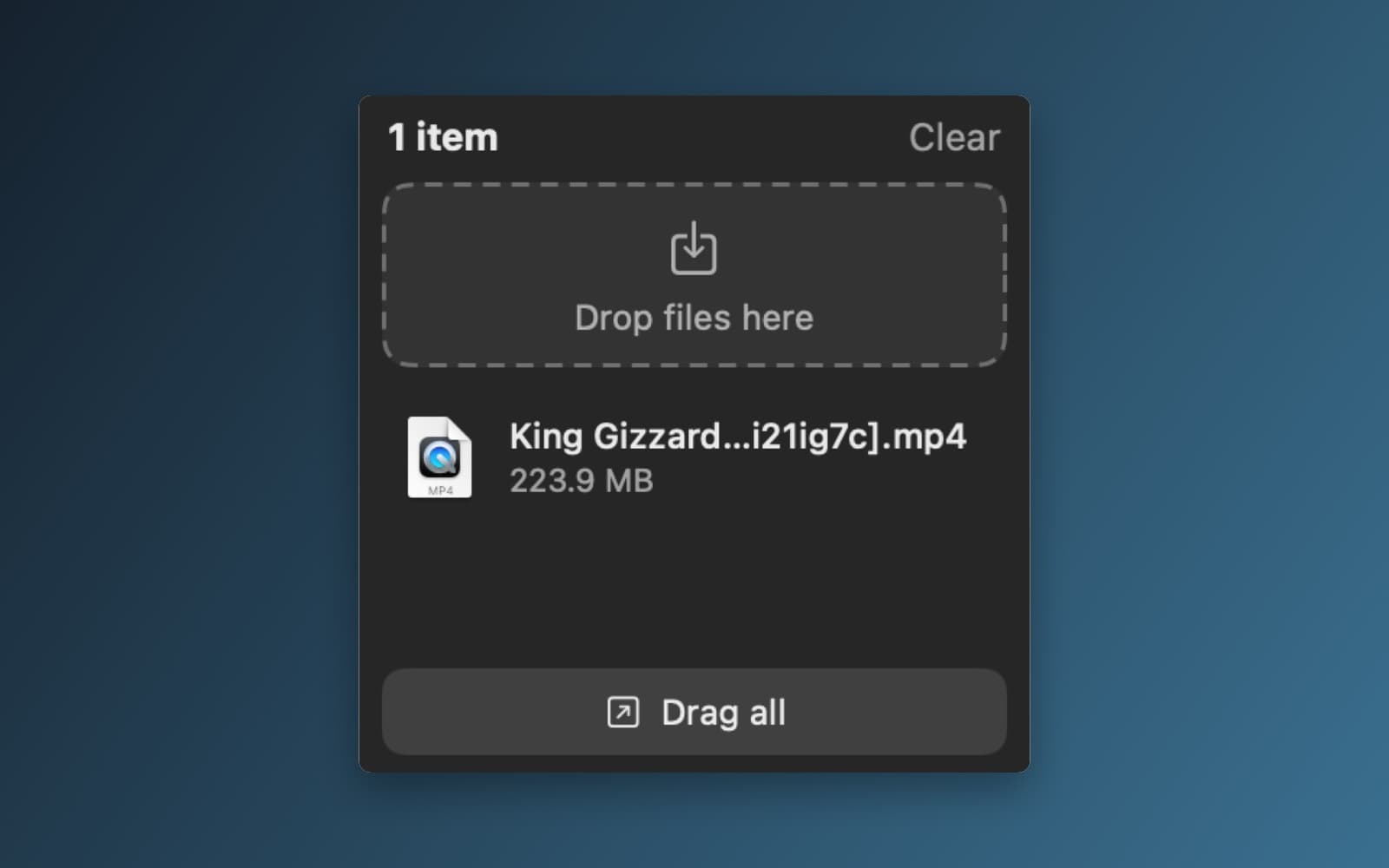
Shake while dragging a file and a shelf appears at the screen edge. Drop files on it, then drag them out anywhere.
- Category
- Productivity
- Requires
- macOS 13+
- Size
- 0.4 MB
- Price
- Free
Preview
About Shelf
Shelf is a small place to park files while you move them between apps and folders. Start dragging a file, shake the mouse, and a shelf slides in at the edge of the screen. Drop the file on it, go to wherever it needs to end up, then drag it back out. The shelf holds the original files, not copies, so nothing is duplicated.
What it does
- Shake to open. Shake the mouse while dragging a file and the shelf appears. It also has a menu bar item and a hotkey, and a setting to open on any file drag instead of a shake.
- Drop zone. Drop files or folders onto the shelf from Finder or any other app. The panel shows how many items it holds and has a Clear button.
- Drag them back out. Drag an item, or use Drag all, to drop everything into Finder, Mail, Messages, a browser upload box or another app.
- Stays out of the way. The shelf is a floating panel that does not take over the app you are working in, and there is no Dock icon.
Notes
Shelf watches the mouse and the system's drag clipboard to notice a file drag, and it needs no special macOS permission. Some apps do not put real files on the drag clipboard, so a drag from them may not be noticed. The settings, the hotkey and the other details listed here come from the prompt, and were not all checked in the app. The first compile had errors, which the desktop app sent back to the cloud to fix automatically.
Information
- Developer
- SiliconDevKit (generated by AI from a prompt)
- Category
- Productivity
- Compatibility
- macOS 13 or later, Apple silicon. Apple silicon Macs only (M1 or later), not Intel
- Size
- 0.4 MB (.dmg)
- Latest version
- 1.0
- Price
- Free
- Signing
- Ad-hoc signed, not notarized
The prompt behind it
This app was generated from the prompt below. Paste it into SiliconDevKit to build your own version, then change it however you like.
Build a native Mac app called Shelf. While you are dragging files, shake the mouse and a small shelf slides in at the screen edge. Drop the files on it, go to another app or folder, then drag them out of the shelf into it. The shelf holds references to the files, never copies. It saves a lot of window juggling when you move files between apps and folders. APP SHAPE - A menu bar app with no Dock icon (NSApp.setActivationPolicy(.accessory) at launch). The menu bar menu has: Show Shelf, Clear Shelf, Settings, Launch at Login (SMAppService.mainApp, macOS 13), Quit. On first launch show a small window that explains "Drag a file and shake the mouse" with a looping simple animation drawn in code. - No Accessibility, Input Monitoring or Screen Recording permission may be required. Do not capture the screen. - Global hotkey Control+Option+S to show or hide the shelf, registered with Carbon RegisterEventHotKey, changeable in Settings. DETECTING A DRAG THAT STARTED IN ANOTHER APP (the hard part, so do it this way) - Use NSEvent.addGlobalMonitorForEvents for .leftMouseDragged and .leftMouseUp (global monitors for mouse events need no permission), plus a local monitor for the same events. - A file drag is in progress when the left button is down (NSEvent.pressedMouseButtons) and the drag pasteboard (NSPasteboard(name: .drag)) has a new changeCount holding file URLs (read with readObjects(forClasses: [NSURL.self], options: [.urlReadingFileURLsOnly: true])). Remember the changeCount at the last mouse-up so an old drag is never treated as new. Ignore a drag that starts from Shelf's own panel. - Shake: while a file drag is in progress, keep the last 0.8 seconds of pointer positions. It is a shake when the pointer reverses horizontal direction at least 4 times, each leg moving at least 40 points. Make the sensitivity a Settings option (Gentle, Normal, Easy). After a shake, the shelf opens even if the pointer is far from the edge. - Setting "Open the shelf when": Shake (default) or Any file drag begins. Keep all this in one small DragWatcher class, and never do slow work in the event callbacks. THE SHELF - A non-activating NSPanel (styleMask [.nonactivatingPanel, .borderless], never key or main, so the app you are dragging from stays active), always on top (level .statusBar), collectionBehavior [.canJoinAllSpaces, .fullScreenAuxiliary, .stationary, .ignoresCycle], rounded translucent dark material (NSVisualEffectView, hudWindow), a soft shadow, about 240 points wide and up to 70% of the screen tall. It slides in from the chosen edge (Right by default, or Left, or Bottom; chosen in Settings) with a short spring animation, on the screen where the pointer is. - Content in SwiftUI inside an NSHostingView: a header with the item count and a Clear button, a large drop zone ("Drop files here") that highlights while a drag is over it, and a scrolling list of held items. Each item shows the file icon (NSWorkspace icon), name (middle-truncated) and size or "Folder". Items whose file has been moved or deleted look dimmed and say "Missing". - Drop: accept files and folders (.fileURL) from any app, including Finder, a browser's downloads and the Desktop. Store each as a security-scope-free bookmark plus its path, so the item still resolves after the file is renamed or moved. Ignore a duplicate of an item already on the shelf. Accept up to 100 items. - Drag out: dragging a row drags the real file (an NSDraggingSession with the file URL as pasteboard writer), so it can be dropped into Finder, Mail, Messages, a browser upload box, a chat app or any other app. Support selecting several rows (click, Shift-click, Command-click) and dragging them together, and a "Drag all" button that drags every item at once. Use AppKit's NSDraggingSource through NSViewRepresentable if SwiftUI's onDrag is not enough for multiple items. - Setting "After dragging an item out": Remove it from the shelf (default) or Keep it. Only remove it when the drop was actually accepted (the dragging session's end operation is not empty). - Right-click on an item: Reveal in Finder, Open, Quick Look, Copy Path, Pin (a pinned item stays through Clear and auto-clear), Remove. Space bar does Quick Look on the selected item (QLPreviewPanel). Delete removes the selected items. - Hiding: when a drag ends without a drop, a shelf that holds nothing slides away after 1.5 seconds. A shelf that holds items shrinks to a slim tab on the edge. Hovering over the tab, clicking it, the hotkey or another shake brings it back. Esc hides the shelf. SETTINGS AND STORAGE - Settings window: the edge, when to open, shake sensitivity, what happens after dragging out, Auto-clear after (Never, 1 hour, 1 day, 1 week; pinned items stay), Keep items when quitting (default on), the hotkey, Launch at Login. - Save the shelf as JSON in Application Support/Shelf and restore it at launch. QUALITY - Smooth and light: the app must use almost no CPU while idle, and never block the main thread. Handle several displays, and keep the panel on screen when the screen layout changes. - Keep the code modular: DragWatcher, ShelfPanelController, ShelfStore, views, drag source, settings. Use only Apple frameworks and no Xcode project or asset catalog. Target macOS 13. - Do not fake anything. In your reply, say in a few sentences what the app does and anything that may not work, such as drags from apps that do not put file URLs on the drag pasteboard.
What it cost
The cost of this demo was not recorded in our usage log. Demos built through the live build system show every run with its tokens and cost.
Version tree
Every change to this app is a new version. Use any build as a template to start your own copy from it; forks that their makers shared appear as branches.
Version 1.0Oct 9, 2026
Build a native Mac app called Shelf. While you are dragging files, shake the mouse and a small shelf slides in at the screen edge. Drop the files on it, go to another app or folder, then drag them out of the shelf into it. The shelf holds references to the files, never copies. It saves a lot of window juggling when you move files between apps and folders. APP SHAPE - A menu bar app with no Dock icon (NSApp.setActivationPolicy(.accessory) at launch). The menu bar menu has: Show Shelf, Clear Shelf, Settings, Launch at Login (SMAppService.mainApp, macOS 13), Quit. On first launch show a small window that explains "Drag a file and shake the mouse" with a looping simple animation drawn in code. - No Accessibility, Input Monitoring or Screen Recording permission may be required. Do not capture the screen. - Global hotkey Control+Option+S to show or hide the shelf, registered with Carbon RegisterEventHotKey, changeable in Settings. DETECTING A DRAG THAT STARTED IN ANOTHER APP (the hard part, so do it this way) - Use NSEvent.addGlobalMonitorForEvents for .leftMouseDragged and .leftMouseUp (global monitors for mouse events need no permission), plus a local monitor for the same events. - A file drag is in progress when the left button is down (NSEvent.pressedMouseButtons) and the drag pasteboard (NSPasteboard(name: .drag)) has a new changeCount holding file URLs (read with readObjects(forClasses: [NSURL.self], options: [.urlReadingFileURLsOnly: true])). Remember the changeCount at the last mouse-up so an old drag is never treated as new. Ignore a drag that starts from Shelf's own panel. - Shake: while a file drag is in progress, keep the last 0.8 seconds of pointer positions. It is a shake when the pointer reverses horizontal direction at least 4 times, each leg moving at least 40 points. Make the sensitivity a Settings option (Gentle, Normal, Easy). After a shake, the shelf opens even if the pointer is far from the edge. - Setting "Open the shelf when": Shake (default) or Any file drag begins. Keep all this in one small DragWatcher class, and never do slow work in the event callbacks. THE SHELF - A non-activating NSPanel (styleMask [.nonactivatingPanel, .borderless], never key or main, so the app you are dragging from stays active), always on top (level .statusBar), collectionBehavior [.canJoinAllSpaces, .fullScreenAuxiliary, .stationary, .ignoresCycle], rounded translucent dark material (NSVisualEffectView, hudWindow), a soft shadow, about 240 points wide and up to 70% of the screen tall. It slides in from the chosen edge (Right by default, or Left, or Bottom; chosen in Settings) with a short spring animation, on the screen where the pointer is. - Content in SwiftUI inside an NSHostingView: a header with the item count and a Clear button, a large drop zone ("Drop files here") that highlights while a drag is over it, and a scrolling list of held items. Each item shows the file icon (NSWorkspace icon), name (middle-truncated) and size or "Folder". Items whose file has been moved or deleted look dimmed and say "Missing". - Drop: accept files and folders (.fileURL) from any app, including Finder, a browser's downloads and the Desktop. Store each as a security-scope-free bookmark plus its path, so the item still resolves after the file is renamed or moved. Ignore a duplicate of an item already on the shelf. Accept up to 100 items. - Drag out: dragging a row drags the real file (an NSDraggingSession with the file URL as pasteboard writer), so it can be dropped into Finder, Mail, Messages, a browser upload box, a chat app or any other app. Support selecting several rows (click, Shift-click, Command-click) and dragging them together, and a "Drag all" button that drags every item at once. Use AppKit's NSDraggingSource through NSViewRepresentable if SwiftUI's onDrag is not enough for multiple items. - Setting "After dragging an item out": Remove it from the shelf (default) or Keep it. Only remove it when the drop was actually accepted (the dragging session's end operation is not empty). - Right-click on an item: Reveal in Finder, Open, Quick Look, Copy Path, Pin (a pinned item stays through Clear and auto-clear), Remove. Space bar does Quick Look on the selected item (QLPreviewPanel). Delete removes the selected items. - Hiding: when a drag ends without a drop, a shelf that holds nothing slides away after 1.5 seconds. A shelf that holds items shrinks to a slim tab on the edge. Hovering over the tab, clicking it, the hotkey or another shake brings it back. Esc hides the shelf. SETTINGS AND STORAGE - Settings window: the edge, when to open, shake sensitivity, what happens after dragging out, Auto-clear after (Never, 1 hour, 1 day, 1 week; pinned items stay), Keep items when quitting (default on), the hotkey, Launch at Login. - Save the shelf as JSON in Application Support/Shelf and restore it at launch. QUALITY - Smooth and light: the app must use almost no CPU while idle, and never block the main thread. Handle several displays, and keep the panel on screen when the screen layout changes. - Keep the code modular: DragWatcher, ShelfPanelController, ShelfStore, views, drag source, settings. Use only Apple frameworks and no Xcode project or asset catalog. Target macOS 13. - Do not fake anything. In your reply, say in a few sentences what the app does and anything that may not work, such as drags from apps that do not put file URLs on the drag pasteboard.
Shake while dragging files to open a shelf at the screen edge that holds file references so you can drop them elsewhere later.
Opening it for the first time
- Open the .dmg and drag Shelf onto the Applications folder.
- Open it from Applications. macOS may say it can’t check the app for malicious software. Click Done.
- Open System Settings → Privacy & Security and click Open Anyway. This is needed once. Why this happens. To share an app without the warning, see how to notarize it.
You might also like
 Get
GetPlayTube
Paste a video link and watch it in a clean player, with no ads.
 Get
GetAdMute
Listens to your Mac's audio and mutes the ads, then brings the sound back.
 Get
GetToob-Downer
Paste a video link and save the video to your Mac, with a queue to keep track.
 Get
GetAgent Swarm
Send one task to Claude, Gemini and Hermes at once.