
Productivity
Screen Draw
Press a hotkey and draw arrows, shapes, highlights and text on top of your screen. It all fades away.
- Category
- Productivity
- Requires
- macOS 13+
- Size
- 0.3 MB
- Price
- Free
Preview
About Screen Draw
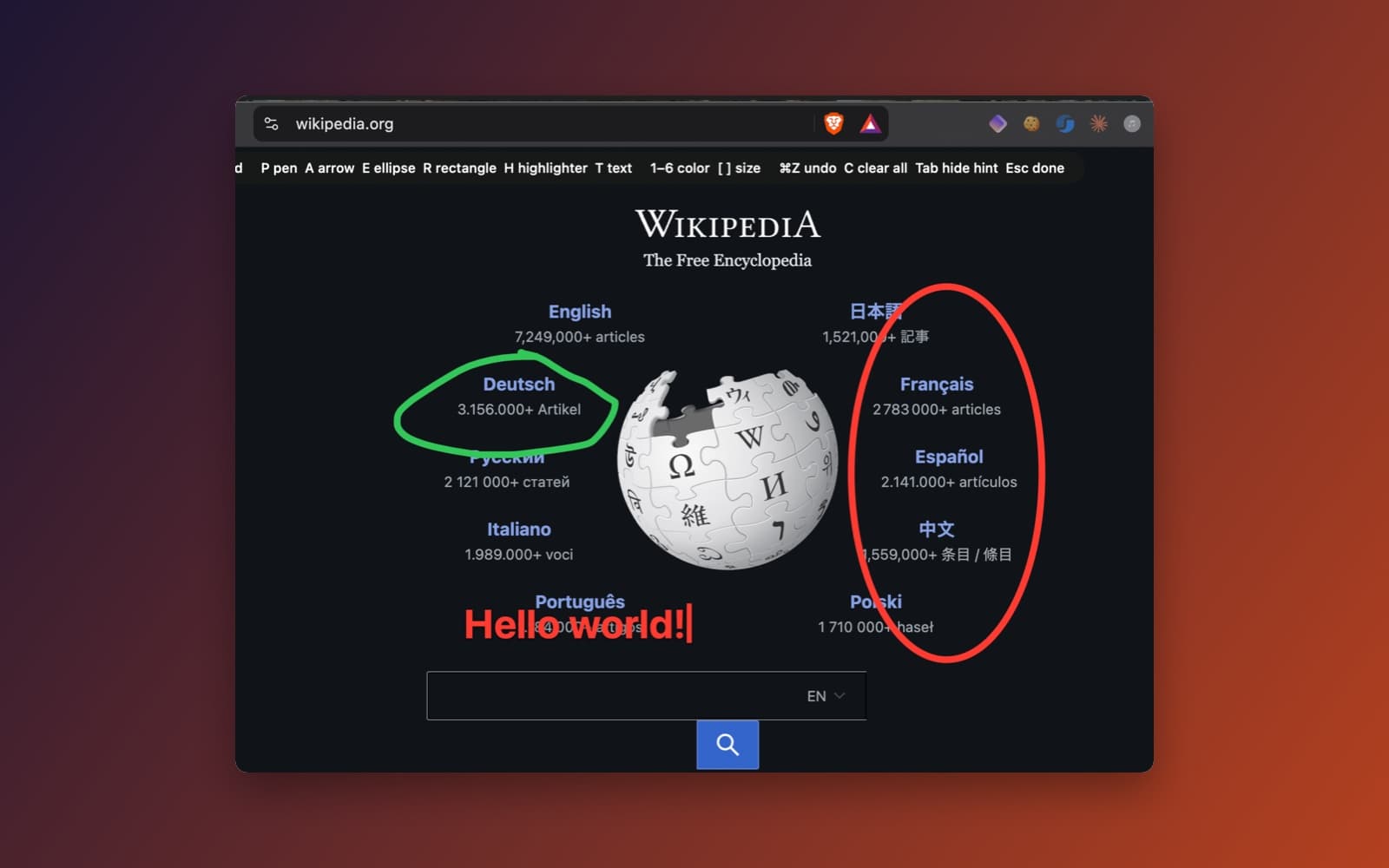
Screen Draw lets you draw on top of whatever is on your screen: circle something, point at it with an arrow, write a note next to it. Your marks fade away by themselves after a moment, so there is nothing to clean up. It is made for presenters, teachers and anyone recording a tutorial or sharing their screen on a call.
What it does
- Draw anywhere. Press the hotkey (Control+Option+D by default) and the screen becomes a drawing surface. Press it again, or press Esc, to go back to normal.
- Tools. Pen (P), arrow (A), ellipse (E), rectangle (R), highlighter (H) and text (T), each one key away. A hint bar along the top of the screen lists them.
- Text. Click anywhere and type. The letters are big, black and outlined in white so they are readable on any background.
- Colors and size. Keys 1 to 6 pick a color, and the bracket keys change the size.
- Fades and clears. Strokes fade out after the time you choose. Command-Z undoes the last mark and C clears everything.
- Lives in the menu bar. There is no Dock icon. The menu bar item starts and stops drawing, clears the screen and sets how long marks stay.
Notes
The hotkey does not need any special macOS permission, and the app does not record your screen. Drawing over some full-screen apps may not work on every Mac. The keys listed are the ones shown in the app's own hint bar.
Information
- Developer
- SiliconDevKit (generated by AI from a prompt)
- Category
- Productivity
- Compatibility
- macOS 13 or later, Apple silicon. Apple silicon Macs only (M1 or later), not Intel
- Size
- 0.3 MB (.dmg)
- Latest version
- 1.0
- Price
- Free
- Signing
- Ad-hoc signed, not notarized
The prompt behind it
This app was generated from the prompt below. Paste it into SiliconDevKit to build your own version, then change it however you like.
Build a native Mac app called Screen Draw. Press a global hotkey and draw on top of everything on the screen: pen strokes, arrows, ellipses, rectangles, highlighter and typed text. Everything fades away after a moment, or clears on demand. It is for presenters, teachers and anyone recording a tutorial or on a call. APP SHAPE - A menu bar app with no Dock icon (set NSApp.setActivationPolicy(.accessory) at launch). The menu bar menu has: Start or Stop Drawing (showing the hotkey), Clear All, Fade after (Never, 2, 4, 8, 15 seconds), Launch at Login (SMAppService.mainApp, macOS 13), Quit. On first launch show a small window or popover that says the hotkey and how to draw. - Global hotkey, default Control+Option+D, registered with Carbon RegisterEventHotKey so no special permission is needed. Let the user change it in a small Settings window. Pressing it again, or pressing Esc while drawing, ends drawing. - No Accessibility, Screen Recording or Input Monitoring permission may be required. Do not capture the screen. THE OVERLAY - One borderless, transparent, non-opaque NSW that screen, with no shadow. Use a window
What it cost
The cost of this demo was not recorded in our usage log. Demos built through the live build system show every run with its tokens and cost.
Version tree
Every change to this app is a new version. Use any build as a template to start your own copy from it; forks that their makers shared appear as branches.
Version 1.0Oct 9, 2026
Build a native Mac app called Screen Draw. Press a global hotkey and draw on top of everything on the screen: pen strokes, arrows, ellipses, rectangles, highlighter and typed text. Everything fades away after a moment, or clears on demand. It is for presenters, teachers and anyone recording a tutorial or on a call. APP SHAPE - A menu bar app with no Dock icon (set NSApp.setActivationPolicy(.accessory) at launch). The menu bar menu has: Start or Stop Drawing (showing the hotkey), Clear All, Fade after (Never, 2, 4, 8, 15 seconds), Launch at Login (SMAppService.mainApp, macOS 13), Quit. On first launch show a small window or popover that says the hotkey and how to draw. - Global hotkey, default Control+Option+D, registered with Carbon RegisterEventHotKey so no special permission is needed. Let the user change it in a small Settings window. Pressing it again, or pressing Esc while drawing, ends drawing. - No Accessibility, Screen Recording or Input Monitoring permission may be required. Do not capture the screen. THE OVERLAY - One borderless, transparent, non-opaque NSW that screen, with no shadow. Use a window
Press a global hotkey and draw pens, arrows, shapes, highlights and text on top of your screen that fade away.
Opening it for the first time
- Open the .dmg and drag Screen Draw onto the Applications folder.
- Open it from Applications. macOS may say it can’t check the app for malicious software. Click Done.
- Open System Settings → Privacy & Security and click Open Anyway. This is needed once. Why this happens. To share an app without the warning, see how to notarize it.
You might also like
 Get
GetPlayTube
Paste a video link and watch it in a clean player, with no ads.
 Get
GetAdMute
Listens to your Mac's audio and mutes the ads, then brings the sound back.
 Get
GetToob-Downer
Paste a video link and save the video to your Mac, with a queue to keep track.
 Get
GetAgent Swarm
Send one task to Claude, Gemini and Hermes at once.