
Media
OpenEmu Launcher
Install, update and set up OpenEmu-Silicon in a few clicks.
- Category
- Media
- Requires
- macOS 11+
- Size
- 1.1 MB
- Price
- Free
Preview
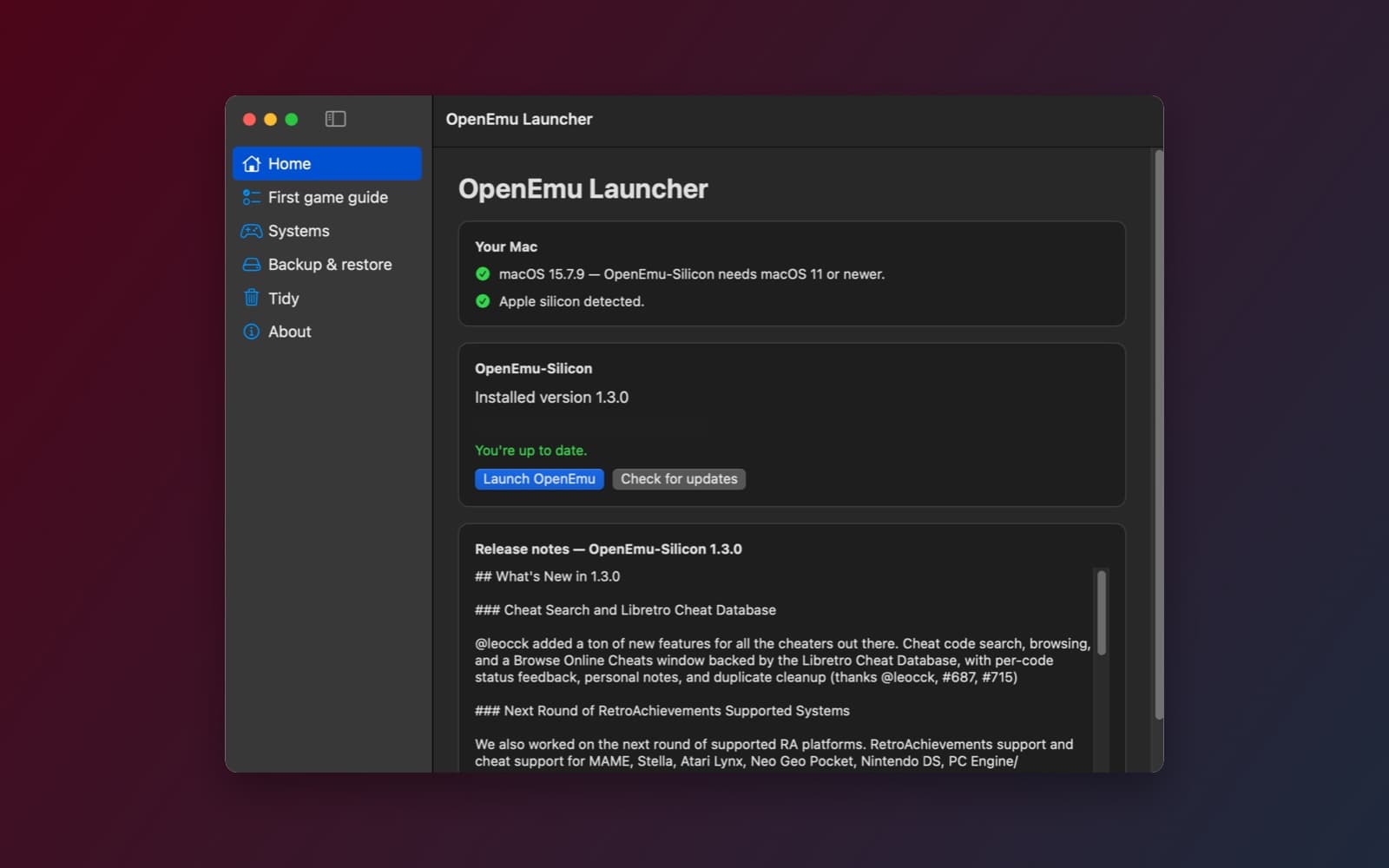
About OpenEmu Launcher
OpenEmu Launcher is a helper for OpenEmu-Silicon, the Apple silicon version of the OpenEmu retro game player. It downloads OpenEmu-Silicon's own releases, keeps them up to date, and walks a new user from nothing to playing a first game. It does not copy or rebuild OpenEmu.
What it does
- Install and update. Checks your Mac, shows the latest version with its release notes, and installs it to your Applications folder with a progress bar and a size and checksum check. When a new version comes out, one button updates it, and a Roll back button restores the previous one.
- First game guide. A checklist for installing, choosing a games folder, adding BIOS files and checking your controllers. A BIOS table shows which file each system needs, with a green check when the file is in place. The app never downloads or links to BIOS files or games.
- Systems. The list of 41 systems OpenEmu-Silicon supports, with a note where a system needs a BIOS.
- Backup and restore. Zips your save states, game library and settings with sizes shown first, and restores them after a confirmation.
- Tidy. Shows how much space OpenEmu uses, with Reveal in Finder, and an uninstall that asks separately before removing your data.
How it was made
One prompt in the SiliconDevKit desktop app. The prompt asks the builder to read OpenEmu-Silicon's README, releases and wiki before writing code, and the builder did. It found the real download (a notarized .dmg of about 50 MB with a published checksum), the real minimum macOS version, and the places OpenEmu keeps its data. The cloud wrote the code and a Mac compiled it.
Notes
OpenEmu Launcher is not affiliated with the OpenEmu-Silicon project. You must own the games you play. The screenshot shows the app with OpenEmu-Silicon 1.3.0 installed and up to date, and part of the file path is hidden. We checked the Mac check, the installed version, update check and release notes. We did not test installing, updating, rolling back, backup, restore or uninstall end to end. A few folder names it uses for backup are the builder's best guesses, and the app shows "not found" for any that are wrong.
Information
- Developer
- SiliconDevKit (generated by AI from a prompt)
- Category
- Media
- Compatibility
- macOS 11 or later (OpenEmu-Silicon's own requirement), Apple silicon. Apple silicon Macs only (M1 or later), not Intel
- Size
- 1.1 MB (.dmg)
- Latest version
- 1.0
- Price
- Free
- Signing
- Ad-hoc signed, not notarized
The prompt behind it
This app was generated from the prompt below. Paste it into SiliconDevKit to build your own version, then change it however you like.
Build a Mac app called OpenEmu Launcher: a friendly installer, updater and setup helper for OpenEmu-Silicon, the native Apple silicon fork of the OpenEmu retro game emulator. It does not copy or rebuild OpenEmu. It downloads the project's own signed releases, keeps them up to date, and gets a new user from nothing to playing their first game. RESEARCH FIRST (use WebSearch and WebFetch before you write code) OpenEmu-Silicon changes often, so do not rely on memory. Read: (1) the project's README, its license and its releases page (search the web for the OpenEmu-Silicon project and find its GitHub releases, and the GitHub REST API address for the latest release of that project) for the real asset names, sizes, whether a checksum is published, and the minimum macOS version; (2) the project's wiki or docs on adding games, BIOS files, controllers, core updates and where it keeps its library and settings (usually under Application Support and the user's Library); (3) the page that lists which game systems and cores it supports and which of them need a BIOS. Where a page disagrees with this prompt, follow the page and say what changed. WHAT THE APP DOES - Install: if OpenEmu-Silicon is not in /Applications or ~/Applications, show a card with its name, the latest version, size and release notes (from the GitHub API, header User-Agent: RetroLauncher). One button "Install OpenEmu-Silicon" downloads the release asset with progress, speed and Cancel into a temporary file, checks the size and any published checksum, unpacks it (/usr/bin/ditto or /usr/bin/unzip through Process with arguments, never a shell string; or mounts a dmg with /usr/bin/hdiutil), and copies the app to ~/Applications (or /Applications if the user chooses and it is writable). Remove the quarantine flag only if the documentation says a release needs it, and say so on screen. Never bypass Gatekeeper silently. - Check the Mac: macOS version against the project's requirement, and Apple silicon. Say plainly if the Mac is too old. - Open and update: a Launch button, the installed version, and "Check for updates" that compares against the latest release and offers Update (quit OpenEmu if it runs after asking, replace the app, keep the user's data folders untouched, and keep the previous version in a "Previous versions" folder for one rollback). - First game guide: a short checklist with real status where the app can read it: (1) installed, (2) a games folder chosen (the app only stores the path and opens it in Finder; it does not copy games), (3) a BIOS-needed table for the systems from the research (system name, file names, a "Where to put it" button that opens the folder, and a green check when a file with that exact name exists; never download, name sources for, or bundle BIOS or game files), (4) a controller check using the GameController framework that shows connected controllers and their type. - Systems list: the supported systems from the project's docs with a one-line note and whether a BIOS is needed. Mark only what the docs say. - Backup and restore: copy OpenEmu's library database, save states and settings folders (from the research) to a folder the user picks as a timestamped zip, and restore from one after confirmation, with OpenEmu closed. Show the size before copying. - Tidy: show the size of the app, its data and caches, with Reveal in Finder, and an Uninstall button that removes only the app (move it to the Trash through NSWorkspace) and asks separately whether to also remove its data, naming the folders. - About: credits and licenses, with the line "OpenEmu-Silicon is a separate project; Retro Launcher is not affiliated with it. You must own the games you play." QUALITY - macOS 13, Swift 5 language mode, SwiftUI with ObservableObject and @Published. Only Apple frameworks, no packages, no Xcode project or asset catalog. Modular: GitHubReleases, Installer, VersionChecker, GuideChecklist, BackupManager and the views. - Network and file work off the main thread. Friendly, plain-language errors with a Show Details box; handle no network, a missing asset, a full disk and a running OpenEmu. - The code is compiled later on the user's Mac, not here: check every initializer, argument label and optional, with no force-unwraps. Do not fake anything. In your reply, say what you built, what the lookups changed (asset names, folders, requirements), and what you could not test, especially the install and update steps and the data folder paths.
What it cost
Every AI run that made this demo, one per line. Model: Claude Sonnet 5.5. Tokens are shown as (in / out). “In” counts everything the model read, including text it had already seen in the session at a reduced price.
| Initial prompt(495k in / 42k out) | 78 credits | |
| = | Total(495k in / 42k out) | 78 credits |
Credits are what a build uses on your plan. This counts AI usage only: hosting and the Mac that compiled it are not included.
Version tree
Every change to this app is a new version. Use any build as a template to start your own copy from it; forks that their makers shared appear as branches.
Version 1.0Oct 10, 2026
Build a Mac app called OpenEmu Launcher: a friendly installer, updater and setup helper for OpenEmu-Silicon, the native Apple silicon fork of the OpenEmu retro game emulator. It does not copy or rebuild OpenEmu. It downloads the project's own signed releases, keeps them up to date, and gets a new user from nothing to playing their first game. RESEARCH FIRST (use WebSearch and WebFetch before you write code) OpenEmu-Silicon changes often, so do not rely on memory. Read: (1) the project's README, its license and its releases page (search the web for the OpenEmu-Silicon project and find its GitHub releases, and the GitHub REST API address for the latest release of that project) for the real asset names, sizes, whether a checksum is published, and the minimum macOS version; (2) the project's wiki or docs on adding games, BIOS files, controllers, core updates and where it keeps its library and settings (usually under Application Support and the user's Library); (3) the page that lists which game systems and cores it supports and which of them need a BIOS. Where a page disagrees with this prompt, follow the page and say what changed. WHAT THE APP DOES - Install: if OpenEmu-Silicon is not in /Applications or ~/Applications, show a card with its name, the latest version, size and release notes (from the GitHub API, header User-Agent: RetroLauncher). One button "Install OpenEmu-Silicon" downloads the release asset with progress, speed and Cancel into a temporary file, checks the size and any published checksum, unpacks it (/usr/bin/ditto or /usr/bin/unzip through Process with arguments, never a shell string; or mounts a dmg with /usr/bin/hdiutil), and copies the app to ~/Applications (or /Applications if the user chooses and it is writable). Remove the quarantine flag only if the documentation says a release needs it, and say so on screen. Never bypass Gatekeeper silently. - Check the Mac: macOS version against the project's requirement, and Apple silicon. Say plainly if the Mac is too old. - Open and update: a Launch button, the installed version, and "Check for updates" that compares against the latest release and offers Update (quit OpenEmu if it runs after asking, replace the app, keep the user's data folders untouched, and keep the previous version in a "Previous versions" folder for one rollback). - First game guide: a short checklist with real status where the app can read it: (1) installed, (2) a games folder chosen (the app only stores the path and opens it in Finder; it does not copy games), (3) a BIOS-needed table for the systems from the research (system name, file names, a "Where to put it" button that opens the folder, and a green check when a file with that exact name exists; never download, name sources for, or bundle BIOS or game files), (4) a controller check using the GameController framework that shows connected controllers and their type. - Systems list: the supported systems from the project's docs with a one-line note and whether a BIOS is needed. Mark only what the docs say. - Backup and restore: copy OpenEmu's library database, save states and settings folders (from the research) to a folder the user picks as a timestamped zip, and restore from one after confirmation, with OpenEmu closed. Show the size before copying. - Tidy: show the size of the app, its data and caches, with Reveal in Finder, and an Uninstall button that removes only the app (move it to the Trash through NSWorkspace) and asks separately whether to also remove its data, naming the folders. - About: credits and licenses, with the line "OpenEmu-Silicon is a separate project; Retro Launcher is not affiliated with it. You must own the games you play." QUALITY - macOS 13, Swift 5 language mode, SwiftUI with ObservableObject and @Published. Only Apple frameworks, no packages, no Xcode project or asset catalog. Modular: GitHubReleases, Installer, VersionChecker, GuideChecklist, BackupManager and the views. - Network and file work off the main thread. Friendly, plain-language errors with a Show Details box; handle no network, a missing asset, a full disk and a running OpenEmu. - The code is compiled later on the user's Mac, not here: check every initializer, argument label and optional, with no force-unwraps. Do not fake anything. In your reply, say what you built, what the lookups changed (asset names, folders, requirements), and what you could not test, especially the install and update steps and the data folder paths.
Installs, updates and sets up OpenEmu-Silicon, and helps you back up and tidy it.
Opening it for the first time
- Open the .dmg and drag OpenEmu Launcher onto the Applications folder.
- Open it from Applications. macOS may say it can’t check the app for malicious software. Click Done.
- Open System Settings → Privacy & Security and click Open Anyway. This is needed once. Why this happens. To share an app without the warning, see how to notarize it.
You might also like
 Get
GetPlayTube
Paste a video link and watch it in a clean player, with no ads.
 Get
GetAdMute
Listens to your Mac's audio and mutes the ads, then brings the sound back.
 Get
GetToob-Downer
Paste a video link and save the video to your Mac, with a queue to keep track.
 Get
GetAgent Swarm
Send one task to Claude, Gemini and Hermes at once.