
AI agents
Local LLM Manager
Download Ollama and a model in a few clicks, then chat with it on your Mac. No cloud.
- Category
- AI agents
- Requires
- macOS 13+
- Size
- 16 MB
- Price
- Free
Preview
About Local LLM Manager
Local LLM Manager is a control panel for running AI models on your own Mac. It sets up Ollama for you, downloads a model from a built-in list, and opens a chat with it. Everything runs on your Mac and nothing is sent to a cloud service.
What it does
- Engine. It finds Ollama if you already have it, or installs it for you into the app's own folder (about 170 MB) with a progress bar and a Cancel button.
- Server. It runs Ollama as part of the app on a local address, with an on/off switch, a status light and a Copy button for the address. Sharing it on your network is off by default and comes with a warning.
- Models. A list of ten models with a badge for how well each one fits your Mac's memory and a star on the best pick. Downloads queue up and run one at a time, with a disk space check. You can also add any other model by name, and delete or unload the ones you have.
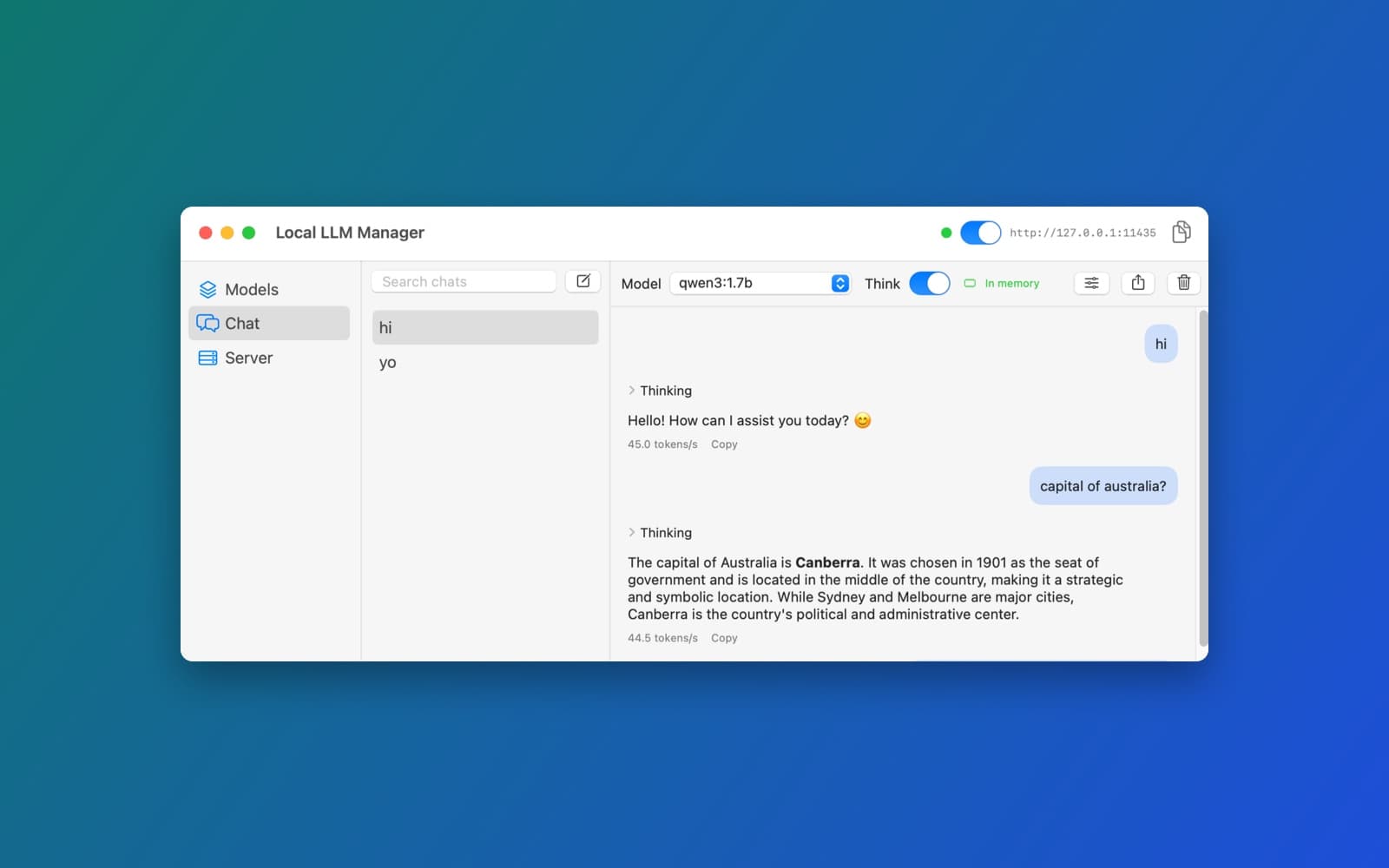
- Chat. Conversations are saved on your Mac, with a sidebar and search, streaming replies, Markdown, a Think switch, tokens per second, Stop, Regenerate, Edit and export.
- The rest. A first-launch guide, a Settings window, an optional menu bar item and plain-language error messages.
How it was made
One prompt in the SiliconDevKit desktop app. The prompt asks the builder to look up Ollama's real download and the model sizes before writing any code, and the builder did, which changed a few sizes in the list. The cloud wrote the code and a Mac compiled it.
Notes
You need a network connection and free disk space for the first download: about 170 MB for Ollama, plus the model you pick (from about 0.5 GB to several GB). The screenshot shows a chat with the qwen3:1.7b model running on a Mac. We tried a chat with that model. We did not test the engine install, the other nine models, sharing on your network or the menu bar item end to end.
Information
- Developer
- SiliconDevKit (generated by AI from a prompt)
- Category
- AI agents
- Compatibility
- macOS 13 or later, Apple silicon. Apple silicon Macs only (M1 or later), not Intel
- Size
- 16 MB (.dmg)
- Latest version
- 1.0
- Price
- Free
- Signing
- Ad-hoc signed, not notarized
The prompt behind it
This app was generated from the prompt below. Paste it into SiliconDevKit to build your own version, then change it however you like.
Build a native Mac app called Local LLM Manager: a self-contained controller for Ollama. One click downloads Ollama itself (if the Mac does not have it), one click downloads a model from a built-in list, and one more click opens a chat with it, all running on the Mac with no cloud. RESEARCH FIRST (use WebSearch and WebFetch before you write code) Ollama changes often, so do not rely on memory. Before writing code, look up and read: (1) https://api.github.com/repos/ollama/ollama/releases/latest for the real macOS asset name and its size; (2) the Ollama API reference https://github.com/ollama/ollama/blob/main/docs/api.md for the exact fields of /api/pull, /api/chat, /api/tags, /api/show, /api/ps, /api/delete and keep_alive; (3) https://ollama.com/library/qwen3 (and one other model page) to check each model name and tag in the list below, and how thinking output is returned. Where a page disagrees with this prompt, follow the page and say what you changed in your reply. THE ENGINE (Ollama) - Find an existing Ollama first: /Applications/Ollama.app/Contents/Resources/ollama, /opt/homebrew/bin/ollama, /usr/local/bin/ollama. If none is found, offer "Install Ollama (about 200 MB)". Install by asking the GitHub API https://api.github.com/repos/ollama/ollama/releases/latest (URLSession, header User-Agent: LocalLLMManager) for the asset named ollama-darwin.tgz, downloading it with a progress bar, a speed and Cancel, and unpacking it into Application Support/Local LLM Manager/engine/ (use /usr/bin/tar through Process with arguments, never a shell string; make it executable). Check the size and that the file runs (ollama --version) before calling it installed. If the asset is not found or the network is down, say so plainly and offer "Choose Ollama manually" (an open panel). - Run the engine as the app's own child process: ollama serve with the environment OLLAMA_HOST=127.0.0.1:11435 (a port of our own, so a running Ollama app on 11434 is not disturbed) and OLLAMA_MODELS=Application Support/Local LLM Manager/models. Talk to it over http://127.0.0.1:11435 (an IP address, so App Transport Security does not block it). Wait until GET /api/version answers before enabling anything. Stop the child process when the app quits. - A "Local server" switch in the toolbar: on = the engine runs and answers on 127.0.0.1:11435, off = stopped (and loaded models freed). Show a status dot (stopped, starting, running) and the address with a Copy button, so other tools can use it. "Share on my network" (off by default) binds 0.0.0.0 and warns that anyone on the network could use it. THE MODEL LIBRARY (built in, exactly these ten) Show a table or card list with the name, download size, what it is best for, and how it fits this Mac. Read the Mac's memory with ProcessInfo.processInfo.physicalMemory and show a badge for each model: "Good fit", "Tight" or "Too big for this Mac" (a model is a good fit when its size is under 35% of memory, tight under 60%, otherwise too big; say that rule in a help tooltip). Mark the single best pick for this Mac's memory with a star. 1 qwen3:0.6b, 523 MB, very fast chat, drafts, simple extraction (limited reasoning) 2 qwen3:1.7b, 1.4 GB, fast general assistant, light coding help 3 llama3.2:3b, 2.0 GB, general chat, tool calling 4 phi3.5, 2.4 GB, reasoning and code in a small package 5 qwen3:4b, 2.5 GB, best small all-rounder, 256K context (best pick for 8 GB) 6 qwen2.5-coder:7b, 4.5 GB, local coding, refactoring, explanations (best coding pick for 16 GB) 7 qwen2.5:7b, 4.5 GB, strong general chat and multilingual work (best all-round pick for 16 GB) 8 llama3.1:8b, 5.0 GB, broad ecosystem, general assistant, tools 9 gemma2:9b, 5.5 GB, multilingual chat and general reasoning (leave headroom on 16 GB) 10 mistral-nemo, 7.5 GB, long context, 128K (16 GB only, expect slower replies) - Each model has one main button that does the next step: Download, Downloading (progress), Chat. Download uses POST /api/pull with {"model": name, "stream": true} and reads the newline-delimited JSON ({status, total, completed}): show the percent, the bytes done of total, speed, time left, the current status and Cancel. A cancelled or failed pull can be resumed, since Ollama continues partial files. Several downloads queue one at a time. Check free disk space first (URL resourceValues .volumeAvailableCapacityForImportantUsage) and refuse politely when there is not room for the size plus 2 GB. - Installed models come from GET /api/tags (also shows models downloaded earlier). Each installed model has Delete (DELETE /api/delete, after a confirmation), "Show details" (POST /api/show: parameters, context length, quantization, license), and "Loaded in memory" status from GET /api/ps with an Unload button (POST /api/generate with keep_alive 0). - A search box to add any other model by name with a note that its size is not known in advance. Never invent sizes for it. THE CHAT - A native chat window: a sidebar of conversations (new, rename, delete, search), the messages in the middle, the message box at the bottom, a model picker at the top showing only installed models. Stream replies from POST /api/chat with {"model", "messages", "stream": true, "options": {...}} and show the text as it arrives, with a Stop button that cancels the request. Render basic Markdown (bold, lists, and code blocks with a Copy button). Show tokens per second from the final chunk (eval_count and eval_duration), and Regenerate, Copy and Edit-last-message actions. - Models such as qwen3 can send their reasoning separately (a "thinking" field in the message, or a <think> block in the text). Show it in a collapsed "Thinking" section above the answer, and add a "Think" switch per conversation (the request field "think": false turns it off for models that support it; hide the switch when a model does not). - Per-model settings (Settings sheet, saved per model): system prompt, temperature, top_p, context length (num_ctx, with a note that bigger uses more memory), and "keep loaded" time (keep_alive). A Reset button restores defaults. - Save conversations as JSON files in Application Support/Local LLM Manager/chats, and restore them at launch. Export a conversation as Markdown with a save panel. THE WINDOW One window, minimum 960 by 620: a sidebar with "Models", "Chat" and "Server", and the content on the right. First launch is a short guide: step 1 get the engine, step 2 pick a model (the star pick is highlighted), step 3 chat; do the steps for the user with one button each, and let them skip. A menu bar item (optional in Settings) shows the server status with Start, Stop and Open Window. Settings: where models are stored (with "Show in Finder" and the total size used), the port, launch at login (SMAppService.mainApp), and an About section. QUALITY - Target macOS 13, Swift 5 language mode, only Apple frameworks, no Xcode project, no asset catalog, no third-party packages. Double-check every initializer, argument label and optional; the code is compiled later on the user's Mac. - Never block the main thread: use async URLSession (URLSession.bytes for the streams) and actors or Tasks; update the UI on the main actor. Keep the code modular: an EngineManager (find, install, start and stop the process), an OllamaClient (the HTTP calls), a ModelCatalog (the ten models and the fit rule), a DownloadQueue, a ChatStore (conversations on disk), and the SwiftUI views. - Friendly one-line messages and no crash for: no network, GitHub rate limit, a full disk, the engine failing to start (show the last lines of its output in a details box), a port already in use (offer another), a model that fails to load because there is not enough memory, and a model name that does not exist. - Do not fake anything. In your reply, say in a few sentences what works and what you could not check, in particular: whether the engine downloaded and started, whether a pull completed, and which models you could not try.
What it cost
Every AI run that made this demo, one per line. Model: Claude Sonnet 5.5. Tokens are shown as (in / out). “In” counts everything the model read, including text it had already seen in the session at a reduced price.
| Initial prompt(1.16M in / 76k out) | 139 credits | |
| = | Total(1.16M in / 76k out) | 139 credits |
Credits are what a build uses on your plan. This counts AI usage only: hosting and the Mac that compiled it are not included.
Version tree
Every change to this app is a new version. Use any build as a template to start your own copy from it; forks that their makers shared appear as branches.
Version 1.0Oct 10, 2026
Build a native Mac app called Local LLM Manager: a self-contained controller for Ollama. One click downloads Ollama itself (if the Mac does not have it), one click downloads a model from a built-in list, and one more click opens a chat with it, all running on the Mac with no cloud. RESEARCH FIRST (use WebSearch and WebFetch before you write code) Ollama changes often, so do not rely on memory. Before writing code, look up and read: (1) https://api.github.com/repos/ollama/ollama/releases/latest for the real macOS asset name and its size; (2) the Ollama API reference https://github.com/ollama/ollama/blob/main/docs/api.md for the exact fields of /api/pull, /api/chat, /api/tags, /api/show, /api/ps, /api/delete and keep_alive; (3) https://ollama.com/library/qwen3 (and one other model page) to check each model name and tag in the list below, and how thinking output is returned. Where a page disagrees with this prompt, follow the page and say what you changed in your reply. THE ENGINE (Ollama) - Find an existing Ollama first: /Applications/Ollama.app/Contents/Resources/ollama, /opt/homebrew/bin/ollama, /usr/local/bin/ollama. If none is found, offer "Install Ollama (about 200 MB)". Install by asking the GitHub API https://api.github.com/repos/ollama/ollama/releases/latest (URLSession, header User-Agent: LocalLLMManager) for the asset named ollama-darwin.tgz, downloading it with a progress bar, a speed and Cancel, and unpacking it into Application Support/Local LLM Manager/engine/ (use /usr/bin/tar through Process with arguments, never a shell string; make it executable). Check the size and that the file runs (ollama --version) before calling it installed. If the asset is not found or the network is down, say so plainly and offer "Choose Ollama manually" (an open panel). - Run the engine as the app's own child process: ollama serve with the environment OLLAMA_HOST=127.0.0.1:11435 (a port of our own, so a running Ollama app on 11434 is not disturbed) and OLLAMA_MODELS=Application Support/Local LLM Manager/models. Talk to it over http://127.0.0.1:11435 (an IP address, so App Transport Security does not block it). Wait until GET /api/version answers before enabling anything. Stop the child process when the app quits. - A "Local server" switch in the toolbar: on = the engine runs and answers on 127.0.0.1:11435, off = stopped (and loaded models freed). Show a status dot (stopped, starting, running) and the address with a Copy button, so other tools can use it. "Share on my network" (off by default) binds 0.0.0.0 and warns that anyone on the network could use it. THE MODEL LIBRARY (built in, exactly these ten) Show a table or card list with the name, download size, what it is best for, and how it fits this Mac. Read the Mac's memory with ProcessInfo.processInfo.physicalMemory and show a badge for each model: "Good fit", "Tight" or "Too big for this Mac" (a model is a good fit when its size is under 35% of memory, tight under 60%, otherwise too big; say that rule in a help tooltip). Mark the single best pick for this Mac's memory with a star. 1 qwen3:0.6b, 523 MB, very fast chat, drafts, simple extraction (limited reasoning) 2 qwen3:1.7b, 1.4 GB, fast general assistant, light coding help 3 llama3.2:3b, 2.0 GB, general chat, tool calling 4 phi3.5, 2.4 GB, reasoning and code in a small package 5 qwen3:4b, 2.5 GB, best small all-rounder, 256K context (best pick for 8 GB) 6 qwen2.5-coder:7b, 4.5 GB, local coding, refactoring, explanations (best coding pick for 16 GB) 7 qwen2.5:7b, 4.5 GB, strong general chat and multilingual work (best all-round pick for 16 GB) 8 llama3.1:8b, 5.0 GB, broad ecosystem, general assistant, tools 9 gemma2:9b, 5.5 GB, multilingual chat and general reasoning (leave headroom on 16 GB) 10 mistral-nemo, 7.5 GB, long context, 128K (16 GB only, expect slower replies) - Each model has one main button that does the next step: Download, Downloading (progress), Chat. Download uses POST /api/pull with {"model": name, "stream": true} and reads the newline-delimited JSON ({status, total, completed}): show the percent, the bytes done of total, speed, time left, the current status and Cancel. A cancelled or failed pull can be resumed, since Ollama continues partial files. Several downloads queue one at a time. Check free disk space first (URL resourceValues .volumeAvailableCapacityForImportantUsage) and refuse politely when there is not room for the size plus 2 GB. - Installed models come from GET /api/tags (also shows models downloaded earlier). Each installed model has Delete (DELETE /api/delete, after a confirmation), "Show details" (POST /api/show: parameters, context length, quantization, license), and "Loaded in memory" status from GET /api/ps with an Unload button (POST /api/generate with keep_alive 0). - A search box to add any other model by name with a note that its size is not known in advance. Never invent sizes for it. THE CHAT - A native chat window: a sidebar of conversations (new, rename, delete, search), the messages in the middle, the message box at the bottom, a model picker at the top showing only installed models. Stream replies from POST /api/chat with {"model", "messages", "stream": true, "options": {...}} and show the text as it arrives, with a Stop button that cancels the request. Render basic Markdown (bold, lists, and code blocks with a Copy button). Show tokens per second from the final chunk (eval_count and eval_duration), and Regenerate, Copy and Edit-last-message actions. - Models such as qwen3 can send their reasoning separately (a "thinking" field in the message, or a <think> block in the text). Show it in a collapsed "Thinking" section above the answer, and add a "Think" switch per conversation (the request field "think": false turns it off for models that support it; hide the switch when a model does not). - Per-model settings (Settings sheet, saved per model): system prompt, temperature, top_p, context length (num_ctx, with a note that bigger uses more memory), and "keep loaded" time (keep_alive). A Reset button restores defaults. - Save conversations as JSON files in Application Support/Local LLM Manager/chats, and restore them at launch. Export a conversation as Markdown with a save panel. THE WINDOW One window, minimum 960 by 620: a sidebar with "Models", "Chat" and "Server", and the content on the right. First launch is a short guide: step 1 get the engine, step 2 pick a model (the star pick is highlighted), step 3 chat; do the steps for the user with one button each, and let them skip. A menu bar item (optional in Settings) shows the server status with Start, Stop and Open Window. Settings: where models are stored (with "Show in Finder" and the total size used), the port, launch at login (SMAppService.mainApp), and an About section. QUALITY - Target macOS 13, Swift 5 language mode, only Apple frameworks, no Xcode project, no asset catalog, no third-party packages. Double-check every initializer, argument label and optional; the code is compiled later on the user's Mac. - Never block the main thread: use async URLSession (URLSession.bytes for the streams) and actors or Tasks; update the UI on the main actor. Keep the code modular: an EngineManager (find, install, start and stop the process), an OllamaClient (the HTTP calls), a ModelCatalog (the ten models and the fit rule), a DownloadQueue, a ChatStore (conversations on disk), and the SwiftUI views. - Friendly one-line messages and no crash for: no network, GitHub rate limit, a full disk, the engine failing to start (show the last lines of its output in a details box), a port already in use (offer another), a model that fails to load because there is not enough memory, and a model name that does not exist. - Do not fake anything. In your reply, say in a few sentences what works and what you could not check, in particular: whether the engine downloaded and started, whether a pull completed, and which models you could not try.
One-click controller for Ollama: install the engine, download models and chat with them, all on your Mac.
Opening it for the first time
- Open the .dmg and drag Local LLM Manager onto the Applications folder.
- Open it from Applications. macOS may say it can’t check the app for malicious software. Click Done.
- Open System Settings → Privacy & Security and click Open Anyway. This is needed once. Why this happens. To share an app without the warning, see how to notarize it.
You might also like
 Get
GetPlayTube
Paste a video link and watch it in a clean player, with no ads.
 Get
GetAdMute
Listens to your Mac's audio and mutes the ads, then brings the sound back.
 Get
GetToob-Downer
Paste a video link and save the video to your Mac, with a queue to keep track.
 Get
GetAgent Swarm
Send one task to Claude, Gemini and Hermes at once.