
System
Linux Sandbox
Run scripts and commands in disposable Linux machines on your Mac, through OrbStack.
- Category
- System
- Requires
- macOS 14+
- Size
- 1.1 MB
- Price
- Free
Preview
About Linux Sandbox
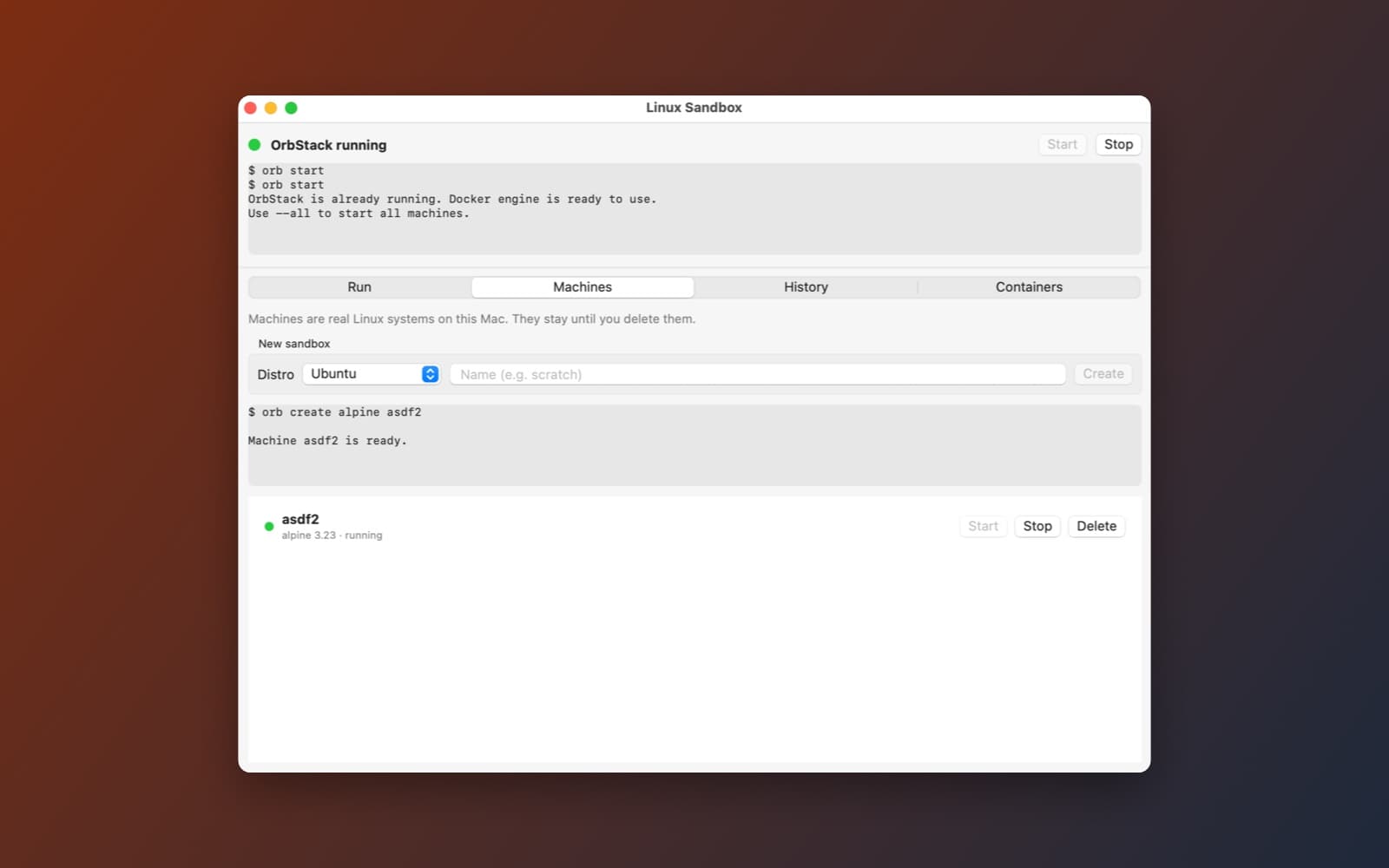
Linux Sandbox is a one-window control panel for OrbStack, the fast Linux machine and container tool for the Mac. You make a Linux machine, paste a script, and watch it run, without opening Terminal.
What it does
- Set up OrbStack. The app finds OrbStack's
orbanddockertools, shows whether OrbStack is running, and has Start and Stop buttons. If OrbStack is missing, one button installs it with Homebrew, or opens orbstack.dev if you do not have Homebrew. It never installs Homebrew itself. - Machines. Create an Ubuntu, Debian or Alpine machine, then start, stop and delete it. Machines are real Linux systems and stay until you delete them.
- Run scripts. Paste a script or command, pick a machine, and see the output as it arrives, with errors in red, the exit status, Stop and Copy output. Runs are saved in a history you can load back.
- Disposable mode. Make a fresh machine for one run and delete it afterwards, so nothing is left behind.
- Extras. Share a Mac folder with a run, install packages with apt or apk, and manage Docker containers on a separate tab.
How it was made
One prompt in the SiliconDevKit desktop app. The prompt asks the builder to read the OrbStack command line docs before writing any code, and the builder did, which changed how it lists, deletes and shares folders. The cloud wrote the code and a Mac compiled it.
Notes
You need macOS 14 or later, because OrbStack does. OrbStack is free for personal use. The screenshot shows the app on a Mac with OrbStack running and an Alpine machine created through it. We checked that the status panel and creating and listing a machine work. We did not test running scripts, disposable mode, shared folders or the Containers tab end to end.
Information
- Developer
- SiliconDevKit (generated by AI from a prompt)
- Category
- System
- Compatibility
- macOS 14 or later, Apple silicon, OrbStack. Apple silicon Macs only (M1 or later), not Intel
- Size
- 1.1 MB (.dmg)
- Latest version
- 1.0
- Price
- Free
- Signing
- Ad-hoc signed, not notarized
The prompt behind it
This app was generated from the prompt below. Paste it into SiliconDevKit to build your own version, then change it however you like.
Build a native Mac app called Linux Sandbox: a one-window control panel that uses OrbStack's command line (orb and docker) to give the user a disposable Linux machine for running scripts and commands safely. No Linux desktop, no Terminal. RESEARCH FIRST (use WebSearch and WebFetch before you write code) Read https://docs.orbstack.dev (the pages on the command line, "orb" machines, headless use and installing) and https://formulae.brew.sh/cask/orbstack. Check the exact subcommands and flags you use: start, stop, status, list (and any JSON output option), create, delete, run or -m, push and pull, and how Mac folders appear inside a machine. Where a page disagrees with this prompt, follow the page and say what changed. SETUP (honest and one click) - Find orb and docker in /opt/homebrew/bin, /usr/local/bin and /Applications/OrbStack.app/Contents/MacOS/xbin. Run them with Process and an argument array, never a shell string, with a PATH that includes those folders. Give every quick call a 10 second timeout. - OrbStack needs macOS 14 or later: if the Mac is older, say so plainly. - If orb is missing: an "Install OrbStack" button that runs brew install --cask orbstack, streaming the output into a log with a progress bar and Cancel. No Homebrew: the button becomes "Get OrbStack" and opens https://orbstack.dev. Never install Homebrew. After installing, run orb start and wait up to 90 seconds until orb status says it is running. Mention that OrbStack may ask to be opened once to finish its setup, and that it is free for personal use. - A status dot (not installed, stopped, starting, running) and Start and Stop buttons. THE SANDBOX - "New sandbox": pick Ubuntu (the default), Debian or Alpine, give it a name, create it with orb create, and show progress. Keep the list of machines (from orb list) with state, distro and Start, Stop, Delete (with confirmation). Say that machines are real Linux on this Mac and are removed only when the user deletes them. - Run box: a monospaced text area for a command or a whole script, a machine picker and a Run button. Run it inside the machine with orb -m <name>, stream stdout and stderr live into an output pane (colors for stderr, a different color for the exit status), with Stop (terminate the process), Copy output and a Clear button. Run scripts by sending them through stdin to bash -s, not by building quoted shell strings. Show how long it took. - History: the last 50 runs (command, machine, exit code, time) saved as JSON in Application Support, click to load one back, Delete and Clear. - "Disposable mode" switch: before a run, make a fresh machine, run in it, and delete it afterwards, so nothing persists. Confirm the first time. - Share a folder: a button to choose a Mac folder and run a command with that folder as the working directory inside the machine (check how OrbStack exposes Mac paths), with a warning that a script can change files in a shared folder. - Packages shortcut: a field to install packages in the machine (apt, apk by distro) with the output streamed. - Containers tab: docker ps -a as a list with Start, Stop, Remove and Logs, and a "Run a container" form for an image name, ports and a name (docker run -d). Say when the docker command is missing. QUALITY - macOS 14, Swift 5 language mode, SwiftUI with ObservableObject and @Published. Only Apple frameworks, no packages, no Xcode project or asset catalog. Modular: OrbCLI (finds and runs the tools, parses output), MachineStore, RunController (streaming, stop), HistoryStore, and the views. - Read process output with pipe readability handlers and never block the main thread. Handle a process that never ends with Stop and a long default timeout of 10 minutes for runs, which the user can turn off. - The code is compiled later on the user's Mac, not here, so check every initializer, argument label and optional. No force-unwraps. - Do not fake anything: no sample machines, no pretend output. If something cannot work, show that state in the app. - In your reply, say in a few sentences what you built, what the lookups changed, and what you could not test (the orb commands and the folder sharing were not run).
What it cost
Every AI run that made this demo, one per line. Model: Claude Sonnet 5.5. Tokens are shown as (in / out). “In” counts everything the model read, including text it had already seen in the session at a reduced price.
| Initial prompt(287k in / 34k out) | 58 credits | |
| = | Total(287k in / 34k out) | 58 credits |
Credits are what a build uses on your plan. This counts AI usage only: hosting and the Mac that compiled it are not included.
Version tree
Every change to this app is a new version. Use any build as a template to start your own copy from it; forks that their makers shared appear as branches.
Version 1.0Oct 10, 2026
Build a native Mac app called Linux Sandbox: a one-window control panel that uses OrbStack's command line (orb and docker) to give the user a disposable Linux machine for running scripts and commands safely. No Linux desktop, no Terminal. RESEARCH FIRST (use WebSearch and WebFetch before you write code) Read https://docs.orbstack.dev (the pages on the command line, "orb" machines, headless use and installing) and https://formulae.brew.sh/cask/orbstack. Check the exact subcommands and flags you use: start, stop, status, list (and any JSON output option), create, delete, run or -m, push and pull, and how Mac folders appear inside a machine. Where a page disagrees with this prompt, follow the page and say what changed. SETUP (honest and one click) - Find orb and docker in /opt/homebrew/bin, /usr/local/bin and /Applications/OrbStack.app/Contents/MacOS/xbin. Run them with Process and an argument array, never a shell string, with a PATH that includes those folders. Give every quick call a 10 second timeout. - OrbStack needs macOS 14 or later: if the Mac is older, say so plainly. - If orb is missing: an "Install OrbStack" button that runs brew install --cask orbstack, streaming the output into a log with a progress bar and Cancel. No Homebrew: the button becomes "Get OrbStack" and opens https://orbstack.dev. Never install Homebrew. After installing, run orb start and wait up to 90 seconds until orb status says it is running. Mention that OrbStack may ask to be opened once to finish its setup, and that it is free for personal use. - A status dot (not installed, stopped, starting, running) and Start and Stop buttons. THE SANDBOX - "New sandbox": pick Ubuntu (the default), Debian or Alpine, give it a name, create it with orb create, and show progress. Keep the list of machines (from orb list) with state, distro and Start, Stop, Delete (with confirmation). Say that machines are real Linux on this Mac and are removed only when the user deletes them. - Run box: a monospaced text area for a command or a whole script, a machine picker and a Run button. Run it inside the machine with orb -m <name>, stream stdout and stderr live into an output pane (colors for stderr, a different color for the exit status), with Stop (terminate the process), Copy output and a Clear button. Run scripts by sending them through stdin to bash -s, not by building quoted shell strings. Show how long it took. - History: the last 50 runs (command, machine, exit code, time) saved as JSON in Application Support, click to load one back, Delete and Clear. - "Disposable mode" switch: before a run, make a fresh machine, run in it, and delete it afterwards, so nothing persists. Confirm the first time. - Share a folder: a button to choose a Mac folder and run a command with that folder as the working directory inside the machine (check how OrbStack exposes Mac paths), with a warning that a script can change files in a shared folder. - Packages shortcut: a field to install packages in the machine (apt, apk by distro) with the output streamed. - Containers tab: docker ps -a as a list with Start, Stop, Remove and Logs, and a "Run a container" form for an image name, ports and a name (docker run -d). Say when the docker command is missing. QUALITY - macOS 14, Swift 5 language mode, SwiftUI with ObservableObject and @Published. Only Apple frameworks, no packages, no Xcode project or asset catalog. Modular: OrbCLI (finds and runs the tools, parses output), MachineStore, RunController (streaming, stop), HistoryStore, and the views. - Read process output with pipe readability handlers and never block the main thread. Handle a process that never ends with Stop and a long default timeout of 10 minutes for runs, which the user can turn off. - The code is compiled later on the user's Mac, not here, so check every initializer, argument label and optional. No force-unwraps. - Do not fake anything: no sample machines, no pretend output. If something cannot work, show that state in the app. - In your reply, say in a few sentences what you built, what the lookups changed, and what you could not test (the orb commands and the folder sharing were not run).
A control panel for disposable Linux machines and containers on your Mac, powered by OrbStack.
Opening it for the first time
- Open the .dmg and drag Linux Sandbox onto the Applications folder.
- Open it from Applications. macOS may say it can’t check the app for malicious software. Click Done.
- Open System Settings → Privacy & Security and click Open Anyway. This is needed once. Why this happens. To share an app without the warning, see how to notarize it.
You might also like
 Get
GetPlayTube
Paste a video link and watch it in a clean player, with no ads.
 Get
GetAdMute
Listens to your Mac's audio and mutes the ads, then brings the sound back.
 Get
GetToob-Downer
Paste a video link and save the video to your Mac, with a queue to keep track.
 Get
GetAgent Swarm
Send one task to Claude, Gemini and Hermes at once.