
Productivity
Free Chat
A minimal chat that signs in with OpenRouter and always finds a free model that answers.
- Category
- Productivity
- Requires
- macOS 13+
- Size
- 0.5 MB
- Price
- Free
Preview
About Free Chat
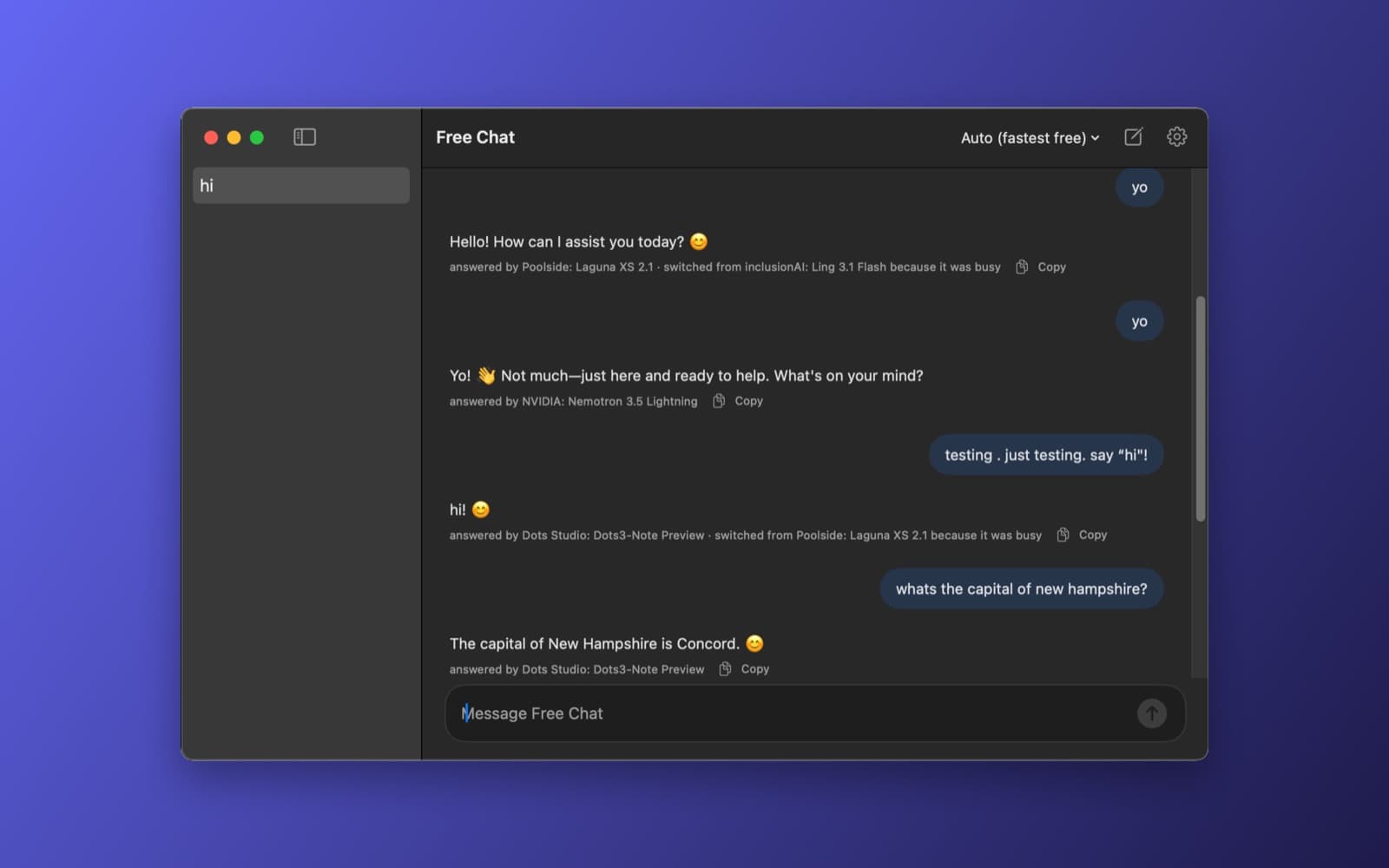
Free Chat is a very simple chat app. You sign in once with your OpenRouter account, and it opens a chat window. It finds a fast free model by itself, and if that model is busy or fails, it moves to the next one, so you get an answer.
What it does
- Sign in with OpenRouter. One button opens OpenRouter's sign-in (OAuth). The app gets an API key for your account and keeps it in the macOS Keychain. You can also paste your own key, and sign out removes it.
- Picks the model for you. The model menu says "Auto (fastest free)". Under each reply it shows which model answered, and when it switched because another was busy.
- Chat. Streaming replies, saved chats in a sidebar, a Copy button on every reply, and a new chat button.
How it was made
One prompt in the SiliconDevKit desktop app. The prompt asks the builder to read OpenRouter's OAuth, chat and model documentation before writing code. The cloud wrote the code and a Mac compiled it. The model-picking idea comes from our earlier ModelRadar app.
Notes
Free models have daily limits on OpenRouter (about 50 requests a day for an account with no credits), and a free model can be slow or busy. The screenshot shows a short test chat. We tested the sign-in, the model switching and a few replies. We did not test images, long chats or the other options in settings.
Information
- Developer
- SiliconDevKit (generated by AI from a prompt)
- Category
- Productivity
- Compatibility
- macOS 13 or later, Apple silicon, a free OpenRouter account. Apple silicon Macs only (M1 or later), not Intel
- Size
- 0.5 MB (.dmg)
- Latest version
- 1.0
- Price
- Free
- Signing
- Ad-hoc signed, not notarized
The prompt behind it
This app was generated from the prompt below. Paste it into SiliconDevKit to build your own version, then change it however you like.
Build a native Mac app called Free Chat: an instant, minimal, clean chatbot that runs on OpenRouter's free models and always answers. The user signs in with their OpenRouter account once (OAuth), and from then on the app finds the best free model by itself, falls back automatically when one fails, and just chats. No settings to learn. RESEARCH FIRST (use WebSearch and WebFetch before you write code) Do not rely on memory. Read: (1) https://openrouter.ai/docs/guides/overview/auth/oauth (the PKCE flow: the authorization URL with callback_url, code_challenge and code_challenge_method=S256, and the POST to https://openrouter.ai/api/v1/auth/keys with the code and code_verifier) and find out exactly which callback URLs OpenRouter accepts (https, http://localhost with a port, or a custom app scheme); (2) https://openrouter.ai/docs/api-reference (chat completions with stream: true, the server-sent event format, the error codes 401, 402, 429 and 5xx, and the optional headers HTTP-Referer and X-Title); (3) the models list (GET https://openrouter.ai/api/v1/models, how to tell a free model: ids ending in :free or zero prompt and completion pricing, and the context length and supported input types such as image); (4) the Free Models Router (model id openrouter/free) and the page on free model limits (requests per minute and per day, and how adding credits raises the daily limit); (5) any endpoint or field that publishes a model's uptime or latency (for example /api/v1/models/{author}/{slug}/endpoints). Where a page disagrees with this prompt, follow the page and say what changed. SIGN IN FIRST (the first screen) - If there is no key in the Keychain, show one clean screen: the app name, one line ("Free AI chat through your OpenRouter account"), a big "Sign in with OpenRouter" button, and under it a small "Use my own API key" link that reveals a secure field (validate the key with a small authenticated call, then save it). - OAuth with PKCE: CryptoKit SHA-256 for the code_challenge and a random 64-character code_verifier. Use whichever callback OpenRouter really accepts. Preferred: ASWebAuthenticationSession with a custom scheme if the docs allow it; otherwise start a tiny local HTTP listener on 127.0.0.1 (Network framework NWListener, a free port, closed right after one request) and open the sign-in page in the default browser, then show a friendly "You can close the browser tab" page. Exchange the code for a key, then store only the key in the Keychain (Security framework, kSecClassGenericPassword, this app's service name). Never write the key to UserDefaults, a file, a log or the screen. - Handle a cancelled sign-in, a closed browser, a timeout (after 3 minutes), no network, and a rejected exchange with plain-language messages and a Try again button. - Sign out (menu): delete the key from the Keychain and return to the sign-in screen. Also a menu item "Manage keys on OpenRouter" that opens https://openrouter.ai/keys. FINDING THE BEST FREE MODEL (automatic, invisible) - After sign-in, and again on every launch (cached for 15 minutes in Application Support), call the models list and keep the free models. Rank them with the published uptime and latency if the research found them, then send a tiny test request (max_tokens 1, a 6 second timeout) to only the top 3 to 5 candidates, in parallel, and sort by the measured time to the first token. Do not probe every free model: free requests count against a daily limit (about 50 per day for accounts without credits), so keep probes few and cached, and never probe again after a successful chat unless a failure happens. Say nothing about this unless the user opens the model menu. - The result is an ordered ladder: [fastest probed model, next, next, ..., openrouter/free as the last resort]. If probing fails entirely (offline or rate limited), the ladder is just openrouter/free so chat still works. - Fallback while chatting: if a request fails with 429, 5xx, a timeout over 8 seconds before the first token, an empty reply or a model that no longer exists, silently retry the same message on the next model in the ladder (up to 4 tries) and mark the failed one as "cooling down" for 10 minutes. The user sees only a small label under the answer ("answered by <model name>", and "switched from <model> because it was busy" when it fell back). Respect a Retry-After header. If all fail, say so plainly with a Try again button and the real reason (for example "Daily free limit reached; it resets at midnight UTC, or add credits at openrouter.ai"). - Handle 401 (the key was revoked: show the sign-in screen with a message) and 402 (out of credit on a paid model: skip to a free one) differently from the others. - A model menu (small, in the toolbar) shows "Auto (fastest free)" by default, the current model, and a list of the free models with a refresh button. Choosing one pins it for that chat, and it still falls back if it fails. THE CHAT (opens straight after sign-in, minimal and fast) - One window: a slim sidebar of saved chats (title from the first message, delete, rename), a large conversation area, and a multi-line input at the bottom (Return sends, Shift-Return makes a new line, a Stop button while streaming). - Streaming replies with server-sent events (URLSession bytes(for:) or a delegate), text appearing token by token with no lag, auto-scroll that stops when the user scrolls up, and a "thinking" indicator until the first token. Never block the main thread. - Render Markdown (AttributedString(markdown:) for text, and a monospaced block with a Copy button for fenced code), selectable text, and a Copy button on each reply and Regenerate on the last one. - Images: drag and drop or paste an image into the input to attach it (only if the chosen model accepts images; otherwise say "this model can't see images" and offer to switch to one that can, using the ladder filtered to vision-capable models). Send images as base64 data URLs; limit size and downscale large ones. - A system prompt field (global, default empty) in a small settings sheet, plus the keyboard shortcut for new chat (Command-N). - Save every chat as JSON in Application Support (the last 200 chats), loaded lazily. Send the whole conversation each time, and trim the oldest messages to fit the model's context length. - Menu bar icon: an NSStatusItem with a global hotkey (Control-Option-Space, registered with the Carbon RegisterEventHotKey API, and say in the settings if it conflicts) that shows the window and focuses the input. Also an item to start a new chat and to quit. - Looks: native and calm. System fonts, a clean light and dark mode, rounded message bubbles (the user's tinted, the assistant's plain), generous spacing, subtle animation, a small status dot in the toolbar (green: ready, yellow: switching model, red: failing). No clutter and no onboarding tour. First message to first token should feel instant. QUALITY - macOS 13, Swift 5 language mode, SwiftUI with ObservableObject and @Published. Only Apple frameworks, no packages, no Xcode project or asset catalog. Modular files: OpenRouterAuth (PKCE, callback, exchange), KeychainStore, OpenRouterClient (models, chat streaming, errors), ModelRanker (stats, probes, cache, ladder, cool-downs), ChatStore, ChatViewModel (fallback logic), MarkdownView, and the views. Add the network client entitlement and a URL scheme only if the research says it is needed. - The code is compiled later on the user's Mac, not here: check every initializer, argument label and optional, with no force-unwraps. Do not fake anything: no sample models, no pretend replies. Show every real error in plain language with a Show Details box. - In your reply, say in a few sentences what you built, what the lookups changed (the callback rules, the model fields, the limits), and what you could not test: the OAuth sign-in, the streaming format, the ranking and the fallback behaviour were not run.
What it cost
Every AI run that made this demo, one per line. Model: Claude Sonnet 5.5. Tokens are shown as (in / out). “In” counts everything the model read, including text it had already seen in the session at a reduced price.
| Initial prompt(1.31M in / 82k out) | 152 credits | |
| = | Total(1.31M in / 82k out) | 152 credits |
Credits are what a build uses on your plan. This counts AI usage only: hosting and the Mac that compiled it are not included.
Version tree
Every change to this app is a new version. Use any build as a template to start your own copy from it; forks that their makers shared appear as branches.
Version 1.0Oct 10, 2026
Build a native Mac app called Free Chat: an instant, minimal, clean chatbot that runs on OpenRouter's free models and always answers. The user signs in with their OpenRouter account once (OAuth), and from then on the app finds the best free model by itself, falls back automatically when one fails, and just chats. No settings to learn. RESEARCH FIRST (use WebSearch and WebFetch before you write code) Do not rely on memory. Read: (1) https://openrouter.ai/docs/guides/overview/auth/oauth (the PKCE flow: the authorization URL with callback_url, code_challenge and code_challenge_method=S256, and the POST to https://openrouter.ai/api/v1/auth/keys with the code and code_verifier) and find out exactly which callback URLs OpenRouter accepts (https, http://localhost with a port, or a custom app scheme); (2) https://openrouter.ai/docs/api-reference (chat completions with stream: true, the server-sent event format, the error codes 401, 402, 429 and 5xx, and the optional headers HTTP-Referer and X-Title); (3) the models list (GET https://openrouter.ai/api/v1/models, how to tell a free model: ids ending in :free or zero prompt and completion pricing, and the context length and supported input types such as image); (4) the Free Models Router (model id openrouter/free) and the page on free model limits (requests per minute and per day, and how adding credits raises the daily limit); (5) any endpoint or field that publishes a model's uptime or latency (for example /api/v1/models/{author}/{slug}/endpoints). Where a page disagrees with this prompt, follow the page and say what changed. SIGN IN FIRST (the first screen) - If there is no key in the Keychain, show one clean screen: the app name, one line ("Free AI chat through your OpenRouter account"), a big "Sign in with OpenRouter" button, and under it a small "Use my own API key" link that reveals a secure field (validate the key with a small authenticated call, then save it). - OAuth with PKCE: CryptoKit SHA-256 for the code_challenge and a random 64-character code_verifier. Use whichever callback OpenRouter really accepts. Preferred: ASWebAuthenticationSession with a custom scheme if the docs allow it; otherwise start a tiny local HTTP listener on 127.0.0.1 (Network framework NWListener, a free port, closed right after one request) and open the sign-in page in the default browser, then show a friendly "You can close the browser tab" page. Exchange the code for a key, then store only the key in the Keychain (Security framework, kSecClassGenericPassword, this app's service name). Never write the key to UserDefaults, a file, a log or the screen. - Handle a cancelled sign-in, a closed browser, a timeout (after 3 minutes), no network, and a rejected exchange with plain-language messages and a Try again button. - Sign out (menu): delete the key from the Keychain and return to the sign-in screen. Also a menu item "Manage keys on OpenRouter" that opens https://openrouter.ai/keys. FINDING THE BEST FREE MODEL (automatic, invisible) - After sign-in, and again on every launch (cached for 15 minutes in Application Support), call the models list and keep the free models. Rank them with the published uptime and latency if the research found them, then send a tiny test request (max_tokens 1, a 6 second timeout) to only the top 3 to 5 candidates, in parallel, and sort by the measured time to the first token. Do not probe every free model: free requests count against a daily limit (about 50 per day for accounts without credits), so keep probes few and cached, and never probe again after a successful chat unless a failure happens. Say nothing about this unless the user opens the model menu. - The result is an ordered ladder: [fastest probed model, next, next, ..., openrouter/free as the last resort]. If probing fails entirely (offline or rate limited), the ladder is just openrouter/free so chat still works. - Fallback while chatting: if a request fails with 429, 5xx, a timeout over 8 seconds before the first token, an empty reply or a model that no longer exists, silently retry the same message on the next model in the ladder (up to 4 tries) and mark the failed one as "cooling down" for 10 minutes. The user sees only a small label under the answer ("answered by <model name>", and "switched from <model> because it was busy" when it fell back). Respect a Retry-After header. If all fail, say so plainly with a Try again button and the real reason (for example "Daily free limit reached; it resets at midnight UTC, or add credits at openrouter.ai"). - Handle 401 (the key was revoked: show the sign-in screen with a message) and 402 (out of credit on a paid model: skip to a free one) differently from the others. - A model menu (small, in the toolbar) shows "Auto (fastest free)" by default, the current model, and a list of the free models with a refresh button. Choosing one pins it for that chat, and it still falls back if it fails. THE CHAT (opens straight after sign-in, minimal and fast) - One window: a slim sidebar of saved chats (title from the first message, delete, rename), a large conversation area, and a multi-line input at the bottom (Return sends, Shift-Return makes a new line, a Stop button while streaming). - Streaming replies with server-sent events (URLSession bytes(for:) or a delegate), text appearing token by token with no lag, auto-scroll that stops when the user scrolls up, and a "thinking" indicator until the first token. Never block the main thread. - Render Markdown (AttributedString(markdown:) for text, and a monospaced block with a Copy button for fenced code), selectable text, and a Copy button on each reply and Regenerate on the last one. - Images: drag and drop or paste an image into the input to attach it (only if the chosen model accepts images; otherwise say "this model can't see images" and offer to switch to one that can, using the ladder filtered to vision-capable models). Send images as base64 data URLs; limit size and downscale large ones. - A system prompt field (global, default empty) in a small settings sheet, plus the keyboard shortcut for new chat (Command-N). - Save every chat as JSON in Application Support (the last 200 chats), loaded lazily. Send the whole conversation each time, and trim the oldest messages to fit the model's context length. - Menu bar icon: an NSStatusItem with a global hotkey (Control-Option-Space, registered with the Carbon RegisterEventHotKey API, and say in the settings if it conflicts) that shows the window and focuses the input. Also an item to start a new chat and to quit. - Looks: native and calm. System fonts, a clean light and dark mode, rounded message bubbles (the user's tinted, the assistant's plain), generous spacing, subtle animation, a small status dot in the toolbar (green: ready, yellow: switching model, red: failing). No clutter and no onboarding tour. First message to first token should feel instant. QUALITY - macOS 13, Swift 5 language mode, SwiftUI with ObservableObject and @Published. Only Apple frameworks, no packages, no Xcode project or asset catalog. Modular files: OpenRouterAuth (PKCE, callback, exchange), KeychainStore, OpenRouterClient (models, chat streaming, errors), ModelRanker (stats, probes, cache, ladder, cool-downs), ChatStore, ChatViewModel (fallback logic), MarkdownView, and the views. Add the network client entitlement and a URL scheme only if the research says it is needed. - The code is compiled later on the user's Mac, not here: check every initializer, argument label and optional, with no force-unwraps. Do not fake anything: no sample models, no pretend replies. Show every real error in plain language with a Show Details box. - In your reply, say in a few sentences what you built, what the lookups changed (the callback rules, the model fields, the limits), and what you could not test: the OAuth sign-in, the streaming format, the ranking and the fallback behaviour were not run.
Instant, minimal chat that runs on OpenRouter's free models and falls back automatically so it always answers.
Opening it for the first time
- Open the .dmg and drag Free Chat onto the Applications folder.
- Open it from Applications. macOS may say it can’t check the app for malicious software. Click Done.
- Open System Settings → Privacy & Security and click Open Anyway. This is needed once. Why this happens. To share an app without the warning, see how to notarize it.
You might also like
 Get
GetPlayTube
Paste a video link and watch it in a clean player, with no ads.
 Get
GetAdMute
Listens to your Mac's audio and mutes the ads, then brings the sound back.
 Get
GetToob-Downer
Paste a video link and save the video to your Mac, with a queue to keep track.
 Get
GetAgent Swarm
Send one task to Claude, Gemini and Hermes at once.