
Media
Cinema
A dark streaming-style app for Archive.org's public films, with torrent search and a built-in video player.
- Category
- Media
- Requires
- macOS 13+
- Size
- 845 KB
- Price
- Free
Preview
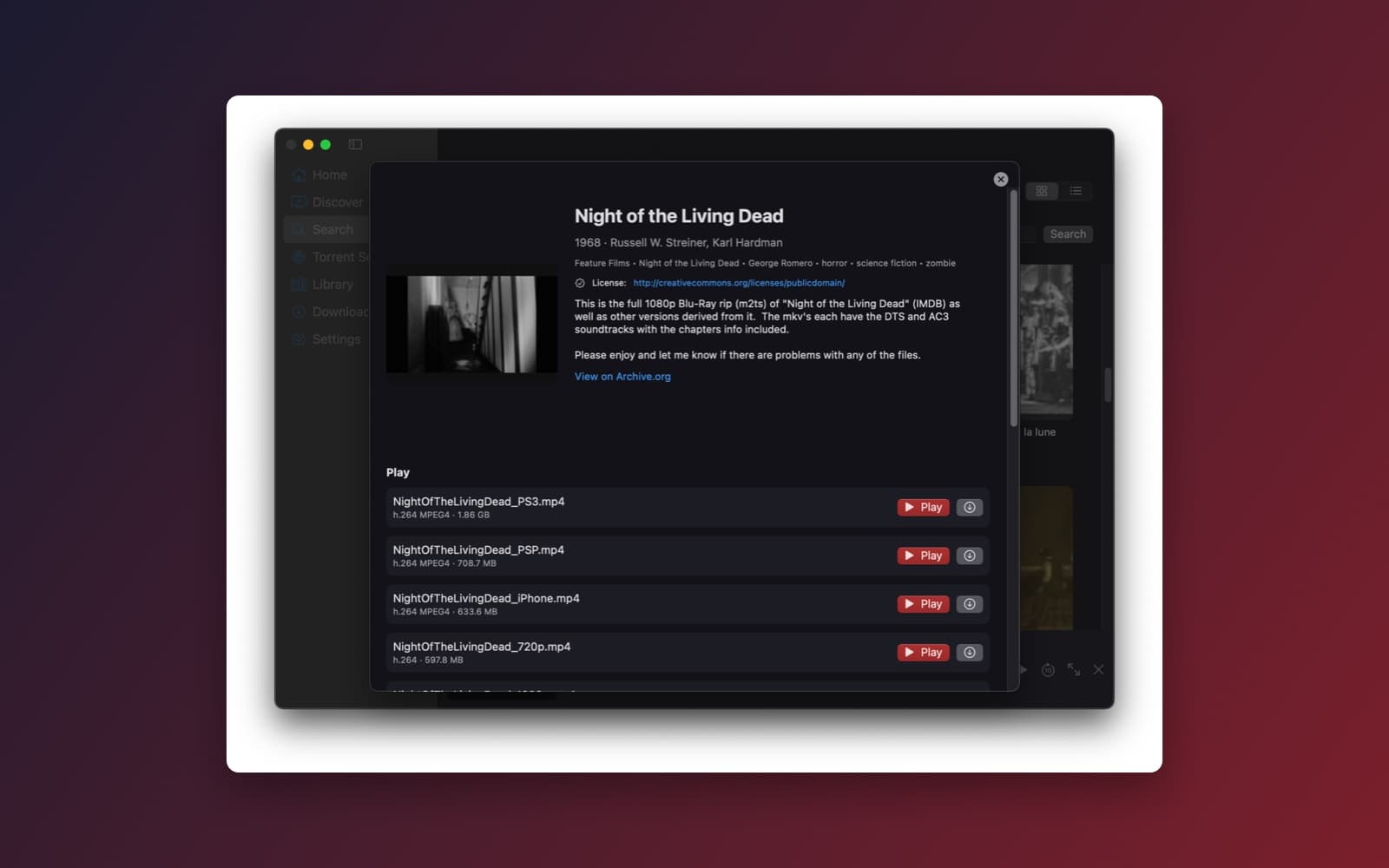
About Cinema
Cinema is a dark, streaming-service style window for finding films and playing them. It searches the Internet Archive's public catalog and shows each film's details, license link and playable files, with a Play button and a download button on every file.
What it does
- Search and browse. Home, Discover and Search in the sidebar, with poster cards or a list. Results come from the Internet Archive's public catalog, not from a list built into the app.
- Film pages. Each film shows its year, people, tags, the license the Archive lists for it, a description and a link back to its Archive.org page. The Archive does not mark every item as public domain, so check the license shown.
- Play or save. Every video file the Archive offers for a film is listed with its format and size. Press Play to watch it in the built-in player, or download it.
- Torrent Search. A separate screen searches torrent sources you can turn on and off. It only lists results, and nothing downloads or plays until you choose it.
- Library, Downloads and Settings. What you have watched and saved, and the settings for where files are kept.
Notes
Cinema does not host any video. It is a search and playback tool, so what you can watch depends on what the Archive and your chosen sources offer. Torrent playback depends on which torrent engine the build could use, and some sources may be down or blocked. Use it only for content you have the right to watch, and see the copyright page for takedown requests.
Information
- Developer
- SiliconDevKit (generated by AI from a prompt)
- Category
- Media
- Compatibility
- macOS 13 or later, Apple silicon. Apple silicon Macs only (M1 or later), not Intel
- Size
- 845 KB (.dmg)
- Latest version
- 1.0
- Price
- Free
- Signing
- Ad-hoc signed, not notarized
The prompt behind it
This app was generated from the prompt below. Paste it into SiliconDevKit to build your own version, then change it however you like.
Build a polished, production-ready native macOS streaming cinema app using Swift + SwiftUI. It combines searchable public-domain films, torrent metasearch, streaming torrent playback, and a built-in video player. The experience should feel like a premium, minimal streaming service—not a torrent utility. Deliver a working end-to-end implementation, not a mockup. Do not host video content or operate a proprietary torrent index. The app searches external catalogs and sources. CORE EXPERIENCE Users can: Search movies, documentaries, films, and other video content. Search Archive.org's public catalog. Search multiple configurable torrent metadata sources from inside the app. Browse results with posters, titles, years, genres, descriptions, quality, and source info where available. Stream supported Archive.org videos directly. Open a torrent or magnet link and begin playback before the full file finishes downloading. Pause, resume, seek, and manage playback. Track buffering and download progress. Manage temporary storage and completed downloads. BUILT-IN TORRENT METASEARCH Torrent metasearch is a core feature, not an optional add-on. Provide a search bar that searches multiple configurable torrent metadata providers in parallel. Requirements: Search by title and keywords. Aggregate results into one unified list. Deduplicate matching torrents using info hashes when available. Display title, size, seeders, leechers, source, and available metadata. Sort by seeders, size, title, and source. Filter by video format, resolution, size, and source when supported. Show individual provider status and failures. Support magnet links and torrent files. Let users configure, enable, disable, and remove metadata providers. Use provider adapters so individual sources can be updated independently. Handle unavailable providers gracefully without failing the entire search. Inspect provider APIs, terms, availability, and legal restrictions before implementing integrations. Prefer documented APIs and maintained sources. Do not hardcode a single fragile scraping implementation or invent search results. Search only metadata. Do not automatically download or play results without user action. Include Archive.org results alongside torrent search results, clearly identifying each source. ARCHIVE.ORG Integrate the Internet Archive's public metadata and search APIs. Search titles and descriptions, display available metadata, and inspect item files to identify playable video formats. Prefer direct HTTP streaming when a compatible media URL exists. Do not download the entire file before playback unless necessary. Handle missing files, restricted items, and unsupported formats gracefully. Clearly identify source links and public-domain or licensing information when provided by the catalog. Do not assume every Archive.org item is public domain. TORRENT STREAMING ENGINE Use a mature torrent engine such as libtorrent-rasterbar, with a maintained and compatible macOS integration. Inspect current releases, licensing, architecture support, and distribution requirements before choosing the implementation. Do not implement the BitTorrent protocol from scratch. Support: Magnet links Torrent files DHT and peer discovery Metadata acquisition Download progress Peer and connection status Cancellation and cleanup Sequential Streaming Implement real sequential download prioritization: Resolve magnet metadata. Identify video files in multi-file torrents. Let the user choose a video when several are available. Prioritize the pieces required for playback in order. Maintain a local disk-backed cache. Start playback when sufficient initial data is available. Continue downloading while playing. Reprioritize pieces when the user seeks. Pause playback gracefully when buffering runs out. Resume automatically when enough data arrives. Use piece priorities and deadlines where supported by the chosen engine. Do not rely on a simplistic percentage-based buffer. Serve cached torrent data through a local HTTP server bound only to loopback, using a random port and appropriate access restrictions, or use a reliable direct integration with the player. Never expose the local streaming server to the public network. BUILT-IN VIDEO PLAYER Use libmpv or another mature player with broad format support and reliable macOS hardware acceleration. The player must support: Play and pause Seeking Volume and mute Fullscreen Subtitles Audio-track selection Playback speed Keyboard shortcuts Aspect-ratio handling Buffering indicators Playback errors and recovery Automatically discover subtitle files in the same torrent and allow manual subtitle selection. The player must handle HTTP streams from Archive.org and local HTTP streams from the torrent cache. Keep playback responsive and all blocking work off the main thread. MAIN WINDOW AND DISCOVERY Create a premium dark native macOS interface. Sidebar: Home Discover Search Torrent Search Library Downloads Settings Home: Featured public-domain films Popular Archive.org discoveries Recently viewed Continue watching Search suggestions Recently added local content Use real catalog data. Never fabricate movie posters, ratings, availability, or recommendations. Search results should use attractive poster cards when artwork is available, with a compact list view option. Torrent results should use a dense table optimized for comparing sources, seeders, sizes, and quality. Include a persistent mini-player when playback is active. STORAGE AND DOWNLOAD MANAGEMENT Use a configurable application-managed cache directory. Support: Cache size limit Free-space monitoring Automatic cleanup of old temporary data Clearing cached content Preserving explicitly saved downloads Cancelling and removing torrent tasks Resuming supported downloads after restart Never delete user-selected permanent downloads during automatic cache cleanup. Provide clear controls for whether a torrent remains active after playback ends. Seeding behavior must be transparent and configurable. LEGAL AND SAFETY DESIGN The app is a general-purpose search and playback tool, not a content-hosting service. Clearly identify sources and their licensing information when available. Do not claim that arbitrary search results are legal to download. Let users manage metadata providers and understand where results originate. Avoid hidden background uploads or seeding. ARCHITECTURE Use modular Swift components: AppState SearchAggregator TorrentSearchProvider ProviderRegistry ArchiveOrgProvider TorrentEngine TorrentSession StreamBuffer LocalStreamServer VideoPlayerManager PlaybackCoordinator SubtitleManager LibraryStore DownloadManager CacheManager SettingsStore Use clear interfaces between the UI, metadata providers, torrent engine, and player. Keep third-party dependencies isolated behind small adapters. Handle cancellation, concurrency, and cleanup correctly. TESTING Do not stop after creating the UI. Test the full workflows: Archive.org search and playback Multiple-provider torrent metasearch Provider failure and partial results Magnet metadata acquisition Torrent download Sequential playback before download completion Seeking and piece reprioritization Buffer underrun and recovery Multi-file torrent selection Subtitle loading Pause, resume, and cancellation Restart recovery Cache cleanup Disk-space exhaustion Clean-Mac installation Use known test torrents and media that you are authorized to access. Include automated tests for search aggregation, stream buffering, and provider adapters. FINAL REQUIREMENT Deliver a real native macOS app with a working built-in torrent metasearch, Archive.org discovery, torrent streaming engine, and integrated video player. Prioritize reliable playback and search over adding lots of secondary features.
What it cost
The cost of this demo was not recorded in our usage log. Demos built through the live build system show every run with its tokens and cost.
Version tree
Every change to this app is a new version. Use any build as a template to start your own copy from it; forks that their makers shared appear as branches.
Version 1.0Oct 9, 2026
Build a polished, production-ready native macOS streaming cinema app using Swift + SwiftUI. It combines searchable public-domain films, torrent metasearch, streaming torrent playback, and a built-in video player. The experience should feel like a premium, minimal streaming service—not a torrent utility. Deliver a working end-to-end implementation, not a mockup. Do not host video content or operate a proprietary torrent index. The app searches external catalogs and sources. CORE EXPERIENCE Users can: Search movies, documentaries, films, and other video content. Search Archive.org's public catalog. Search multiple configurable torrent metadata sources from inside the app. Browse results with posters, titles, years, genres, descriptions, quality, and source info where available. Stream supported Archive.org videos directly. Open a torrent or magnet link and begin playback before the full file finishes downloading. Pause, resume, seek, and manage playback. Track buffering and download progress. Manage temporary storage and completed downloads. BUILT-IN TORRENT METASEARCH Torrent metasearch is a core feature, not an optional add-on. Provide a search bar that searches multiple configurable torrent metadata providers in parallel. Requirements: Search by title and keywords. Aggregate results into one unified list. Deduplicate matching torrents using info hashes when available. Display title, size, seeders, leechers, source, and available metadata. Sort by seeders, size, title, and source. Filter by video format, resolution, size, and source when supported. Show individual provider status and failures. Support magnet links and torrent files. Let users configure, enable, disable, and remove metadata providers. Use provider adapters so individual sources can be updated independently. Handle unavailable providers gracefully without failing the entire search. Inspect provider APIs, terms, availability, and legal restrictions before implementing integrations. Prefer documented APIs and maintained sources. Do not hardcode a single fragile scraping implementation or invent search results. Search only metadata. Do not automatically download or play results without user action. Include Archive.org results alongside torrent search results, clearly identifying each source. ARCHIVE.ORG Integrate the Internet Archive's public metadata and search APIs. Search titles and descriptions, display available metadata, and inspect item files to identify playable video formats. Prefer direct HTTP streaming when a compatible media URL exists. Do not download the entire file before playback unless necessary. Handle missing files, restricted items, and unsupported formats gracefully. Clearly identify source links and public-domain or licensing information when provided by the catalog. Do not assume every Archive.org item is public domain. TORRENT STREAMING ENGINE Use a mature torrent engine such as libtorrent-rasterbar, with a maintained and compatible macOS integration. Inspect current releases, licensing, architecture support, and distribution requirements before choosing the implementation. Do not implement the BitTorrent protocol from scratch. Support: Magnet links Torrent files DHT and peer discovery Metadata acquisition Download progress Peer and connection status Cancellation and cleanup Sequential Streaming Implement real sequential download prioritization: Resolve magnet metadata. Identify video files in multi-file torrents. Let the user choose a video when several are available. Prioritize the pieces required for playback in order. Maintain a local disk-backed cache. Start playback when sufficient initial data is available. Continue downloading while playing. Reprioritize pieces when the user seeks. Pause playback gracefully when buffering runs out. Resume automatically when enough data arrives. Use piece priorities and deadlines where supported by the chosen engine. Do not rely on a simplistic percentage-based buffer. Serve cached torrent data through a local HTTP server bound only to loopback, using a random port and appropriate access restrictions, or use a reliable direct integration with the player. Never expose the local streaming server to the public network. BUILT-IN VIDEO PLAYER Use libmpv or another mature player with broad format support and reliable macOS hardware acceleration. The player must support: Play and pause Seeking Volume and mute Fullscreen Subtitles Audio-track selection Playback speed Keyboard shortcuts Aspect-ratio handling Buffering indicators Playback errors and recovery Automatically discover subtitle files in the same torrent and allow manual subtitle selection. The player must handle HTTP streams from Archive.org and local HTTP streams from the torrent cache. Keep playback responsive and all blocking work off the main thread. MAIN WINDOW AND DISCOVERY Create a premium dark native macOS interface. Sidebar: Home Discover Search Torrent Search Library Downloads Settings Home: Featured public-domain films Popular Archive.org discoveries Recently viewed Continue watching Search suggestions Recently added local content Use real catalog data. Never fabricate movie posters, ratings, availability, or recommendations. Search results should use attractive poster cards when artwork is available, with a compact list view option. Torrent results should use a dense table optimized for comparing sources, seeders, sizes, and quality. Include a persistent mini-player when playback is active. STORAGE AND DOWNLOAD MANAGEMENT Use a configurable application-managed cache directory. Support: Cache size limit Free-space monitoring Automatic cleanup of old temporary data Clearing cached content Preserving explicitly saved downloads Cancelling and removing torrent tasks Resuming supported downloads after restart Never delete user-selected permanent downloads during automatic cache cleanup. Provide clear controls for whether a torrent remains active after playback ends. Seeding behavior must be transparent and configurable. LEGAL AND SAFETY DESIGN The app is a general-purpose search and playback tool, not a content-hosting service. Clearly identify sources and their licensing information when available. Do not claim that arbitrary search results are legal to download. Let users manage metadata providers and understand where results originate. Avoid hidden background uploads or seeding. ARCHITECTURE Use modular Swift components: AppState SearchAggregator TorrentSearchProvider ProviderRegistry ArchiveOrgProvider TorrentEngine TorrentSession StreamBuffer LocalStreamServer VideoPlayerManager PlaybackCoordinator SubtitleManager LibraryStore DownloadManager CacheManager SettingsStore Use clear interfaces between the UI, metadata providers, torrent engine, and player. Keep third-party dependencies isolated behind small adapters. Handle cancellation, concurrency, and cleanup correctly. TESTING Do not stop after creating the UI. Test the full workflows: Archive.org search and playback Multiple-provider torrent metasearch Provider failure and partial results Magnet metadata acquisition Torrent download Sequential playback before download completion Seeking and piece reprioritization Buffer underrun and recovery Multi-file torrent selection Subtitle loading Pause, resume, and cancellation Restart recovery Cache cleanup Disk-space exhaustion Clean-Mac installation Use known test torrents and media that you are authorized to access. Include automated tests for search aggregation, stream buffering, and provider adapters. FINAL REQUIREMENT Deliver a real native macOS app with a working built-in torrent metasearch, Archive.org discovery, torrent streaming engine, and integrated video player. Prioritize reliable playback and search over adding lots of secondary features.
A dark streaming-style app for Archive.org public films, multi-provider torrent metasearch, and a built-in video player.
Fork: Cinema
Version 1.0.1Oct 9, 2026
FOLLOW-UP: Two changes to the existing streaming cinema app. Keep the current architecture, provider adapters, torrent engine, player, and UI. Modify and extend them; do not rewrite. ## 1) FIX: "A server with the specified hostname could not be found" (YTS provider) That error is a DNS failure: the provider's hardcoded domain no longer resolves. Fix the root cause, not just the string: * Remove hardcoded base URLs from all provider adapters. Each provider gets a user-editable Base URL in Settings → Providers, stored in SettingsStore and validated as http(s) with a host. Keep each adapter's existing API paths and query parameters; only the host changes. * Support an ordered list of mirror URLs per provider. On DNS failure, connection refused, TLS error, timeout, or a non-JSON response, automatically try the next mirror and remember the last working one. * Add a "Test Connection" button per provider showing reachability, response time, and whether the response parses as the expected API format. * Detect HTML or challenge pages (Cloudflare and similar) returned in place of JSON, and report "Provider returned a web page instead of API data" rather than a decode error. * Make sure ATS/network settings allow the configured scheme. Prefer HTTPS. * Per-provider error banners in Torrent Search must be human-readable ("YTS unreachable at <host>. Check the address in Settings → Providers") with a Settings shortcut, while the other providers' results still display. * After the fix, confirm the provider loads with the URL I enter in Settings, and that a dead mirror fails over cleanly. ## 2) ADD: One-click Play from Torrent Search Add a Play button as the first (leftmost) column of every Torrent Search result row (SF Symbol play.fill, accent-colored, with hover state and a tooltip "Stream now"). Clicking it streams the torrent in the built-in player with no further steps. Double-clicking a row and pressing Return on a selected row do the same. Flow (implement in PlaybackCoordinator, reusing TorrentEngine, StreamBuffer, LocalStreamServer): 1. Start or reuse a TorrentSession for the magnet/torrent. If the same info hash is already active, attach to it rather than adding it again. 2. Open the player window immediately with a loading overlay showing real stages: Connecting to peers → Fetching metadata → Selecting file → Buffering X% (show peers, download speed) and a Cancel button. 3. Auto-select the video file: filter by video extensions (mkv, mp4, m4v, avi, mov, webm, ts). Exclude files whose names or paths contain sample, trailer, or extras, or that are under 10% of the largest file. Pick the largest remaining file. If several large video files remain (episodes or parts), show a quick picker sorted naturally by name. 4. Set all other files to priority 0, except subtitle files (.srt, .vtt, .ass, .ssa, .sub), which download fully and load into the player automatically. 5. Sequential streaming: set piece deadlines for the opening window, and also prioritize the final pieces of the file so MP4 moov atoms and MKV cues/index are available. Start playback once the opening window and tail pieces are present, not after an arbitrary percentage. 6. Hand the player the loopback-only local HTTP stream URL with range support. 7. On seek, reprioritize pieces around the new position. On underrun, pause with a buffering spinner and resume automatically. Quality variants: if a provider result offers multiple qualities for one title (e.g. 720p/1080p/2160p), Play uses a "Preferred streaming quality" setting (default 1080p, falling back to the nearest available). Attach a small dropdown arrow to the Play button to choose another quality. Row states: the Play button becomes a spinner while starting, a "now playing" indicator while active, and a retry icon on failure. Errors (friendly message + log): * 0 seeders: warn before starting, with a "Try anyway" option. * No metadata after 60s: show a timeout message with Retry and Cancel. * No playable video file found. * Unsupported codec: try mpv's fallbacks first. * Disk space too low for the cache. * Stream stalls with no peers. Cancel or close player: stop the session and clean the cache per the existing "keep after playback" and seeding settings. Upload/seeding activity must be visible in the player overlay and Downloads screen, and controllable (upload rate limit, stop-seeding-on-close). Also wire the existing mini-player and Continue Watching so a torrent stream started from Torrent Search resumes at the last position when played again. ## ARCHITECTURE Add or modify: ProviderEndpointConfig (base URL + mirror list per provider), ProviderHealthChecker, adapter updates for configurable hosts, a TorrentResultRow Play column, PlaybackCoordinator.playFromSearchResult(_:quality:), VideoFileSelector (sample/extras filtering + natural sort), and tail-piece prioritization in StreamBuffer. ## TESTS * Unit tests: mirror failover, HTML-instead-of-JSON detection, URL validation, VideoFileSelector (samples, extras, multi-episode), quality fallback. * End-to-end with known legally distributable test torrents (e.g. public-domain films or Blender open movies): Play from a result → metadata → playback before completion → seek → underrun recovery → cancel → replay resumes position. * Multi-file torrent picker, subtitle auto-load, provider down while others succeed. Compile, run the tests, and verify both fixes work in the built .app before finishing.
A dark streaming-style app for Archive.org public films, multi-provider torrent search with failover mirrors, and one-click torrent streaming in a built-in player.
Opening it for the first time
- Open the .dmg and drag Cinema onto the Applications folder.
- Open it from Applications. macOS may say it can’t check the app for malicious software. Click Done.
- Open System Settings → Privacy & Security and click Open Anyway. This is needed once. Why this happens. To share an app without the warning, see how to notarize it.
You might also like
 Get
GetPlayTube
Paste a video link and watch it in a clean player, with no ads.
 Get
GetAdMute
Listens to your Mac's audio and mutes the ads, then brings the sound back.
 Get
GetToob-Downer
Paste a video link and save the video to your Mac, with a queue to keep track.
 Get
GetAgent Swarm
Send one task to Claude, Gemini and Hermes at once.