
Game
N64 Emulator
One button downloads an N64 emulator and a free game, then plays it.
- Category
- Game
- Requires
- macOS 13+
- Size
- 0.8 MB
- Price
- Free
Preview
About N64 Emulator
N64 Emulator is the simplest way to play a Nintendo 64 game on a Mac. The first time you click Play, it downloads the open-source Ares emulator and a free homebrew game, BotBoy!64, and starts the game. After that, Play starts it at once. You do not set anything up.
What it does
- One button. The first click downloads and sets up both. It shows what it is doing at each step.
- Ares emulator. It uses Ares, a free open-source emulator with a Mac version. The app downloads it from the project's releases and keeps it in its own folder.
- BotBoy!64. A free 3D platformer made by Psyop Studios for the 2025 N64brew Game Jam. The app downloads it from the game's official page. It does not contain the game.
- Controls card. The window lists the game's controls and says a game controller works too.
- Reset. One link removes the downloaded files so you can start fresh.
How it was made
One prompt in the SiliconDevKit desktop app. The prompt asks the builder to read the Ares releases and documentation and the game's page first, and it describes the steps for getting the game's file from the official page. The cloud wrote the code and a Mac compiled it. The first try of the prompt named two GitHub projects, and the importer refused it as too large, so the GitHub addresses were removed and the second try worked.
Notes
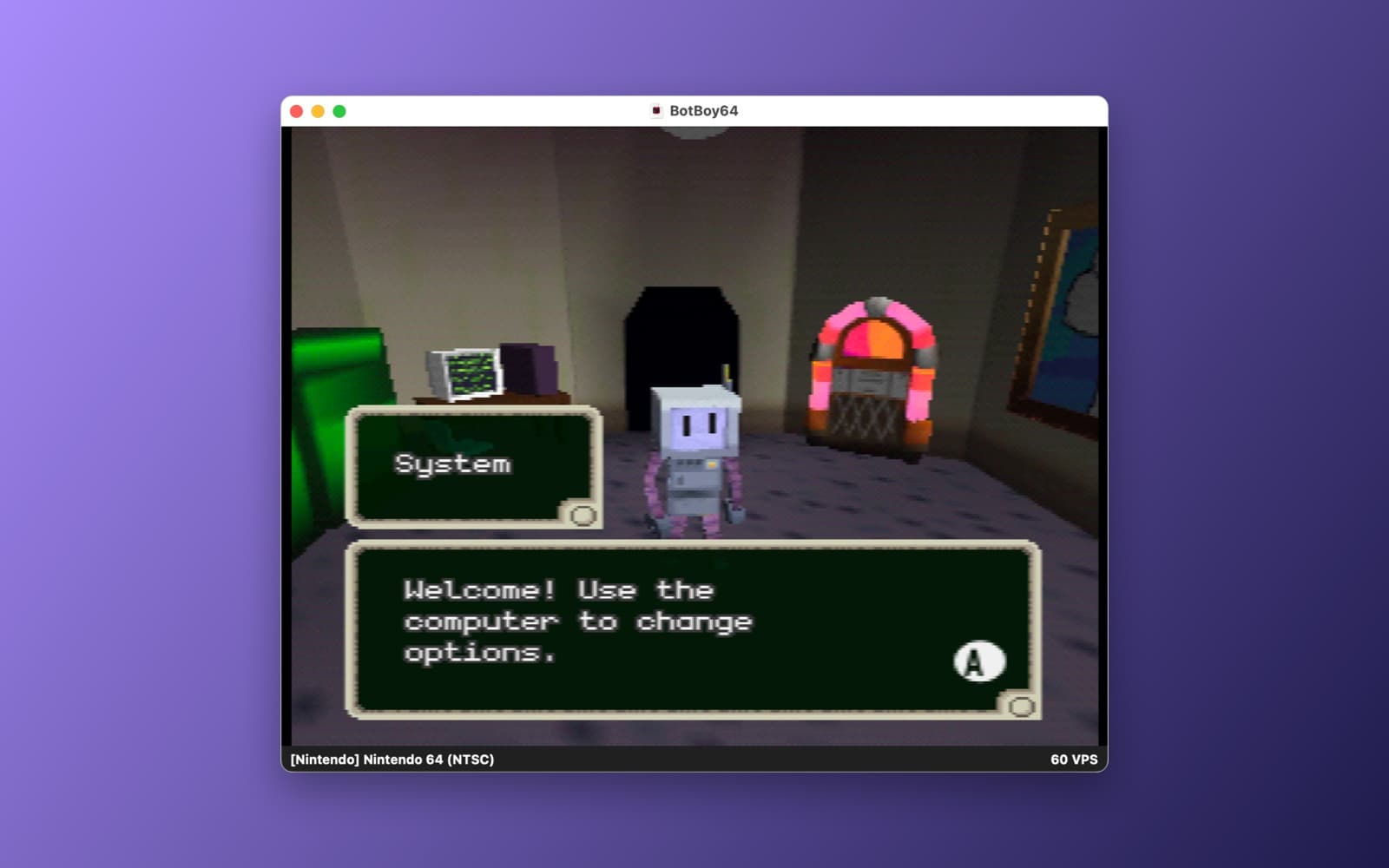
The screenshot shows BotBoy!64 running in Ares at 60 frames per second, started by the app. We tested the download, the start and the first screen of the game. We did not test the controls in depth, fullscreen, updating Ares or the Reset link. The first launch needs internet. Ares is open source (ISC license). BotBoy!64 belongs to its authors, and the app only downloads it from their official page. This app is not affiliated with either project.
Information
- Developer
- SiliconDevKit (generated by AI from a prompt)
- Category
- Game
- Compatibility
- macOS 13 or later, Apple silicon, internet for the first launch. Apple silicon Macs only (M1 or later), not Intel
- Size
- 0.8 MB (.dmg)
- Latest version
- 1.0
- Price
- Free
- Signing
- Ad-hoc signed, not notarized
The prompt behind it
This game was generated from the prompt below. Paste it into SiliconDevKit to build your own version, then change it however you like.
Build an extremely simple Mac app called N64 Emulator. One window, one big button. The first time the user clicks "Play", the app downloads the Ares Nintendo 64 emulator and the free homebrew game BotBoy!64, and then launches the game in Ares. After that, "Play" starts the game at once, with no setup and no menus to learn. Swift only, no packages, no Homebrew, no Terminal. RESEARCH FIRST (use WebSearch and WebFetch before you write code) Do not rely on memory. Read and check: (1) Ares releases: search the web for the Ares emulator project (ares-emu.net) and find its GitHub releases page and the GitHub REST API address for its latest release (use the header User-Agent: BotBoyPlayer). At the time of writing the latest is v148 and the Mac download is the asset "ares-macos-universal.zip" (about 80 MB, a universal app); read the asset list and pick the asset whose name starts with "ares-macos" and ends with ".zip" but does not contain "dSYMs". Ares is open source (ISC license; read its LICENSE and show it in About). (2) Ares documentation: how to start it with a game from the command line or by opening a file (the README, the website https://ares-emu.net and the project's docs), whether it needs a system name argument for Nintendo 64, how to pick fullscreen, and the default keyboard and controller mapping, so the app can show a controls help card. The N64 needs no BIOS file. (3) The game: BotBoy!64 by Psyop Studios (N64brew Game Jam 2025), page https://psyopsstudio.itch.io/botboy64, its public source code (search for BotBoy64 by Psyop Studios; MIT license) and the controls in its README (Torso, Arms and Fullbody modes, A to jump, C-Up and C-Down for the camera). Where a page disagrees with this prompt, follow the page and say what changed. HOW TO GET THE GAME (checked: this works today with no password and no login) The ROM is one file, BotBoy64.z64 (about 16 MB), published for free on the official itch.io page. The source code has no ROM, so it cannot be bundled at build time and the app must download it at first launch, the way a browser would, from the official page only: 1. GET https://psyopsstudio.itch.io/botboy64 with a URLSession that keeps cookies. Read the hidden form value csrf_token (name="csrf_token" value="...") and the upload id of the file named BotBoy64.z64 (the attribute data-upload_id="..." on its download button; it was 16352781). Read the file's name on the page too, and do not guess. 2. POST https://psyopsstudio.itch.io/botboy64/file/<upload id>?source=game_download with the form field csrf_token, using the same cookies. It answers JSON like {"external":false,"url":"https://..."}; the url is a signed link that expires after about 60 seconds, so start the download at once. 3. GET that url (follow redirects) into a temporary file with progress, speed and a Cancel button, then check that the size is plausible (10 to 40 MB), that the first four bytes are 80 37 12 40 (a big-endian .z64), and move it to Application Support/BotBoy64 Player/BotBoy64.z64. Do not edit the file. If the page changes and a step fails, say so plainly and offer two buttons: "Open the download page" (opens the itch.io page in the browser) and "I already have the file" (an open panel for BotBoy64.z64, with the same size and header checks). Never bundle, rehost or share the ROM, and never bypass any password or payment. Say in About that BotBoy!64 belongs to its authors, that the app only downloads it from their official page, and link to the page. THE WINDOW (keep it tiny and friendly) - A dark card, about 480 by 560 points: a simple robot icon drawn in code (a rounded square head with two eyes and a bolt, SwiftUI shapes), the title "BotBoy!64", one line ("A free 3D platformer for the Nintendo 64, made for the 2025 N64brew Game Jam. Plays in the Ares emulator."), and one big green button. - The button reads "Set up and Play" the first time (with a line under it: "Downloads the Ares emulator (about 80 MB) and the game (about 16 MB). Once only."), "Play" afterwards, and "Playing..." while Ares runs. A progress bar shows the real stage: "Getting Ares", "Getting the game", "Starting". No fake progress. - Under the button a small controls card (the game's controls from its README, and Ares' default keyboard keys from the documentation, and a line saying a USB or Bluetooth game controller works too), a "Fullscreen" switch (default off) and a "Reset" link (confirmation; deletes the downloaded emulator and game so the next click downloads again). GETTING ARES - Download the Ares zip from the asset's browser_download_url into a temporary file, with progress and Cancel, check the size against the asset's size, unpack it with /usr/bin/ditto -x -k (Process, argument array, never a shell string) into Application Support/BotBoy64 Player/Ares/, and find ares.app inside it. A file downloaded by the app itself carries no quarantine flag, so do not remove or bypass anything; if a launch is blocked by macOS, show the real error and the steps in System Settings, Privacy and Security, Open Anyway. - If Ares is already in /Applications or ~/Applications, offer to use that one instead of downloading. - Remember the Ares version; a small "Check for a newer Ares" link compares with the latest release and offers to update (keep the old copy until the new one works). LAUNCHING - Start Ares with the game using the method the research found (the app's executable in Contents/MacOS with the ROM path as an argument and the system choice if needed, or NSWorkspace.open with a configuration that passes the file). Pass the path as an argument array. Keep the Process so the button can show "Playing..." and return to "Play" when Ares quits, and show the first lines of Ares' error output if it exits at once. - Do not edit Ares' settings files unless the research shows a simple documented way to set fullscreen or a sensible default; if it does, apply only that, and tell the user. - A "Show in Finder" link reveals the folder. QUALITY - macOS 13, Swift 5 language mode, SwiftUI with ObservableObject and @Published. Only Apple frameworks, no packages, no Xcode project or asset catalog. Modular: AresInstaller, GameDownloader (the itch.io steps), Launcher and the views. Network, file and process work off the main thread. Friendly errors with a Show Details box; handle no network, a full disk, a cancelled download and a corrupt file (delete it and offer to try again). - The code is compiled later on the user's Mac, not here: check every initializer, argument label and optional, with no force-unwraps. Do not fake anything. - In your reply, say in a few sentences what you built, what the lookups changed (the Ares asset name, the launch method, the itch.io steps), and what you could not test: the downloads, the launch of Ares with the game, the controls and the fullscreen switch were not run. Also make sure there's a button to open ANY n64 (.z64 / .v64) rom file.
What it cost
Every AI run that made this demo, one per line. Model: Claude Sonnet 5.5. Tokens are shown as (in / out). “In” counts everything the model read, including text it had already seen in the session at a reduced price.
| Initial prompt(461k in / 31k out) | 66 credits | |
| = | Total(461k in / 31k out) | 66 credits |
Credits are what a build uses on your plan. This counts AI usage only: hosting and the Mac that compiled it are not included.
Version tree
Every change to this app is a new version. Use any build as a template to start your own copy from it; forks that their makers shared appear as branches.
Version 1.0Oct 11, 2026
Build an extremely simple Mac app called N64 Emulator. One window, one big button. The first time the user clicks "Play", the app downloads the Ares Nintendo 64 emulator and the free homebrew game BotBoy!64, and then launches the game in Ares. After that, "Play" starts the game at once, with no setup and no menus to learn. Swift only, no packages, no Homebrew, no Terminal. RESEARCH FIRST (use WebSearch and WebFetch before you write code) Do not rely on memory. Read and check: (1) Ares releases: search the web for the Ares emulator project (ares-emu.net) and find its GitHub releases page and the GitHub REST API address for its latest release (use the header User-Agent: BotBoyPlayer). At the time of writing the latest is v148 and the Mac download is the asset "ares-macos-universal.zip" (about 80 MB, a universal app); read the asset list and pick the asset whose name starts with "ares-macos" and ends with ".zip" but does not contain "dSYMs". Ares is open source (ISC license; read its LICENSE and show it in About). (2) Ares documentation: how to start it with a game from the command line or by opening a file (the README, the website https://ares-emu.net and the project's docs), whether it needs a system name argument for Nintendo 64, how to pick fullscreen, and the default keyboard and controller mapping, so the app can show a controls help card. The N64 needs no BIOS file. (3) The game: BotBoy!64 by Psyop Studios (N64brew Game Jam 2025), page https://psyopsstudio.itch.io/botboy64, its public source code (search for BotBoy64 by Psyop Studios; MIT license) and the controls in its README (Torso, Arms and Fullbody modes, A to jump, C-Up and C-Down for the camera). Where a page disagrees with this prompt, follow the page and say what changed. HOW TO GET THE GAME (checked: this works today with no password and no login) The ROM is one file, BotBoy64.z64 (about 16 MB), published for free on the official itch.io page. The source code has no ROM, so it cannot be bundled at build time and the app must download it at first launch, the way a browser would, from the official page only: 1. GET https://psyopsstudio.itch.io/botboy64 with a URLSession that keeps cookies. Read the hidden form value csrf_token (name="csrf_token" value="...") and the upload id of the file named BotBoy64.z64 (the attribute data-upload_id="..." on its download button; it was 16352781). Read the file's name on the page too, and do not guess. 2. POST https://psyopsstudio.itch.io/botboy64/file/<upload id>?source=game_download with the form field csrf_token, using the same cookies. It answers JSON like {"external":false,"url":"https://..."}; the url is a signed link that expires after about 60 seconds, so start the download at once. 3. GET that url (follow redirects) into a temporary file with progress, speed and a Cancel button, then check that the size is plausible (10 to 40 MB), that the first four bytes are 80 37 12 40 (a big-endian .z64), and move it to Application Support/BotBoy64 Player/BotBoy64.z64. Do not edit the file. If the page changes and a step fails, say so plainly and offer two buttons: "Open the download page" (opens the itch.io page in the browser) and "I already have the file" (an open panel for BotBoy64.z64, with the same size and header checks). Never bundle, rehost or share the ROM, and never bypass any password or payment. Say in About that BotBoy!64 belongs to its authors, that the app only downloads it from their official page, and link to the page. THE WINDOW (keep it tiny and friendly) - A dark card, about 480 by 560 points: a simple robot icon drawn in code (a rounded square head with two eyes and a bolt, SwiftUI shapes), the title "BotBoy!64", one line ("A free 3D platformer for the Nintendo 64, made for the 2025 N64brew Game Jam. Plays in the Ares emulator."), and one big green button. - The button reads "Set up and Play" the first time (with a line under it: "Downloads the Ares emulator (about 80 MB) and the game (about 16 MB). Once only."), "Play" afterwards, and "Playing..." while Ares runs. A progress bar shows the real stage: "Getting Ares", "Getting the game", "Starting". No fake progress. - Under the button a small controls card (the game's controls from its README, and Ares' default keyboard keys from the documentation, and a line saying a USB or Bluetooth game controller works too), a "Fullscreen" switch (default off) and a "Reset" link (confirmation; deletes the downloaded emulator and game so the next click downloads again). GETTING ARES - Download the Ares zip from the asset's browser_download_url into a temporary file, with progress and Cancel, check the size against the asset's size, unpack it with /usr/bin/ditto -x -k (Process, argument array, never a shell string) into Application Support/BotBoy64 Player/Ares/, and find ares.app inside it. A file downloaded by the app itself carries no quarantine flag, so do not remove or bypass anything; if a launch is blocked by macOS, show the real error and the steps in System Settings, Privacy and Security, Open Anyway. - If Ares is already in /Applications or ~/Applications, offer to use that one instead of downloading. - Remember the Ares version; a small "Check for a newer Ares" link compares with the latest release and offers to update (keep the old copy until the new one works). LAUNCHING - Start Ares with the game using the method the research found (the app's executable in Contents/MacOS with the ROM path as an argument and the system choice if needed, or NSWorkspace.open with a configuration that passes the file). Pass the path as an argument array. Keep the Process so the button can show "Playing..." and return to "Play" when Ares quits, and show the first lines of Ares' error output if it exits at once. - Do not edit Ares' settings files unless the research shows a simple documented way to set fullscreen or a sensible default; if it does, apply only that, and tell the user. - A "Show in Finder" link reveals the folder. QUALITY - macOS 13, Swift 5 language mode, SwiftUI with ObservableObject and @Published. Only Apple frameworks, no packages, no Xcode project or asset catalog. Modular: AresInstaller, GameDownloader (the itch.io steps), Launcher and the views. Network, file and process work off the main thread. Friendly errors with a Show Details box; handle no network, a full disk, a cancelled download and a corrupt file (delete it and offer to try again). - The code is compiled later on the user's Mac, not here: check every initializer, argument label and optional, with no force-unwraps. Do not fake anything. - In your reply, say in a few sentences what you built, what the lookups changed (the Ares asset name, the launch method, the itch.io steps), and what you could not test: the downloads, the launch of Ares with the game, the controls and the fullscreen switch were not run. Also make sure there's a button to open ANY n64 (.z64 / .v64) rom file.
One button to download Ares and the free homebrew game BotBoy!64, then play it, or open any .z64/.v64 ROM.
Opening it for the first time
- Open the .dmg and drag N64 Emulator onto the Applications folder.
- Open it from Applications. macOS may say it can’t check the app for malicious software. Click Done.
- Open System Settings → Privacy & Security and click Open Anyway. This is needed once. Why this happens. To share an app without the warning, see how to notarize it.
You might also like
 Get
GetHollow Point
A first-person arena shooter with waves of enemies, built entirely in code.
 Get
GetBunker 13
A fast Doom-style shooter with real brick walls and gun sounds.
 Get
GetFlappy Canary
Flap a canary through the pipes. A Mac port of an open-source game.
 Get
GetQuake SRP Player
Play the open-source quake-srp port of Quake in its own Mac window.