← Case studies

Case study

Bunker 13: a playable 3D shooter from one prompt

One prompt and four plain-English follow-ups made a Doom-style shooter that holds 60 fps at 1280×800.
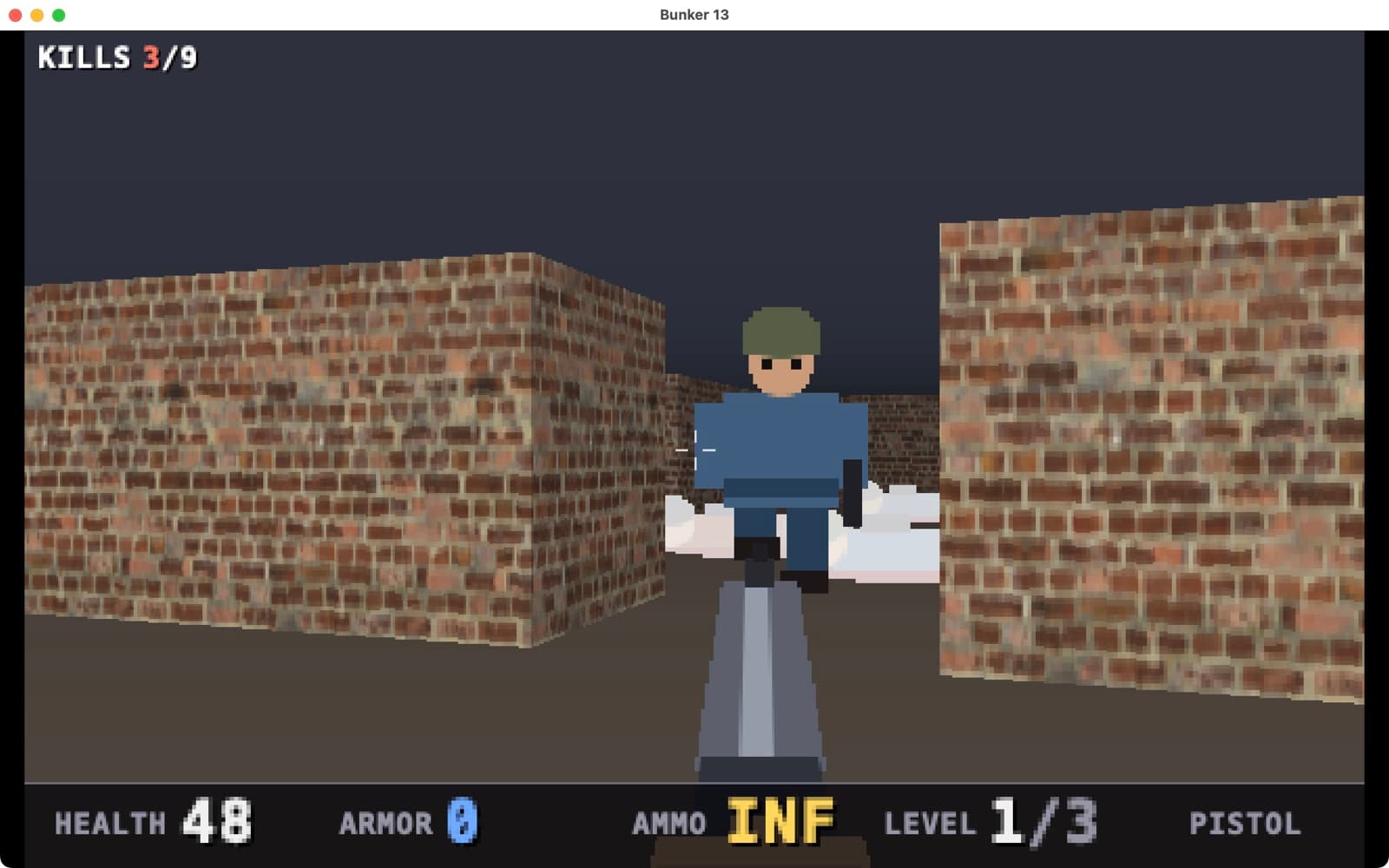
Bunker 13 running on a Mac
Prompts
1 + 4

one build, four follow-ups

First draft
13 min

writing the code in the cloud

Follow-ups
25 s to 2 min

a reply, then a compile on the Mac

AI usage
≈$3.01

whole session, from the usage log

Times and usage come from the build log. Usage is the AI session’s running total at the last reply.

Model: Claude Sonnet 5.5, run through Claude Code.

The idea

Could one prompt make a real first-person shooter, not a toy? It had to run smoothly, look good and be fun to play. The prompt picks a simple, fast design (a raycaster, the technique behind Wolfenstein 3D), names the exact files to use from a free CC0 asset pack on GitHub, and lists the gameplay. It was built with the SiliconDevKit desktop app, so the code was written in the cloud and compiled on a Mac.

See it play

A screen recording of the finished game at full resolution and 60 fps, on an M1 MacBook Air with 16 GB.

The whole conversation

Every message below is word for word, as it appeared in the desktop app. The first one is the exact prompt. The other four are follow-ups in plain English: three bug reports, then a request for smoother, sharper graphics. Nothing was edited or typed by hand in between.

Bunker 13
Build a macOS first-person shooter called Bunker 13: a fast Wolfenstein/Doom-style raycaster in Swift, 60 fps. Write assets.json as exactly [{"repo":"https://github.com/petroulacl/fps-asset-kit","ref":"a19b7458a593598211c95ec46ef4eb4b6d1f94d7","to":"kit","paths":["textures/Bricks097/Bricks097_2K-JPG_Color.jpg","textures/Bricks104/Bricks104_2K-JPG_Color.jpg","textures/Concrete048/Concrete048_2K-JPG_Color.jpg","textures/Metal049A/Metal049A_2K-JPG_Color.jpg","sfx/firearm_sfx/Prepared SFX Library/1911/A_34P.wav","sfx/firearm_sfx/Prepared SFX Library/Nova/O_17P.wav","sfx/footsteps_flac/Fantozzi-StoneL1.flac","sfx/footsteps_flac/Fantozzi-StoneR1.flac"]}] and load them from Bundle.main.resourceURL/Assets/kit/<path>; if any file is missing, fall back to generated textures and a synthesized noise-burst shot so the game still runs. Rendering: one NSView with a layer. Each frame, raycast (DDA) into a preallocated 640x400 UInt32 buffer, split into vertical strips with DispatchQueue.concurrentPerform, and set it as the layer contents CGImage with nearest-neighbour scaling. Drive it with CVDisplayLink and a clamped delta time. No SwiftUI redraw or memory allocation per frame; draw the HUD into the buffer. Walls: the four textures, each downsampled once at launch to 128x128 (CGImageSource thumbnail), darker on one side and fogged by distance; Metal049A is the doors and the exit. Floor and ceiling: smooth gradients with distance fog. Enemies and pickups: billboard sprites drawn once at launch with CoreGraphics into 64x64 bitmaps (a Guard and a tougher Heavy with a walk cycle, hurt flash and death animation; health, ammo and armor pickups), depth-tested against a per-column z-buffer and sorted far to near. Gameplay: three hand-made 24x24 tile levels with rooms, corridors, sliding doors opened with E or Space near them, and an exit; clear a level by reaching the exit. Enemies stay idle until they see or hear you, then chase using BFS on the grid, shoot when in line of sight (accuracy drops with distance). Weapons: pistol (infinite ammo) and shotgun (spread, limited shells), switched with 1 and 2 or the scroll wheel; draw the weapon at the bottom of the screen with bob, recoil and a muzzle flash. Play the pistol wav starting at 1.4 s and the shotgun wav starting at 0.45 s, each cut after about one second. Alternate the two footstep sounds while walking. Add head bob, a screen shake and a red flash when hit, a hit marker, a crosshair, wall collision that slides along walls with a radius, and pickups that are collected on touch. Controls: click to capture the mouse (CGAssociateMouseCursorAndMouseDelta, hide the cursor), mouse look, WASD to move, Shift to run, left click or Control to fire, Esc to release the mouse and pause. Show a title screen, a pause menu with a mouse sensitivity slider, a game over screen with Restart, and a level complete screen with kills and time. HUD: health, armor, ammo, level, a Tab minimap, and an F key FPS counter. Open the window at 1280x800, with a full screen button.
Bunker 13 is written, but I couldn't compile or run it here, so it has never been built. Please do a `swift build` on your Mac and tell me about any errors or oddities. - **Game:** a 60 fps raycaster that draws into a 640×400 buffer, with three hand-made levels, Guard and Heavy enemies that chase you, doors, pickups, the pistol and the shotgun, and the exit. - **Screens and controls:** the title, pause menu with sensitivity slider, game over, and level complete screens are all drawn into the same buffer. Controls follow your spec, and the window opens at 1280×800 with a full-screen button. - **Assets:** `assets.json` is exactly the string you gave. The four textures and the sounds load from `Assets/kit/...`; if any file is missing, the game falls back to generated textures and a synthesized noise-burst shot. - **Extras:** I added arrow-key turning and Return to confirm in menus. - **Level checks:** I confirmed every level row is exactly 24 characters wide. I couldn't run a full path check, so I traced reachability of the rooms, doors and exits by hand in all three levels. - **Display link:** it uses `CVDisplayLink`, which Xcode may flag as deprecated on newer macOS but should still build and run. - **Files:** `app.json` is written, and all source is in `Sources/App/`.
ok but when i press keyboard keys, the system takes them as system-wide input (like i'm holding down "A" key to move left and then press Ctrl to fire and it does some mac system command instead of input being isolated in the game
I made two changes in `GameView.swift`, but I haven't built or run this, so the effect is untested. - **Key combos:** the game now claims Ctrl and Option key combos while you're in a level, so the menus and text system no longer treat them as commands. This should fix Ctrl+A and similar. - **Fire key:** Option now fires as well as Ctrl. Some Ctrl shortcuts are handled by macOS before any app sees them, so the game can't block them. Ctrl+Space (input source switching) and Ctrl+arrow keys (Mission Control and Spaces) are the usual ones. If one of those is what's triggering, use Option to fire, or turn off that shortcut in System Settings > Keyboard > Keyboard Shortcuts.
some input still causes "switch to other window" behavior. check mouse and keyboard input behavior to make sure. i think it happens when i'm holding down a key on the keyboard then click the mouse.
I made two changes in `GameView.swift`, but I haven't built or run this, so I can't confirm it fixes the problem. - **Cursor:** I think the "switch to other window" happens because capturing the mouse freezes the cursor where it is. If that spot is over another window, or ends up outside the game window, a click lands there. The game now moves the cursor to the middle of its window when it captures the mouse, and moves it back whenever it drifts outside. - **Ctrl+click:** with Ctrl held, a click arrives as a right-click, which macOS treats as a context-menu or system action. Right and other mouse buttons now fire the weapon, the same as left click. If it still happens, tell me which key you're holding when you click. A few macOS shortcuts, such as Ctrl+arrow keys, are taken before the game sees them and can't be blocked from inside the app.
ok that seems to have solved the input being sent to other apps / windows, but now the player view / orientation seems to reset sporadically, causing jumpy play
I changed `GameView.swift` to stop the view from jumping, but I haven't run it, so the fix is untested. The cause was the cursor re-centering I added last time. Each re-center sent the game one huge fake mouse movement, which spun your view. The game now ignores the first few movement events after a re-center. It also caps any single mouse movement at 120 pixels, so a stray spike can't throw your aim. If you still see sudden turns, tell me whether they happen when you move the mouse or when you press a key.
is the game 60fps? if not, make sure it runs as smoothly as possible (>60fps if possible). also increase the resolution / pixel density so it's less jagged, smoother
The game is now drawn at 1280×800, four times the pixels it had. I haven't built or run it, so I haven't measured the frame rate. It runs at whatever your display's refresh rate is, so 60 fps on a standard screen. It can't go higher than that, but a 120 Hz ProMotion screen should get 120. Press F in game to check the counter. - **3D view:** walls, floor, ceiling and sprites render at the full 1280×800. - **Sprites and weapons:** enemies, pickups, the weapon art and the muzzle flash are redrawn at twice the detail. - **Text:** the HUD and menu text is also sharper. - **Layout and mouse:** the HUD and menu layout is unchanged, and menu clicks still land in the right place. If it's slower than you want on your Mac, tell me. The simplest fix is to lower the resolution to 960×600.

Compiled on this Mac. Saved to /Users/you/Downloads/silicondevkit.com/5e4a667f

Open appShow in Finder

Apps are ad-hoc signed, not notarized. If macOS blocks the first launch, use System Settings → Privacy & Security → Open Anyway.

Ask for changes…
Send
The SiliconDevKit desktop app chat for Bunker 13

What happened, step by step

  1. 0:00

    Prompt sent

    The prompt above, built on this Mac in source mode: the cloud writes the Swift code, the desktop app compiles it with the Mac’s own Xcode.

  2. 13:10

    First draft written

    About 13 minutes of work and 26 steps. The model wrote about 117,000 tokens of code and reasoning.

  3. ≈14:00

    Three compile rounds, automatic

    The first compile found errors. The desktop app sent them back to the cloud by itself, three times, 6 to 12 seconds each, until it compiled. These are not chat messages and nobody typed them.

  4. 17:43

    Follow-up 1: keys leak to the system

    Reply in 22 seconds, then compiled on the Mac again.

  5. 23:53

    Follow-up 2: clicks switch windows

    Reply in 27 seconds, then compiled on the Mac again.

  6. 26:41

    Follow-up 3: the view jumps

    Reply in 26 seconds, then compiled on the Mac again.

  7. 81:27

    Follow-up 4: smoother and sharper

    Reply in 2:09 minutes, then compiled on the Mac again.

What it cost

One initial prompt, three automatic compile fixes and your four follow-up prompts, each one a separate run. Model: Claude Sonnet 5.5. Tokens are shown as (in / out). “In” counts everything the model read, including text it had already seen in the session at a reduced price.

Initial prompt(1.78M in / 117k out)$2.0633
+Compile fix 1 (automatic)(290k in / 287 out)$0.0767
+Compile fix 2 (automatic)(294k in / 1k out)$0.0757
+Compile fix 3 (automatic)(296k in / 884 out)$0.0722
+Follow-up 1: keys leak to the system(299k in / 1k out)$0.0809
+Follow-up 2: clicks switch windows(304k in / 2k out)$0.0965
+Follow-up 3: the view jumps(308k in / 1k out)$0.0796
+Follow-up 4: smoother, sharper(1.18M in / 14k out)$0.4641
=Total(4.76M in / 138k out)$3.0090

About $3.01 in total. AI usage only: hosting and the Mac that compiled it are not included.

What went wrong, and what it shows

  • The game leaked its input. The first build played fine, but holding a key and pressing Control triggered Mac shortcuts, and clicking could land on another window. The only way to find that was to play it. Fixing it took three rounds, each one a sentence describing what the player saw. The last round, about the view jumping, was a side effect of the second fix.
  • The replies sounded unsure. They said the code had not been run, because the cloud step cannot compile it. The desktop app does compile it right after, so the build instructions now tell it to say what changed and nothing else.
  • The fourth prompt was about speed and looks. Asked whether the game ran at 60 fps and to make it smoother and less jagged, the reply raised the picture from 640×400 to 1280×800, four times the pixels, and redrew the sprites, weapons and text at twice the detail. On an M1 MacBook Air with 16 GB it holds a solid 60 fps and looks much crisper. That reply, too, said it had not measured the frame rate: the cloud step cannot run the game.
  • Game feel needs a player. Everything else (enemies, doors, two weapons, three levels, the minimap) worked as soon as it compiled.

Bunker 13 icon

Play Bunker 13

Free download for Apple silicon Macs, macOS 13 or later.

Get the game

Make your own

Describe a game or an app, play it, then fix it by telling SiliconDevKit what you saw.

Build your own